logo

Vena Software

Vena is a software solution designed for financial planning and analysis (FP&A) that seamlessly works with Excel. It assists businesses in optimizing their budg...

0.00 | 0 Reviews

Vena is a software solution designed for financial planning and analysis (FP&A) that seamlessly works with Excel. It assists businesses in optimizing their budg...

Product Overview

Vena is a software solution designed for financial planning and analysis (FP&A) that seamlessly works with Excel. It assists businesses in optimizing their budgeting, forecasting, reporting, and analytical tasks. Although the software lacks a drag-and-drop feature for choosing columns and fields, users often find that once they become accustomed to the interface, generating reports becomes much easier and more efficient.
Product Snapshot

Product Details

What Is Vena Software?

Vena is a cloud-driven platform that provides customizable templates, data integration, and workflow management to enhance financial planning. It has gained popularity among FP&A leaders and teams for its capacity to streamline and elevate financial planning and analysis tasks. Additionally, Vena facilitates scenario modeling, regulatory reporting, and various financial requirements across the business, enabling teams to dedicate less time to data gathering.

What Is Vena Software Best For?

This software comes equipped with built-in templates aimed at assisting organizations in completing their financial reports accurately and punctually. These templates simplify the reporting process, decreasing the chances of errors while boosting the organization’s productivity. The Excel templates are available at no cost, empowering accounting teams to effectively manage extensive strategic, operational, and financial planning.

Vena Software Pricing

Vena offers two adaptable pricing options: Professional and Complete; both plans feature custom pricing tailored to meet the diverse needs of accounting firms. Reach out to us today for personalized pricing plans for Vena software.

Vena Software Integrations

This software integrates effortlessly with:

  • NetSuite

  • FinancialForce

  • Workday

  • Sage

  • OneDrive

  • QuickBooks

How Does Vena Software Work?

After logging into the platform, you can easily start using it by following these steps:

  1. Access Vena through your desktop or the integrated Microsoft 365 application.

  2. Open Excel and activate the Vena 365 add-on for smooth operation.

  3. Select either a pre-built or customized template suitable for your task.

  4. Input or update data directly in the template fields, using Vena's sidebar for assistance.

  5. Create dynamic profitability analysis reports or dashboards with automated data updates.

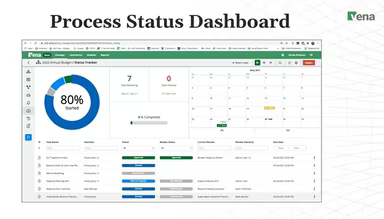
  6. Collaborate with your team through task management and commenting features for effective communication.

  7. Export or share your reports via Excel or PowerPoint with live data integration.

Schedule a demo of Vena software to explore its features further.

Who Is Vena Software For?

The solutions provided by Vena are tailored to assist medium and large businesses across various industries, including:

  • Banking And Credit Unions

  • Sports

  • Construction

  • Higher Education

  • Senior Living

  • Franchising

Is Vena Software Right For You?

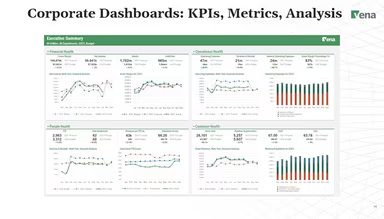
The Vena solution delivers crucial strategic insights while enhancing financial workforce planning and data analysis efficiency. Its AI-powered visualizations, financial projections, and interactive dashboards can readily uncover trends, mitigate financial risks, and showcase opportunities.

This software streamlines vital financial processes and automates repetitive tasks, allowing you to focus on essential business drivers while fostering team collaboration. Vena integrates seamlessly with both cloud-based and on-premises applications, facilitating easy import of Excel and CSV files.

If you're still uncertain whether Vena software is the perfect match for your business needs, feel free to reach out to us at info@softwareseekers.com to discover how it can aid in your business growth.

Accounting Software Features

dashboard
reporting
accounting
dashboards
mobile app
public api
purchasing
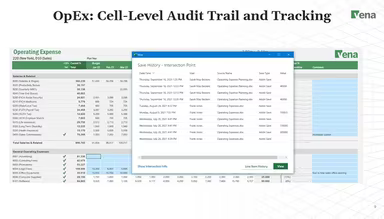
audit trails
audit trials
cybersecurity
mobile access
time tracking
bid management
credit control
cta compliance
expense report
fee management
general ledger
kpi monitoring
pci compliance
tax management
cash management
crm integration
debt collection
email marketing
fund accounting
nav calculation
quality control
soc 2 compliant
task management
accounts payable
asset management
audit management
donor management
event management
expense tracking
fraud management
grant management
maintenance logs
project tracking
budget management
fundraising tools
project templates
recurring billing
safety management
vendor management
alertsnotification
budgeting software
built in reporting
data visualization
equipment tracking
financial tracking
invoice management
payment processing
payroll processing
project management
project scheduling
zapier integration
accounts receivable
ai powered insights
alertsnotifications
bank reconciliation
cloud collaboration
collaboration tools
compliance software
contract management
customizable report
document management
employee management
financial reporting
incident management
integrated payments
payroll integration
production planning
reporting analytics
resource allocation
scheduled reporting
unitholder tracking
workflow management
bookkeeping software
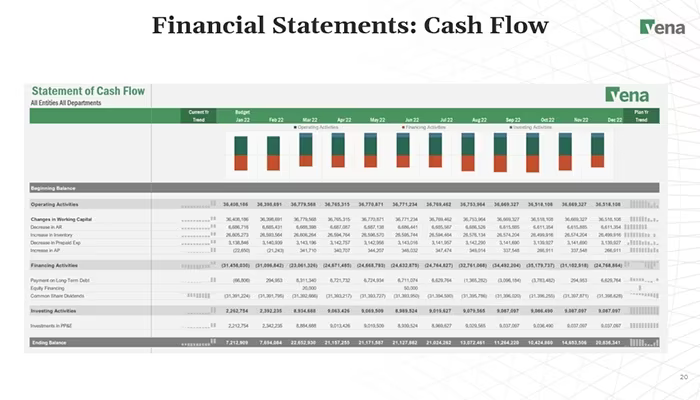
cash flow management
customizable reports
financial reportingg
financial statements
inventory management
loan servicing suite
payroll tax software
real time monitoring
rolebased permission
volunteer management
bill of materials bom
billing and invoicing
contractor management
custom add on modules
membership management
multicurrency support
regulatory compliance
statistical modelling
work order management
account reconciliation
facilities maintenance
fixed asset management
multi currency support
partnership accounting
auditing and compliance
automated loan workflow
change order management
customizable dashboards
paperless documentation
reporting and analytics
supply chain management
debt collection software
financial analysis tools
small business invoicing
subcontractor management
accounts payable software
budgeting and forecasting
regular payment scheduling
data analysis and reporting
accounts receivable software
business management software
financial reporting software
automated email communication
financial management software
data collection and management
efficient portfolio management
financial portfolio management
policy and document management
regulatory compliance tracking
revenue recognition compliance
risk assessment and mitigation
automated notifications updates
contact relationship management
project planning and scheduling
integration with banking systems
advanced analytics and forecasting
multi currency accounting software
machine learning and ai integration
provides government boi transcripts
version control and change tracking
audit trails auditing and compliance

Pros

  • ERP integration for live data updates
  • User-friendly layout for quick feature access
  • Efficient compliance management for easy oversight

Cons

  • No drag-and-drop feature for selecting fields
  • Building a three-dimensional model can be challenging

Price

Professional

Custom Pricing

Get Free Guidance from Our Solution Experts.

Ratings

0.00 | 0 reviews

Ratings Distribution

Positive

0%

Neutral

0%

Negative

0%

User Reviews

No reviews yet

Be the first to share your experience with Vena Software.

Frequently Asked Questions

Find answers to the most common queries about our software recommendation service.

Yes, Vena software provides API.

The software supports the English language.

Vena integrates with NetSuite, FinancialForce, Workday, Sage, OneDrive, and QuickBooks.

The software provides customized pricing plans for its Professional plan and Complete plan. Contact us today to request a free Vena software cost quote.

Vena is commonly used by individuals across diverse industries and sectors, including construction, higher education, franchising, and senior living.

The software provides support via live chat, forms, email, phone, and a comprehensive knowledge base. Users also benefit from automated workflows that streamline issue resolution and task management. Additionally, while the software has a steep learning curve for new users, both Vena’s pricing plans include access to a dedicated customer success manager to assist with onboarding and ongoing support.