logo

UserWay Accessibility Widget

The UserWay Accessibility Widget incorporates AI-driven accessibility features and solutions to assist websites in complying with WCAG and ADA standards. While...

0.00 | 0 Reviews

The UserWay Accessibility Widget incorporates AI-driven accessibility features and solutions to assist websites in complying with WCAG and ADA standards. While...

Product Overview

The UserWay Accessibility Widget incorporates AI-driven accessibility features and solutions to assist websites in complying with WCAG and ADA standards. While there have been some mentions of flickering in the language selector during translation, the majority of users appreciate the swift installation process. Additionally, they commend the responsive customer support and find the customization options along with on-page tools to be quite effective.
Product Snapshot

Product Details

What Is the UserWay Accessibility Widget?

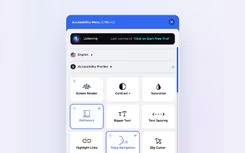
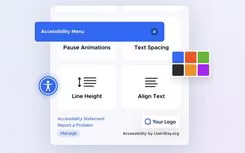
The UserWay Accessibility Widget is an online tool designed to enhance website accessibility through user-initiated controls and automated solutions. This tool assists organizations in minimizing obstacles for their visitors. It features an on-page screen reader, options for contrast and text modifications, and customizable accessibility profiles, allowing users to adjust their viewing experience. These features effectively tackle common challenges such as poor contrast, complex navigation, and issues with readability.

UserWay Accessibility Widget Pricing

The provider offers three distinct pricing plans for the UserWay Accessibility Widget to meet various requirements. A free trial is also available for potential users.

  • Small Website: $49/month

  • Medium Website: $149/month

  • Large Website: Custom Pricing

For a tailored pricing quote for your business, be sure to request one today.

Please note that pricing may change.

UserWay Accessibility Widget Integrations

This software is compatible with a variety of systems and platforms, including:

  • WordPress

  • Shopify

  • Wix

  • Webflow

  • Squarespace

  • Google Tag Manager

To explore its integration capabilities further, watch the demo of the UserWay Accessibility Widget.

Who Is the UserWay Accessibility Widget For?

The UserWay Accessibility Widget is well-suited for numerous industries, including:

  • Government

  • Banking and finance

  • Education

  • Retail and ecommerce

  • Healthcare

  • Media and entertainment

  • Automotive

Is the UserWay Accessibility Widget Right For You?

This tool is beneficial for teams seeking rapid implementation across popular site builders, user-focused controls such as text spacing and contrast adjustments, along with AI-driven remediation. It is ideal for organizations needing ongoing compliance assistance without extensive development resources. If your audience values multilingual support and on-page screen reading, this may be a great option for you.

If you’re still unsure whether the UserWay Accessibility Widget meets your needs, reach out to our customer support team at info@softwareseekers.com for more assistance.

Artificial Intelligence Software Features

hypertune
live chat
trade off
automation
dashboards
self service
customization
mobile access
voice cloning
cloud security
sla management
speech to text
case management
crm integration
data encryption
lead management
mlops platforms
task management
canned responses
natural language
sales automation
security measure
anomaly detection
billing invoicing
context awareness
emotion detection
ticket management
contact management
visual recognition
collaboration tools
document management
employee onboarding
firewall protection
multimodal analysis
omnichannel support
self service portal
smart data recovery
threat intelligence
workflow automation
smart data discovery
bot design deployment
client management crm
escalation management
multilanguage support
data labeling software
generative ai software
multi language support
performance management
self service dashboard
text to speech to text
analytics and reporting
bot design deploymentnt
customizable dashboards
predictive capabilities
reporting and analytics
self service dashboards
synthetic data software
e signature capabilities
training and development
vulnerability management
bot design and deployment
customer feedback surveys
machine learning software
natural language dialogue
natural language software
neutral language dialouge
sales pipeline management
legal research integration
natural language detection
sf artificial intelligence
anti virus and anti malware
document automationassembly
natural language processing
attendance and time tracking
compliance security features
security audits and reporting
text to speech speech to text
design collaboration platforms
employee information management
prediction of the next question
trade off via scenario modeling
automation bot design deployment
text to speech and speech to text
multi language support basic level
recruitment and applicant tracking
conversational intelligence software
defect detection using image analysis
entity extraction with text analytics
data science machine learning platforms
anomaly detection predictive maintenance
predictive capabilities anomaly detection
anamoly detection and predictive maintenance
anomaly detection and predictive maintenance
anamoly discussion and predictive maintenance
automation for processing and insight extraction
visual recognition this applies to its ocr capabilities

Pros

  • Very easy to install
  • Responsive, knowledgeable support team
  • Customizable widget and positioning

Cons

  • Language selector flicker on load
  • May slow page load times

Price

Professional

Custom

Get Free Guidance from Our Solution Experts.

Ratings

0.00 | 0 reviews

Ratings Distribution

Positive

0%

Neutral

0%

Negative

0%

User Reviews

No reviews yet

Be the first to share your experience with UserWay Accessibility Widget.

Frequently Asked Questions

Find answers to the most common queries about our software recommendation service.

The widget supports 50 plus languages, with a language selector available on Pro plans.

Yes. UserWay provides a JavaScript API to control the widget and specific features.

Support is available through the help center, tutorials, and email or chat-based assistance.

UserWay Accessibility Widget cost is listed as Small Website at $49/month, Medium Website at $149/month, and Large Website with custom pricing. For a custom UserWay Accessibility Widget cost, contact us.

Users are from government, banking and finance, education, retail and ecommerce, healthcare, media and entertainment, and automotive.

No. It does not have a native iOS or Android app.

It integrates with platforms such as WordPress, Shopify, Wix, Webflow, and Squarespace.