

logo

ClickMeeting

ClickMeeting enables teams to conduct webinars, virtual meetings, and online training sessions featuring live streaming, tools for audience interaction, and ana...

0.00 | 0 Reviews

ClickMeeting enables teams to conduct webinars, virtual meetings, and online training sessions featuring live streaming, tools for audience interaction, and ana...

Product Overview

ClickMeeting enables teams to conduct webinars, virtual meetings, and online training sessions featuring live streaming, tools for audience interaction, and analytical insights. Although the options for branding customization are somewhat restricted, it ensures dependable and engaging sessions. This platform is ideal for educators, marketers, and small to medium-sized businesses that are organizing organized online events and presentations.
Product Snapshot

Product Details

What Is ClickMeeting?

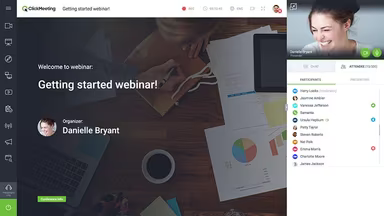
ClickMeeting is a user-friendly web-based platform designed for audio and video webinars, suitable for organizations of various sizes and types. This comprehensive solution addresses every aspect of the webinar experience, from preparation and presentation to interaction and follow-up.

Key Features

  • On-demand webinars

  • Webinar monetization

  • Waiting room functionality

  • Customizable interface

  • Whiteboard tools

  • Presentation options

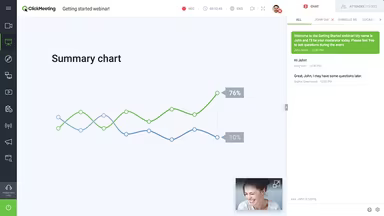
This browser-based application requires no software installation and is compatible with all devices and operating systems. Users can analyze their webinar performance through statistics such as average ratings and attendee device usage. The platform integrates interactive features to facilitate engaging and cost-effective webinars, providing valuable insights through meeting summaries, polls, timing, and survey statistics. These analytics help identify areas for improvement in future webinars.

Customization and Additional Features

With ClickMeeting, organizers can personalize the user interface by incorporating company colors and logos to establish a unique brand identity. Other notable features include:

  • Private chat options

  • Screen sharing capabilities

  • Webinar analytics

  • Multi-user subaccounts

  • Audio and video recording

  • Chat-to-text translations

The software also supports webinar storage, recording functionalities, custom invitations, and branded webinar rooms.

Integrations

The video conferencing service enables users to connect with various applications like Dropbox, Microsoft Office, Adobe, Salesforce, and numerous other third-party services. Additionally, users can stream their webinars live on platforms such as YouTube and Facebook. ClickMeeting’s intuitive user interface simplifies scheduling or launching meetings, sharing webinar links, and creating conference rooms for participants. The vendor provides an open API for developers to create custom integrations for in-house applications.

Free Trial

A no-obligation free trial is available for users to explore ClickMeeting's features thoroughly.

Pricing Structure

The software offers three distinct service plans based on the number of attendees each user wishes to accommodate:

  • MyWebinars: Starting at $30 per month for two presenters and up to 25 attendees.

  • MyWebinars Pro: Priced at $45 per month for four presenters and up to 50 attendees.

  • Enterprise Package: Designed for audiences ranging from 500 to 5,000 participants; pricing varies based on expected webinar volume.

Support

The vendor provides online support as well as assistance during business hours.

Unique Selling Proposition (USP)

This webinar system eliminates the need for separate conference calling services by allowing participants to join meetings via phone, making it accessible for those unable to be in front of a computer or device when the conference begins.

Product Advantages

ClickMeeting ensures seamless video conference calls that can extend for long durations without interruption.

Product Limitations

Users may need some time to become accustomed to the software’s interface.

Collaboration and Productivity Software Features

dashboard
live chat
reporting
mobile app
phone support
time tracking
call recording
email software
knowledge base
call monitoring
case management
crm integration
email marketing
lead generation
lead management
room management
task management
time management
user management
customer support
event management
focus scheduling
sales automation
smart scheduling
activity tracking
automation workfl
billing invoicing
budget management
calendar software
customer profiles
email integration
project templates
real time preview
sales forecasting
ticket management
contact management
payment processing
project scheduling
virtual workspaces
alertsnotifications
analytics reporting
automation workflow
calendar scheduling
campaign management
collaboration tools
communication tools
document management
employee management
feedback management
omnichannel support
reporting analytics
resource allocation
security compliance
workflow automation
integration with crm
mobile accessibility
note taking software
performance tracking
real time management
workforce management
boardworks scheduling
client management crm
customer segmentation
email client software
escalation management
front desk operations
regulatory compliance
automation andworkflow
customizable reporting
opportunity management
performance management
realtime communication
timeline based editing
analytics and reporting
automation and workflow
calendar and scheduling
customer servicesupport
customizable dashboards
file converter software
file sharing management
non destructive editing
real time communication
registration management
reporting and analytics
security and compliance
task project management
automation and workflows
calendar synchronization
communication management
deal pipeline management
e signature capabilities
guest management and crm
reservations and booking
social media integration
task nproject management
time tracking timesheets
board management software
bookmark manager software
customer feedback surveys
email management software
group chat app scheduling
multi format importexport
multi property management
sales pipeline management
document creation software
email marketing automation
employee intranet software
keyframe animation support
audio conferencing software
file sharing and management
integration and api support
meeting management software
task and project management
unified workspaces software
video to text ai scheduling
business scheduling software
cloud pbx platforms software
document generation software
hardware acceleration gpucpu
integration with other tools
internal newsletter software
mobile accessibility limited
multi track or layer support
other collaboration software
tasks and project management
time tracking and timesheets
customer feedback and surveys
integrations with other tools
personalization and targeting
ai meeting assistants software
call transfer and conferencing
high resolution output support
lead generation and management
visual collaboration platforms
customer communication tracking
employee information management
automated responses and chatbots
integration with marketing tools
internal communications software
collaborative whiteboard software
screen and video capture software
color grading and correction tools
plugin and extension compatibility
recruitment and applicant tracking
collaboration productivity software
financial and accounting management
security compliance user management
mobile access and contactless services
sf collaboration productivity software
analytics reporting time tracking timesheets
mobile accessibility limited web basedtablet support
calendar scheduling via form based scheduling and integrations

Pros

  • No pros listed yet.

Cons

  • No cons listed yet.

Price

Professional

Custom

Get Free Guidance from Our Solution Experts.

Ratings

0.00 | 0 reviews

Ratings Distribution

Positive

0%

Neutral

0%

Negative

0%

User Reviews

No reviews yet

Be the first to share your experience with ClickMeeting.

Frequently Asked Questions

Find answers to the most common queries about our software recommendation service.

No FAQs available for this software.