logo

PDF-XChange

PDF-XChange is an efficient solution crafted for smooth document management. While it may not include certain high-level editing capabilities, it operates smoot...

0.00 | 0 Reviews

PDF-XChange is an efficient solution crafted for smooth document management. While it may not include certain high-level editing capabilities, it operates smoot...

Product Overview

PDF-XChange is an efficient solution crafted for smooth document management. While it may not include certain high-level editing capabilities, it operates smoothly and meets the everyday requirements of users effectively. With its user-friendly design, rapid processing speed, and comprehensive set of features, it stands out as a top option for those who demand accuracy and consistency in their PDF tasks.
Product Snapshot

Product Details

What Is PDF-XChange?

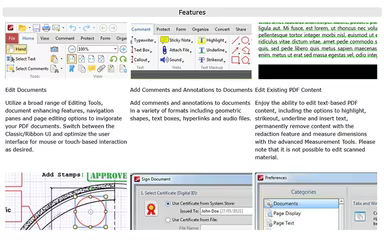
PDF-XChange stands out as a reliable solution for both individuals and organizations seeking effective PDF management. It comes equipped with a comprehensive array of features, such as annotation tools, secure document handling, and impressive speed. Tailored for professionals, it boosts productivity through its intuitive interface and seamless functionality. Whether you need to edit, view, or share PDFs, it delivers a dependable experience that streamlines your workflow, making it an ideal option for those who prioritize efficiency without unnecessary complexity.

PDF-XChange Pricing

The pricing structure for PDF-XChange includes the following plans:

  • PDF-XChange Editor: Starting at $62.00

  • PDF-XChange Editor Plus: Starting at $79.00

  • PDF-XChange Printer Standard: Starting at $58.00

  • PDF-Tools: Starting at $89.00

The pricing for PDF-XChange PRO consists of these options:

  • Standard User Licenses: Starting at $131.00

  • Corporate Licenses: Starting at $23,167.00

  • Government Pricing: Starting at $33,234.00

  • Academic Campus License: Starting at $8,481.00

Each plan allows you to select a maintenance period based on your specific needs.

Please note: Prices may vary.

PDF-XChange Integrations

The PDF-XChange software integrates seamlessly with the following applications:

  • SharePoint

  • OneDrive

  • Google Drive

  • Dropbox

  • Box.com

To discover more about its integration features, watch the comprehensive PDF-XChange demo.

Who Is PDF-XChange For?

This software is crafted for students, professionals, entrepreneurs, and developers alike. It simplifies the processes of editing, annotating, and managing PDFs with practical features like digital signatures and form filling. It helps businesses secure their documents and organize workflows effectively while offering developers the ability to integrate its tools effortlessly using SDKs.

Is PDF-XChange Right For You?

If you're in search of a speedy, feature-rich, and budget-friendly PDF editor, then PDF-XChange is an outstanding option. It's ideal for students, professionals, and businesses that need advanced editing capabilities, annotation tools, digital signatures, and form-filling functionalities. With robust security measures and developer-friendly SDKs, it optimizes document workflows while ensuring files remain lightweight and efficient.

If you're still uncertain whether PDF-XChange suits your needs, reach out to our support team at info@softwareseekers.com for assistance in making the best choice for you.

Collaboration and Productivity Software Features

dashboard
live chat
reporting
mobile app
phone support
time tracking
call recording
email software
knowledge base
call monitoring
case management
crm integration
email marketing
lead generation
lead management
room management
task management
time management
user management
customer support
event management
focus scheduling
sales automation
smart scheduling
activity tracking
automation workfl
billing invoicing
budget management
calendar software
customer profiles
email integration
project templates
real time preview
sales forecasting
ticket management
contact management
payment processing
project scheduling
virtual workspaces
alertsnotifications
analytics reporting
automation workflow
calendar scheduling
campaign management
collaboration tools
communication tools
document management
employee management
feedback management
omnichannel support
reporting analytics
resource allocation
security compliance
workflow automation
integration with crm
mobile accessibility
note taking software
performance tracking
real time management
workforce management
boardworks scheduling
client management crm
customer segmentation
email client software
escalation management
front desk operations
regulatory compliance
automation andworkflow
customizable reporting
opportunity management
performance management
realtime communication
timeline based editing
analytics and reporting
automation and workflow
calendar and scheduling
customer servicesupport
customizable dashboards
file converter software
file sharing management
non destructive editing
real time communication
registration management
reporting and analytics
security and compliance
task project management
automation and workflows
calendar synchronization
communication management
deal pipeline management
e signature capabilities
guest management and crm
reservations and booking
social media integration
task nproject management
time tracking timesheets
board management software
bookmark manager software
customer feedback surveys
email management software
group chat app scheduling
multi format importexport
multi property management
sales pipeline management
document creation software
email marketing automation
employee intranet software
keyframe animation support
audio conferencing software
file sharing and management
integration and api support
meeting management software
task and project management
unified workspaces software
video to text ai scheduling
business scheduling software
cloud pbx platforms software
document generation software
hardware acceleration gpucpu
integration with other tools
internal newsletter software
mobile accessibility limited
multi track or layer support
other collaboration software
tasks and project management
time tracking and timesheets
customer feedback and surveys
integrations with other tools
personalization and targeting
ai meeting assistants software
call transfer and conferencing
high resolution output support
lead generation and management
visual collaboration platforms
customer communication tracking
employee information management
automated responses and chatbots
integration with marketing tools
internal communications software
collaborative whiteboard software
screen and video capture software
color grading and correction tools
plugin and extension compatibility
recruitment and applicant tracking
collaboration productivity software
financial and accounting management
security compliance user management
mobile access and contactless services
sf collaboration productivity software
analytics reporting time tracking timesheets
mobile accessibility limited web basedtablet support
calendar scheduling via form based scheduling and integrations

Pros

  • Allows signing documents without printing them
  • Offers wide-ranging editing and conversion tools
  • Works flawlessly and supports daily workflow needs
  • Provides cost-effective PDF management options
  • Functions as a great alternative to Adobe Acrobat

Cons

  • Lacks certain advanced editing features that help enhance functionality
  • The free version applies watermarks to saved files, limiting usability
  • Interface needs to be more intuitive, advanced, and user-friendly
  • A comprehensive guide is missing, barring users to navigate all features

Price

Professional

Custom

Get Free Guidance from Our Solution Experts.

Ratings

0.00 | 0 reviews

Ratings Distribution

Positive

0%

Neutral

0%

Negative

0%

User Reviews

No reviews yet

Be the first to share your experience with PDF-XChange.

Frequently Asked Questions

Find answers to the most common queries about our software recommendation service.

PDF-XChange offers support through phone (for sale and admin inquiries only), live chat, email, FAQs/forums, and knowledge base.

No, PDF-XChange does not have a mobile app.

PDF-XChange offers smooth integration with Dropbox, Box.com, OneDrive, Google Drive, and SharePoint.

PDF-XChange Editor From $62.00 to $41,477.00, PDF-XChange Editor Plus From $79.00 to $53,712.00, PDF-XChange Printer Standard From $58.00 to $39,370.00, PDF-Tools From $89.00 to $59,621.00, PDF-XChange PRO starting from a Standard User Licenses from $131.00, up to Academic Campus License from $8,481.00.

Typical users of PDF-XChange include students, professionals, business owners, and developers.

PDF-XChange supports a variety of languages, including English, Spanish, French, German, Portuguese, Arabic, Russian, Japanese, Italian, Dutch, Polish, Turkish, Swedish, Danish, Ukrainian, and Thai.

Yes, PDF-XChange offers an API.