

WPS Office
Experience WPS Office, the AI-powered digital office platform with Microsoft Office compatibility and a user-friendly interface for individuals and small teams.
Key Insights
Derived from customer feedback, WPS Office is recognized as an AI-enhanced digital office management solution. It is particularly noted for its user-friendly design and strong compatibility with Microsoft Office. However, some users have expressed concerns regarding its performance, especially when handling large files. The WPS AI Toolbox receives commendation for integrating tools like a writing assistant and AI summarization within one platform. Additionally, a recent update introduced a desktop-quality app for iPad users.
Our Assessment
WPS Office serves as an excellent choice for individuals and small groups in search of an affordable alternative to Microsoft Office. Its free version encompasses essential features, making it appealing to those who are mindful of their budget. However, organizations in need of robust enterprise support or enhanced collaboration capabilities should consider this aspect carefully before making a decision.

What Is WPS Office?
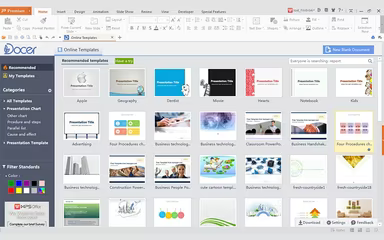
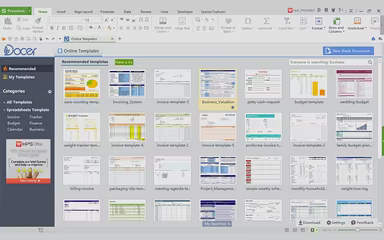
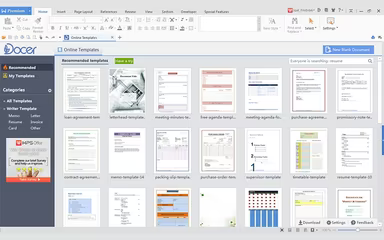
WPS Office is an innovative office productivity suite powered by AI, featuring four essential modules: Writer, Spreadsheet, Presentation, and PDF. This versatile platform is designed to work seamlessly with a variety of file formats, such as .doc, .xls, and .ppt, and operates smoothly across multiple operating systems including Windows, macOS, Linux, Android, and iOS. Users can benefit from real-time synchronization across devices through WPS Cloud, ensuring consistent formatting on any platform. Additionally, it comes equipped with built-in AI tools that assist with writing tasks, document summarization, interactive PDF features, and comprehensive translation services.
What Is WPS Office Best For?
The standout feature of this software is its AI-driven document summarizer. This tool enables users to swiftly condense lengthy documents into concise insights without needing to navigate away from the platform. With the integrated WPS AI assistant, important information can be extracted instantly, minimizing the need for manual reviews or external summarization tools. The application also supports various structured summary formats to help users manage extensive content more effectively and enhance productivity.
WPS Office Pricing
The starting price for WPS Office is $5.99 per month (billed quarterly) for the WPS Pro plan within the Individuals packages. Key features of this plan include 20 GB of cloud storage, advanced text recognition, e-signatures, document conversion capabilities, and enhanced PDF functionality.
Other available plans are as follows:
Individuals
WPS Standard – Free
WPS Pro + WPS AI - $21.99/month
WPS AI - $19.99/month
A Sharing plan is also offered at $3.99 per month per user. These plans are billed on a monthly basis.
Users should keep in mind potential additional costs associated with the system:
Additional Cloud Storage: $2–$10/user/month depending on storage size
Implementation And Team Deployment Support: $500–$5,000 for larger organizations
Third-Party Integrations And Admin Controls: $1,000–$10,000 based on complexity
The pricing of WPS Office is often deemed quite reasonable, particularly appealing to students and those on a budget who find the free tier adequate for their daily tasks. However, some reviews mention that aggressive advertising and prompts for upgrades can make the free experience feel limited, potentially nudging users towards paid plans sooner than anticipated.
Please note: Pricing may vary.
WPS Office Integrations
The vendor has not disclosed information regarding third-party integrations.
How Does WPS Office Work?
If you want to maximize your experience with WPS Office, follow these steps:
Download and install the application by choosing your operating system and log in with your credentials.
Create or open a document by selecting either Writer, Spreadsheet, Presentation, or PDF from the main dashboard.
Utilize WPS AI to enhance your workflow; generate written content, create presentation slides from prompts, summarize PDFs, or conduct parallel document translations.
Enable cloud synchronization by navigating to Home and then accessing the Settings bar. All files that are open or saved will back up automatically to WPS Cloud in real-time across all signed-in devices.
Collaborate in real-time by sharing documents via WPS Cloud so that team members can leave comments and edit simultaneously from any device or platform.
Manage PDFs using the integrated PDF toolkit to merge, split, compress, convert, annotate pages, reorder them, and add e-signatures—all without exiting the application.
You can view the WPS Office demo for further insights into its features.
Who Is WPS Office For?
This office suite caters to a diverse array of industries and sectors including:
Education
IT
Retail
Healthcare
WPS Office Use Cases
An analysis of user feedback alongside the capabilities of WPS Office has highlighted several scenarios where this software excels:
Students And Educators Managing Academic Documents: Ideal for students and educational institutions needing to create co-edited documents without incurring subscription fees. Its Writer, Spreadsheet, Presentation, and PDF modules address all academic requirements from thesis writing to data analysis for students as well as lecture slides and course material annotations for educators.
Remote And Mobile-First Teams Working Across Multiple Devices: Perfect for teams operating across desktop and mobile platforms who require access to their documents at all times. With WPS Cloud sync enabled, updates made on a Windows PC will be accessible on Android or iOS devices instantly. The web version of WPS Office allows for browser-based editing without any installation hassle—great for teams with members using different operating systems or working remotely.
Freelancers And Independent Professionals Handling Client Deliverables: Freelancers in fields like consulting or marketing leverage WPS Office to produce professional client-facing documents while keeping operational costs low. The built-in PDF editing tools and file conversion features are particularly useful for preparing contracts and presentations without needing additional software subscriptions.
Organizations Handling High Volumes Of PDF Documents: Suitable for teams that routinely manage PDF files within their workflows. The comprehensive PDF toolkit enables conversion, compression, merging/splitting files, annotation capabilities including OCR for scanned documents and e-signatures. The Chat PDF feature allows users to interact with document content directly via WPS AI without having to read through lengthy texts manually.
Is WPS Office Right For You?
WPS Office serves as an excellent choice for students, professionals, and businesses seeking a flexible yet cost-effective office suite. With its compatibility with Microsoft Office files and AI-enhanced tools coupled with smooth cloud syncing capabilities, users can effectively edit documents, analyze data sets and create impactful presentations. If you're aiming to boost your productivity levels efficiently, WPS Office stands out as a strong contender. It has gained trust among notable organizations like Lion Group and BSN.
If you're still uncertain whether WPS Office fits your needs perfectly, reach out to our customer support team at info@softwareseekers.com for more assistance.