

logo

AutoCAD LT

With AutoCAD LT, creating professional-grade 2D drawings is a breeze, allowing users to improve their communication through effective annotations. Although it d...

0.00 | 0 Reviews

With AutoCAD LT, creating professional-grade 2D drawings is a breeze, allowing users to improve their communication through effective annotations. Although it d...

Product Overview

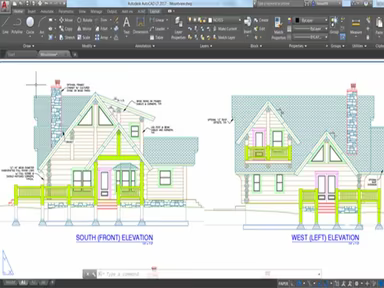
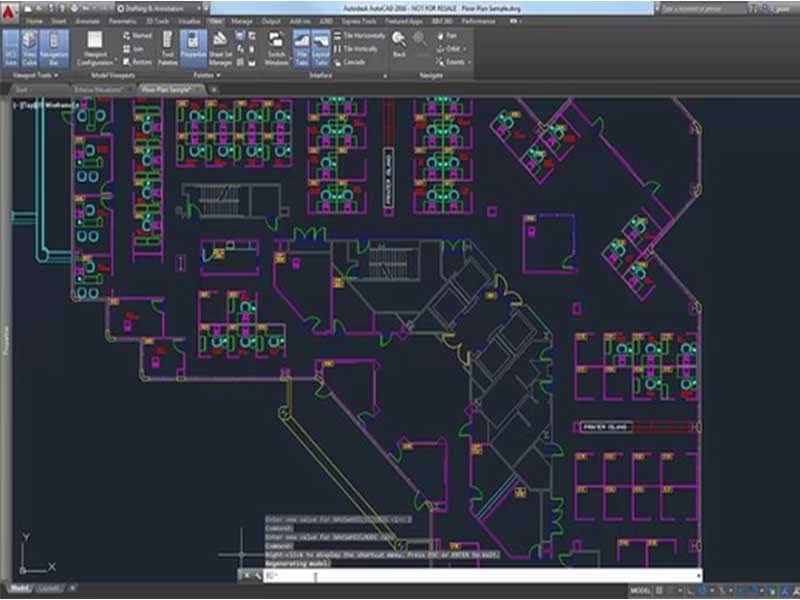
With AutoCAD LT, creating professional-grade 2D drawings is a breeze, allowing users to improve their communication through effective annotations. Although it doesn't include 3D capabilities, AutoCAD LT boasts an intuitive interface that is ideal for those just starting out. Consider scheduling a demo to see AutoCAD LT in action and gain deeper insights into its functionality.
Product Snapshot

Product Details

What Is AutoCAD LT?

AutoCAD LT stands out as a premier computer-aided design (CAD) tool tailored for engineers. This software includes a built-in CUI customization feature, enabling users to modify its appearance and functionality. Moreover, it enhances productivity by allowing the creation of personalized shortcuts along with various other capabilities.

Learning to draw and measure using AutoCAD LT is straightforward, thanks to its clear instructions. Users can produce 2D documents and drawings utilizing an advanced suite of editing and annotation tools while adhering to AutoCAD's user-friendly guidelines.

AutoCAD LT Software Pricing

The pricing details for AutoCAD LT are not publicly disclosed. However, potential customers are encouraged to reach out to the vendor for comprehensive pricing information.

AutoCAD LT Software Demo

It is highly advisable to experience the AutoCAD LT demo prior to purchasing. This trial allows you to see the software in action and explore its various features to assess if they meet your needs. To schedule a demonstration, contact the provider.

AutoCAD LT Software Reviews

A majority of reviews for AutoCAD LT are positive, with many users expressing satisfaction with the software. Customers commend the efficiency it brings to their workflows, often rating it between four and five stars. For further insights into the advantages and disadvantages of this construction software, consider reading the reviews below.

Final Thoughts

AutoCAD has established itself as a benchmark for 2D CAD drawing, equipped with tools for 3D design as well. AutoCAD LT offers engineers numerous ways to visualize their CAD models while allowing them to customize various design components according to their specific requirements. Additionally, students and educational institutions frequently utilize this software to familiarize themselves with real-world working processes.

Still uncertain if this is the right option for you? Reach out to us at info@softwareseekers.com, and our knowledgeable team will help you make a well-informed decision.

Construction Management Software Features

dashboard
invoicing
reporting
seo tools
accounting
estimating
mobile app
audit trails
cost tracking
mobile access
time expenses
time tracking
bid management
issue tracking
tax management
cash management
cost management
crew scheduling
quality control
task management
accounts payable
expense tracking
project closeout
project tracking
billing invoicing
budget management
progress tracking
project templates
safety management
task dependencies
vendor management
content scheduling
content versioning
equipment tracking
invoice management
mobile app support
payroll processing
project management
project scheduling
accounts receivable
alertsnotifications
bank reconciliation
collaboration tools
contract management
document management
employee management
financial reporting
material management
real time reporting
resource allocation
resource management
template management
timeline scheduling
workflow management
budgetingforecasting
inventory management
contractor management
project communication
role based permission
safety and compliance
time expense tracking
maintenance management
mobile app via browser
multi currency support
accounting integrations
analytics and reporting
change order management
construction scheduling
project cost estimation
reporting and analytics
telematics integrations
field employee timecards
media library management
multi channel publishing
punch list task tracking
subcontractor management
budgeting and forecasting
purchase order management
quality safety management
tracking alertsnotifications
construction bidding software
material inventory management
safety and compliance tracking
collaboration and communication
construction project management
project planning and scheduling
project scheduling and planning
construction scheduling software
budget management budget tracking
integration with third party tools
collaboration and communication tools
content creation and editing tools wysiwyg
collaboration tools collaboration and communication
task dependencies implied via scheduling and task management

Pros

  • No pros listed yet.

Cons

  • No cons listed yet.

Price

Professional

Custom

Get Free Guidance from Our Solution Experts.

Ratings

0.00 | 0 reviews

Ratings Distribution

Positive

0%

Neutral

0%

Negative

0%

User Reviews

No reviews yet

Be the first to share your experience with AutoCAD LT.

Frequently Asked Questions

Find answers to the most common queries about our software recommendation service.

No FAQs available for this software.