logo

Dash Software

Are your restoration projects hindered by excessive paperwork and poor communication? DASH provides efficient job management solutions designed to enhance workf...

0.00 | 0 Reviews

Are your restoration projects hindered by excessive paperwork and poor communication? DASH provides efficient job management solutions designed to enhance workf...

Product Overview

Are your restoration projects hindered by excessive paperwork and poor communication? DASH provides efficient job management solutions designed to enhance workflows and ensure that teams stay aligned. Discover the ways in which DASH can revolutionize your operations.
Product Snapshot

Product Details

What Is Dash Software?

Overview

Dash software, created by Next Gear, is a cloud-driven management solution tailored for restoration jobs. It enhances operational workflows and boosts the efficiency of restoration contractors. The platform addresses various challenges associated with restoration work, including emergency responses, insurance claims, and managing contents. Dash empowers users to oversee projects, engage with stakeholders, and maintain compliance throughout the restoration journey. Its primary goal is to lower operational expenses while elevating customer satisfaction for businesses in the restoration sector.

What Is Dash Software Best For?

Dash is particularly recognized for its real-time job updates and automated communication features. These functionalities facilitate a smooth flow of information among field technicians, office personnel, and clients. The platform's strengths lie in its transparency and efficient communication capabilities.

Dash Software Pricing

This software provides multiple pricing plans designed to meet the diverse needs of various organizations. You can request a personalized quote for Dash.

Dash Software Integrations

The software supports integration with several third-party applications, including:

  • DocuSketch

  • Quickbooks

  • ProAssist

  • MICA

  • DryTrack

  • LuxorCRM

How Does Dash Software Work?

Here’s how to get started with the software once installation is finished:

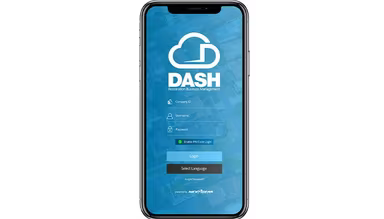
  1. Log in to the secure, cloud-hosted Dash platform.

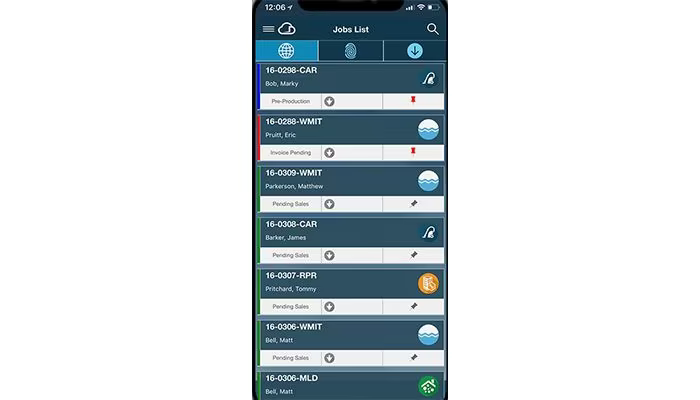
  2. Access the main dashboard, which presents an overview of ongoing jobs, key metrics, and recent activity.

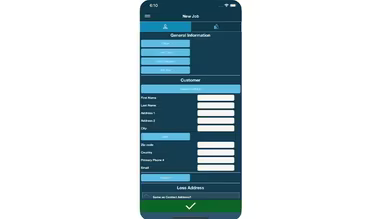
  3. Create a new job by inputting essential project details, client information, and any initial notes.

  4. Schedule tasks and assign technicians using the user-friendly calendar and scheduling interface.

  5. Monitor equipment usage by assigning equipment to jobs and updating its location status.

  6. Use communication tools to send updates directly to team members, clients, or insurance adjusters within the platform.

  7. Upload and store documents such as photos, reports, or estimates linked directly to the corresponding job.

Consider watching a free Dash Demo to explore its features further.

Who Is Dash Software For?

Dash Software is primarily tailored for restoration contractors of all sizes, addressing the specific workflows and challenges unique to this industry. It serves various domains including:

  • Water damage restoration

  • Fire and smoke damage restoration

  • Mold remediation

  • Crisis event response

Is Dash Software Right For You?

If you are frustrated with disjointed systems and poor communication hampering your restoration projects, or if you seek a more effective method to track vital documentation while ensuring compliance with intricate regulations, then Dash software may transform your operations.

This solution offers reliability and peace of mind through its secure cloud-based infrastructure. Your sensitive information remains protected yet accessible from any location, and the software effortlessly adapts as your business expands.

If you’re still uncertain whether Dash is the perfect choice for your needs, reach out to us at info@softwareseekers.com. We would be happy to discuss your specific requirements and assist you in making an informed choice.

Construction Management Software Features

dashboard
invoicing
reporting
seo tools
accounting
estimating
mobile app
audit trails
cost tracking
mobile access
time expenses
time tracking
bid management
issue tracking
tax management
cash management
cost management
crew scheduling
quality control
task management
accounts payable
expense tracking
project closeout
project tracking
billing invoicing
budget management
progress tracking
project templates
safety management
task dependencies
vendor management
content scheduling
content versioning
equipment tracking
invoice management
mobile app support
payroll processing
project management
project scheduling
accounts receivable
alertsnotifications
bank reconciliation
collaboration tools
contract management
document management
employee management
financial reporting
material management
real time reporting
resource allocation
resource management
template management
timeline scheduling
workflow management
budgetingforecasting
inventory management
contractor management
project communication
role based permission
safety and compliance
time expense tracking
maintenance management
mobile app via browser
multi currency support
accounting integrations
analytics and reporting
change order management
construction scheduling
project cost estimation
reporting and analytics
telematics integrations
field employee timecards
media library management
multi channel publishing
punch list task tracking
subcontractor management
budgeting and forecasting
purchase order management
quality safety management
tracking alertsnotifications
construction bidding software
material inventory management
safety and compliance tracking
collaboration and communication
construction project management
project planning and scheduling
project scheduling and planning
construction scheduling software
budget management budget tracking
integration with third party tools
collaboration and communication tools
content creation and editing tools wysiwyg
collaboration tools collaboration and communication
task dependencies implied via scheduling and task management

Pros

  • Intuitive user interface for easy adoption
  • Powerful job management and scheduling tools
  • Comprehensive document storage and organization
  • Streamlined communication with stakeholders
  • Good customer support and onboarding

Cons

  • Limited customization in certain areas
  • Can take some time to master advanced features, according to some Dash reviews
  • Initial setup may involve data transfer

Price

Professional

Custom

Get Free Guidance from Our Solution Experts.

Ratings

0.00 | 0 reviews

Ratings Distribution

Positive

0%

Neutral

0%

Negative

0%

User Reviews

No reviews yet

Be the first to share your experience with Dash Software.

Frequently Asked Questions

Find answers to the most common queries about our software recommendation service.

Yes, the software offers an API.

The software supports the English language.

The software is integrated with DocuSketch, Quickbooks, ProAssist, MICA, DryTrack, and LuxorCRM.

The software supports mobile devices.

The software provides a range of pricing plans that are designed to meet the diverse and changing requirements of many organizations. Request custom Dash pricing.

Dash software is a versatile solution for restoration contractors, catering to sectors, such as fire and smoke damage restoration, water damage, mold remediation, and catastrophic event response.

Dash provides support through chat/sales teams.

Dash software supports successful restoration businesses in the disaster restoration industry by offering a range of features to streamline operations. It centralizes job files, making all job-related information easily accessible in one location.

Tracking equipment and ensuring compatibility with your existing systems are crucial when switching platforms. Dash offers an inventory tracking program that offers real-time equipment visibility accessible from its mobile platform.

Dash enterprise includes CRM functionality and could potentially track the capabilities you require. However, the level of customization and specific features might vary.

While switching software might not directly affect your business hours, it’s crucial to pay attention to potential changes in equipment tracking, CRM access, and integration with other software systems. Make sure the new system provides the same or better level of equipment tracking you currently have.