logo

Power Tools software

In the realm of construction, having access to prompt and precise data is essential for making well-informed decisions. When information is outdated and workflo...

0.00 | 0 Reviews

In the realm of construction, having access to prompt and precise data is essential for making well-informed decisions. When information is outdated and workflo...

Product Overview

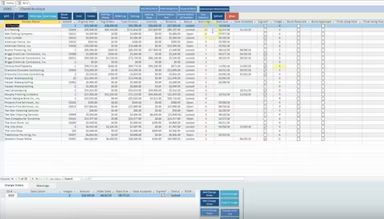
In the realm of construction, having access to prompt and precise data is essential for making well-informed decisions. When information is outdated and workflows are ineffective, it can significantly impact profitability and the overall success of projects. Power Tools software provides real-time job costing, comprehensive reporting, and a consolidated perspective on operations, enabling you to make assured, data-centric decisions for your construction enterprise.
Product Snapshot

Product Details

What Is Power Tools Software?

Overview

The Power Tools software suite is a cloud-based solution tailored for construction management, aimed at simplifying and unifying every aspect of your construction operations. It serves contractors of all sizes and provides an all-encompassing platform for project oversight, financial management, job costing, estimating, and more. Renowned for its user-friendly design, customization capabilities, and outstanding customer service, Power Tools stands out in the market.

What Is Power Tools Software Best For?

This software excels due to its straightforward interface and easy navigation. This focus on usability yields significant advantages for construction firms. It lessens the time required for training, minimizes mistakes linked to complicated software, and encourages widespread adoption across your organization.

Power Tools Software Pricing

A variety of pricing plans are available to meet the diverse needs of different organizations. You can request a custom quote for the Power Tools cost.

Power Tools Software Integrations

The software seamlessly integrates with Microsoft Office Suite.

How Does Power Tools Software Work?

Once installation is complete, here's how to get started with the software:

  1. Log in using your provided credentials.

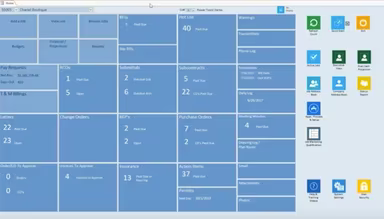
  2. Explore the main dashboard to get an overview of ongoing projects, financial summaries, and essential metrics.

  3. Use the menu to access specific modules such as accounting, project management, or estimating.

  4. Configure company-wide settings including user roles, permissions, and default preferences.

  5. Create project profiles by entering key project information, budgets, and timelines.

  6. Invite team members and assign them roles along with access permissions within the software.

  7. Utilize built-in reports to gain insights into project performance and financial status.

For a more detailed view of the software's features, watch a free demo of Power Tools.

Who Is Power Tools Software For?

This software is crafted specifically for the construction sector, primarily aimed at contractors of various scales. It is ideal for small to medium-sized general contractors as well as larger enterprises specializing in diverse construction fields. The software serves multiple sectors and industries including:

  • General contractors

  • Concrete

  • Drywall

  • Electrical

  • Environmental/Demolition

  • Fire Suppression

  • Glass/Glazing Contractors

  • Landscaping

Is Power Tools Software Right For You?

If you find yourself overwhelmed by managing multiple software solutions or struggling to keep your construction projects organized and within budget, Power Tools could be the answer you need. It consolidates your entire operation for improved workflows and outcomes.

The Power Tools prioritizes the protection of your sensitive data by employing strong encryption methods and access controls. Furthermore, this platform is designed to grow with your business, ensuring that you won't outstrip its functionalities.

If you're still uncertain whether Power Tools is suitable for you, reach out to us at info@softwareseekers.com for guidance in making an informed decision.

Construction Management Software Features

dashboard
invoicing
reporting
seo tools
accounting
estimating
mobile app
audit trails
cost tracking
mobile access
time expenses
time tracking
bid management
issue tracking
tax management
cash management
cost management
crew scheduling
quality control
task management
accounts payable
expense tracking
project closeout
project tracking
billing invoicing
budget management
progress tracking
project templates
safety management
task dependencies
vendor management
content scheduling
content versioning
equipment tracking
invoice management
mobile app support
payroll processing
project management
project scheduling
accounts receivable
alertsnotifications
bank reconciliation
collaboration tools
contract management
document management
employee management
financial reporting
material management
real time reporting
resource allocation
resource management
template management
timeline scheduling
workflow management
budgetingforecasting
inventory management
contractor management
project communication
role based permission
safety and compliance
time expense tracking
maintenance management
mobile app via browser
multi currency support
accounting integrations
analytics and reporting
change order management
construction scheduling
project cost estimation
reporting and analytics
telematics integrations
field employee timecards
media library management
multi channel publishing
punch list task tracking
subcontractor management
budgeting and forecasting
purchase order management
quality safety management
tracking alertsnotifications
construction bidding software
material inventory management
safety and compliance tracking
collaboration and communication
construction project management
project planning and scheduling
project scheduling and planning
construction scheduling software
budget management budget tracking
integration with third party tools
collaboration and communication tools
content creation and editing tools wysiwyg
collaboration tools collaboration and communication
task dependencies implied via scheduling and task management

Pros

  • Intuitive user interface and navigation
  • Highly customizable to match workflows
  • Robust set of construction-specific features
  • Streamlines project management processes
  • Accurate job costing and financials

Cons

  • Potential learning curve for less tech-savvy users
  • May require initial time investment for setup, according to some of the Power Tools reviews
  • Reporting could be more customizable

Price

Professional

Custom

Get Free Guidance from Our Solution Experts.

Ratings

0.00 | 0 reviews

Ratings Distribution

Positive

0%

Neutral

0%

Negative

0%

User Reviews

No reviews yet

Be the first to share your experience with Power Tools software.

Frequently Asked Questions

Find answers to the most common queries about our software recommendation service.

No, Power Tools software does not have an API available.

The software supports the English language.

The Microsoft Office Suite has integration capabilities with Power Tools software.

The software supports mobile devices.

The software presents a range of pricing plans designed to accommodate the diverse and changing requirements of many organizations. You can inquire about the personalized the Power Tools pricing plans.

Power Tools software is tailored for the construction industry, catering to contractors of all sizes. It's ideal for small to medium general contractors and larger firms across sectors like environmental/demolition, general contracting, concrete, drywall, electrical, fire suppression, glass/glazing, and landscaping.

Power Tools supports several channels, including a FAQs section or forums, an email service or help desk, live chat, and telephone support.

The Power Tools features an equipment control module that lets you monitor equipment locations, track maintenance schedules, log usage hours, and analyze associated costs. This helps you optimize equipment utilization and make informed decisions about rentals or purchases.