

logo

Safe Site Check In

Safe Site Check In enhances the management of job sites through a contactless digital check-in system. Although the mobile features are quite strong, there is r...

0.00 | 0 Reviews

Safe Site Check In enhances the management of job sites through a contactless digital check-in system. Although the mobile features are quite strong, there is r...

Product Overview

Safe Site Check In enhances the management of job sites through a contactless digital check-in system. Although the mobile features are quite strong, there is room for enhancement in the resource tracking search capabilities. In general, this solution is perfect for construction companies of any scale aiming to boost safety on site and operational effectiveness.
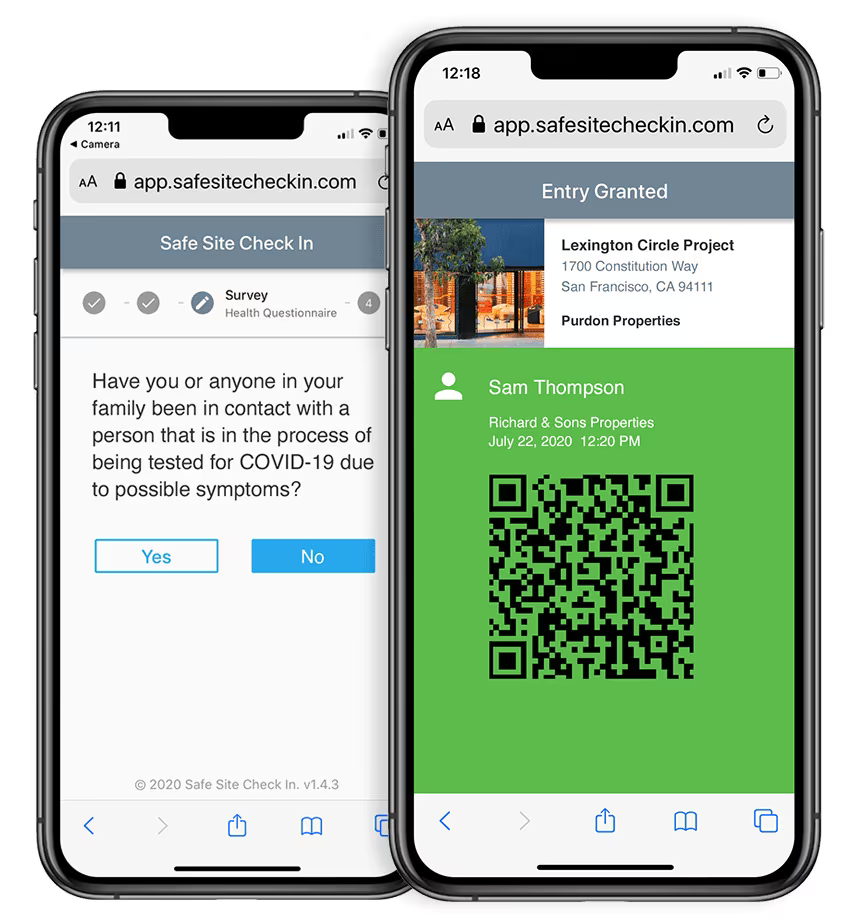
Product Snapshot

Product Details

Streamline Jobsite Management!

Our solution saves time for jobsite superintendents, project managers, safety personnel, and facility managers—freeing up hours each day for tasks such as:

  • Onboarding workers, issuing badges, and conducting orientations

  • Screening for safety and security

  • Creating and archiving daily logs

  • Managing safety training, communications, and documentation

  • Integrating with project management tools

  • Monitoring remote sites

  • Tracking workforce skills and profiles

  • Validating hourly wages and invoices

  • Processing incidents and claims

  • Generating compliance reports

This solution is perfect for construction projects in areas such as education, municipal work, industrial sites, laboratories, or any large-scale operations requiring workforce tracking.

Applications Beyond Construction

Safe Site Check In has found utility across various safety-sensitive sectors that employ a diverse group of workers, including subcontractors, vendors, and visitors. Industries benefiting from this solution include:

  • Infrastructure

  • Industrial facilities

  • Warehouses

  • Assisted living centers

  • Event venues

  • Media production companies

  • Healthcare organizations

Simplified Purchasing Options

You can choose from affordable monthly or annual subscriptions per jobsite that allow unlimited users. Free trials and discounts for bulk purchases are also available.

Simplified Deployment Process

Easily set up and manage new projects in just minutes by generating a poster featuring a project QR code. Employees, subcontractors, vendors, and visitors can scan this QR code poster or utilize a personal QR badge on their tablet or smartphone when arriving or leaving the site. Daily log updates and project management tasks are handled automatically.

User-Friendly Interface

Safe Site Check In is designed to be intuitive. It supports multiple languages and can be accessed via any device, browser, or network.

Comprehensive Support Available

The support team is available 24/7. The system securely archives data instantly, requires no downloads or security patches to handle, and includes support as part of the service.

Construction Management Software Features

dashboard
invoicing
reporting
seo tools
accounting
estimating
mobile app
audit trails
cost tracking
mobile access
time expenses
time tracking
bid management
issue tracking
tax management
cash management
cost management
crew scheduling
quality control
task management
accounts payable
expense tracking
project closeout
project tracking
billing invoicing
budget management
progress tracking
project templates
safety management
task dependencies
vendor management
content scheduling
content versioning
equipment tracking
invoice management
mobile app support
payroll processing
project management
project scheduling
accounts receivable
alertsnotifications
bank reconciliation
collaboration tools
contract management
document management
employee management
financial reporting
material management
real time reporting
resource allocation
resource management
template management
timeline scheduling
workflow management
budgetingforecasting
inventory management
contractor management
project communication
role based permission
safety and compliance
time expense tracking
maintenance management
mobile app via browser
multi currency support
accounting integrations
analytics and reporting
change order management
construction scheduling
project cost estimation
reporting and analytics
telematics integrations
field employee timecards
media library management
multi channel publishing
punch list task tracking
subcontractor management
budgeting and forecasting
purchase order management
quality safety management
tracking alertsnotifications
construction bidding software
material inventory management
safety and compliance tracking
collaboration and communication
construction project management
project planning and scheduling
project scheduling and planning
construction scheduling software
budget management budget tracking
integration with third party tools
collaboration and communication tools
content creation and editing tools wysiwyg
collaboration tools collaboration and communication
task dependencies implied via scheduling and task management

Pros

  • No pros listed yet.

Cons

  • No cons listed yet.

Price

Professional

Custom

Get Free Guidance from Our Solution Experts.

Ratings

0.00 | 0 reviews

Ratings Distribution

Positive

0%

Neutral

0%

Negative

0%

User Reviews

No reviews yet

Be the first to share your experience with Safe Site Check In.

Frequently Asked Questions

Find answers to the most common queries about our software recommendation service.

Yes, Safe Site Check In does offer an API.

Yes, Safe Site Check In does offer a dedicated mobile app.

Safe Site Check In supports the English language.

Safe Site Check In offers three pricing plans: Basic 300 ($99/site/month), Standard 600 ($199/site/month), and Advanced 1000 ($299/site/month). Receive a tailor-made Safe Site Check In cost estimate specific to your needs.

Safe Site Check In integrates with Autodesk Construction Cloud and Procore software.

Typical users include construction, education, energy and water, manufacturing, warehousing, healthcare, and media production industries.

Safe Site Check In offers support via a dedicated help center. Users can also browse a detailed knowledge base and FAQs to quickly resolve their queries with the tool.