

Touchplan
Streamline your construction planning with Touchplan, the collaborative platform that enhances team coordination and boosts real-time collaboration.
Touchplan provides a collaborative platform designed for construction planning, aimed at digitizing the Last Planner System® and enhancing team coordination. While some users have noted restrictions in its task-linking functionalities, the software is frequently lauded for its intuitive interface and efficient real-time collaboration capabilities.
What Is Touchplan?
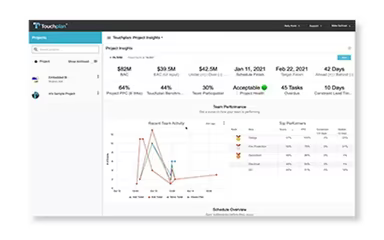
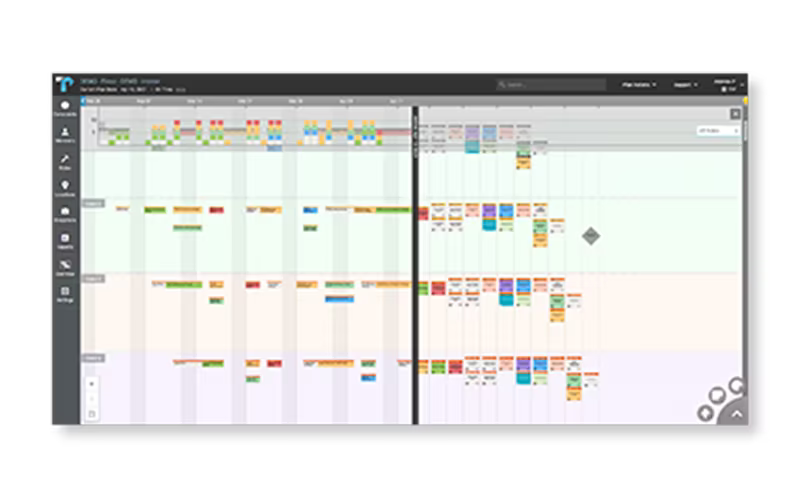
Touchplan is an innovative cloud-based software tailored for construction planning. It serves general contractors, specialty contractors, and project owners looking to enhance their project results. By digitizing the Last Planner System®, it enables teams to develop collaborative pull plans that present a clear and visual workflow. The platform's real-time analytics provide valuable insights into project advancement and possible obstacles, while its tools for tracking commitments foster accountability among all parties involved, ensuring that timelines stay precise and realistic.
What Is Touchplan Best For?
Touchplan excels in construction scheduling based on the Last Planner System, where field teams synchronize their daily tasks through collaborative pull planning. It caters to general contractors, subcontractors, and project owners who oversee intricate construction projects that involve numerous trades and ever-changing site conditions.
How Much Does Touchplan Cost?
The cost for Touchplan is estimated to begin at approximately $50 per user each month. For annual subscriptions, pricing for a single user starts around $500 annually.
For larger teams, the estimated costs range from $400 to $900 monthly for 10 users, while for 100 users, it can be between $3,000 and $8,000 per month.
Software License Cost: $4,800 – $10,800
Onboarding / Implementation Fee: $2,000 – $10,000
Hidden Fees: Charges for exceeding user limits or extensive customization
1st Year Total (10 users): $6,800 – $20,800
User feedback typically describes Touchplan as reasonably priced for larger construction teams utilizing Lean planning and pull planning methodologies. Many reviewers highlight that the platform offers significant value when managing multiple active trades and intricate schedules, especially in comparison to other enterprise-level construction solutions.
Request a tailored pricing quote for your business today.
Disclaimer: Pricing information is based on publicly available third-party data and industry benchmarks. Actual expenses may differ.
Touchplan Integrations
The software seamlessly integrates with a variety of third-party applications including:
Procor software
Microsoft Power BI
Oracle Primavera P6
Microsoft Project
Zoom
How Does Touchplan Work?
Touchplan is accessible via a web browser, which means teams can begin using it right away after initial setup without the need for installation.
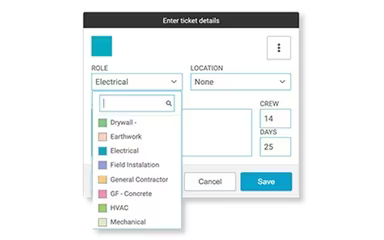
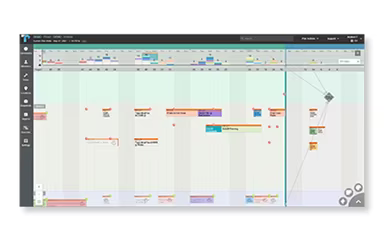
The process starts with users importing existing schedules from tools like Oracle Primavera P6 or Microsoft Project to establish key milestones. Subsequently, work is divided into task cards where teams specify duration, crew size, and task sequences through pull planning.
Teams collaborate to identify dependencies and external constraints while alerts notify them of any potential disruptions to the plan. As tasks are completed, they are marked off and updates are automatically synchronized across the entire schedule.
An overview of progress compares planned work against actual work completed, aiding teams in grasping workflow status and delays. You can also request a complimentary Touchplan demo to see how it integrates into your processes.
Who Is Touchplan For?
Touchplan specializes in construction management and caters to a wide array of industries and sectors such as:
Phased revenue construction
Data centers
Healthcare
Infrastructure
Life sciences
Hospitality
Advanced manufacturing
Education
Mission critical construction
Touchplan Use Cases
Based on our evaluation of Touchplan's features, we have pinpointed specific scenarios where this software proves beneficial for construction teams:
Fast-Track Projects Where Multiple Trades Are Sequenced Daily: In commercial interiors, hospitals, and other rapid-build scenarios that frequently face schedule adjustments due to inspections or material delays, superintendents find value in Touchplan to maintain alignment among various trades as sequences shift day by day. Users frequently mention that it replaces disorganized spreadsheets and verbal updates with a unified view of what work is genuinely ready.
Large Projects Running Weekly Pull Planning Meetings With Field Supervision: General contractors often utilize structured pull planning meetings to establish weekly commitments across trades; however, the execution tends to falter once teams return to the job site. Touchplan is widely adopted to keep these agreements visible beyond the meeting environment and linked to daily activities on site. Field supervisors can monitor whether commitments are upheld without needing separate updates from each trade.
Owners Tracking Schedule Reliability Across Multi-Phase Builds: Owners overseeing extensive portfolios like industrial parks or multi-building developments frequently receive inconsistent progress reports from various contractors. Touchplan is employed in these scenarios to ensure schedule reliability and consistent progress across all active phases. Rather than evaluating disconnected reports, leadership can see how planned work is being completed over time — especially useful during portfolio reviews where delays must be assessed across several projects.
General Contractors Managing Daily Constraints Like RFIs And Material Delays: Issues like RFIs, shortages of materials, and last-minute design changes often disrupt planned workflows on active job sites. Site teams utilize Touchplan to identify blocked tasks before assigning crews each day. This approach helps prevent situations where labor is dispatched to areas not ready for execution — particularly critical on dense projects where one unresolved issue can impact multiple downstream trades.
Subcontractors Working Across Multiple GC-Controlled Schedules: Trade contractors such as electrical or plumbing teams often operate under various general contractors with differing schedules and priorities. Touchplan assists them in understanding when their scope is ready to commence without relying on constant coordination calls or emails — vital when site access windows change frequently or crews are reassigned based on evolving project demands.
Is Touchplan Right For You?
If you’re looking for a solution that makes the Last Planner System® both accessible and effective for businesses of any size, then Touchplan could be an excellent fit. Its primary strength lies in transforming complex long-term schedules into straightforward daily plans that encourage collaboration and accountability. With real-time analytics at its core, Touchplan aids in reducing project delays and minimizing rework — making it especially valuable for firms focused on boosting efficiency and predictability in complicated projects.
If you still have questions about whether Touchplan software suits your needs, feel free to reach out to our customer support team at info@softwareseekers.com for further assistance.