

logo

Workyard

Are you fed up with uncertainty in managing your construction projects? Eliminate timecard disagreements and prevent budget excesses with ease. With Workyard's...

0.00 | 0 Reviews

Are you fed up with uncertainty in managing your construction projects? Eliminate timecard disagreements and prevent budget excesses with ease. With Workyard's...

Product Overview

Are you fed up with uncertainty in managing your construction projects? Eliminate timecard disagreements and prevent budget excesses with ease. With Workyard's GPS-enabled time tracking and comprehensive job costing, you gain the oversight necessary for success. Learn how Workyard enhances transparency in your construction processes.
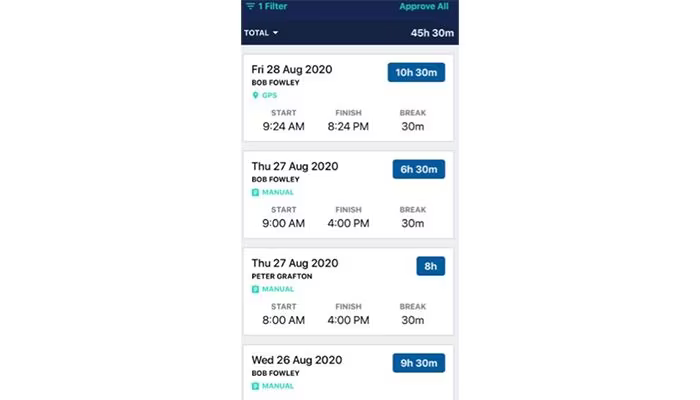
Product Snapshot

Product Details

What Is Workyard?

Overview

Workyard is a specialized software for managing construction workforces, aimed at simplifying the many tasks involved in overseeing a construction team. It enhances operations such as time tracking, job costing, scheduling, and communication, enabling construction firms to achieve improved insights into labor expenses, project profitability, and overall team efficiency.

What Is Workyard Best For?

This software is particularly recognized for its user-friendly interface and commitment to precise job costing. The mobile time clock application along with GPS tracking features makes it especially beneficial for businesses that require meticulous timekeeping and accurate labor cost assessments to ensure project profitability. Although there are other construction management solutions available, Workyard prioritizes ease of use and efficient field data collection.

Workyard Pricing

The pricing structure is as follows:

  • Time Tracking - $8/user/month (+$50/month company base fee)

  • Workforce Management - $16/user/month (+$50/month company base fee)

This software presents various pricing plans designed to meet the diverse needs of organizations. Custom pricing options for Workyard can be requested.

Please note: Pricing may change.

Workyard Integrations

This software connects seamlessly with a variety of third-party applications:

  • Paylocity

  • Paychex

  • Paycor

  • Gusto

  • ADP

  • Sage

  • QuickBooks

  • Microsoft Excel

How Does Workyard Work?

Once you complete the initial setup, you can begin using Workyard by following these steps:

  1. Log in to Workyard with your credentials.

  2. Access a real-time overview of ongoing projects, labor costs, and alerts that need your attention.

  3. Add project information, designate specific locations, and assign cost codes for precise job costing.

  4. Create individual profiles for your team members, detailing their roles and pay rates.

  5. Invite employees to download the Workyard app, which serves as their main tool for clocking in/out, logging hours, and communicating.

  6. Develop your work calendar by assigning workers to various projects and creating tasks for each job site.

  7. Track clock-in/out times, review location data (if enabled), and check any notes or photos uploaded by your team.

  8. Easily analyze job costs, labor hours, and other metrics as required to make informed decisions.

You can also view a free demo of Workyard to discover more about its features.

Who Is Workyard For?

This software is mainly tailored for small to medium-sized enterprises in the construction sector. It caters to businesses involved in:

  • Residential construction

  • Commercial construction

  • Infrastructure

  • Specialty trades

Is Workyard Right For You?

If you are frustrated with inaccurate time tracking impacting your construction profits or find it challenging to manage project expenses and keep your crew organized, then Workyard might be the answer you need.

The importance of security and scalability cannot be overstated for any construction management software. Workyard employs standard security protocols and offers scalable solutions to support your business's growth.

If you're still uncertain whether Workyard fits your needs, reach out to our customer support at info@softwareseekers.com for assistance in making the best choice.

Construction Management Software Features

dashboard
invoicing
reporting
seo tools
accounting
estimating
mobile app
audit trails
cost tracking
mobile access
time expenses
time tracking
bid management
issue tracking
tax management
cash management
cost management
crew scheduling
quality control
task management
accounts payable
expense tracking
project closeout
project tracking
billing invoicing
budget management
progress tracking
project templates
safety management
task dependencies
vendor management
content scheduling
content versioning
equipment tracking
invoice management
mobile app support
payroll processing
project management
project scheduling
accounts receivable
alertsnotifications
bank reconciliation
collaboration tools
contract management
document management
employee management
financial reporting
material management
real time reporting
resource allocation
resource management
template management
timeline scheduling
workflow management
budgetingforecasting
inventory management
contractor management
project communication
role based permission
safety and compliance
time expense tracking
maintenance management
mobile app via browser
multi currency support
accounting integrations
analytics and reporting
change order management
construction scheduling
project cost estimation
reporting and analytics
telematics integrations
field employee timecards
media library management
multi channel publishing
punch list task tracking
subcontractor management
budgeting and forecasting
purchase order management
quality safety management
tracking alertsnotifications
construction bidding software
material inventory management
safety and compliance tracking
collaboration and communication
construction project management
project planning and scheduling
project scheduling and planning
construction scheduling software
budget management budget tracking
integration with third party tools
collaboration and communication tools
content creation and editing tools wysiwyg
collaboration tools collaboration and communication
task dependencies implied via scheduling and task management

Pros

  • Simple, intuitive user interface
  • Accurate GPS-based time tracking
  • Streamlined job cost calculations
  • Easy-to-use crew scheduling tool
  • Centralized team communication

Cons

  • Reporting could be more customizable
  • Some setup effort required initially
  • Occasional updates might disrupt workflow, according to some Workyard reviews

Price

Professional

$8

Get Free Guidance from Our Solution Experts.

Ratings

0.00 | 0 reviews

Ratings Distribution

Positive

0%

Neutral

0%

Negative

0%

User Reviews

No reviews yet

Be the first to share your experience with Workyard.

Frequently Asked Questions

Find answers to the most common queries about our software recommendation service.

Yes, the software has an API available.

The software supports the English language.

Workyard integrates with the following third-party applications: Paycor, Paylocity, Paychex Gusto, ADP, Sage, QuickBooks, and Microsoft Excel.

The software supports mobile devices.

The software offers Time Tracking at $8/user/month and Workforce Management at $16/user/month with a $50/month company base fee for both pricing plans. You can also request a custom Workyard price quote based on your organization’s needs.

Workyard is designed for small to medium-sized businesses in the construction industry, including commercial construction, residential construction, infrastructure, and specialty trades.

Workyard is known for its responsive customer support, which includes phone, email, and online help resources.

Workyard uses GPS location tracking alongside an easy mobile app for clocking in/out. This ensures accurate data on employee hours spent at different job sites, even when workers switch between cost codes within a pay period.

Yes! Workyard allows workers to easily switch between different cost code in their mobile app regularly throughout the pay period. This means you get accurate data for budgeting and job profitability analysis.

Yes! Workyard's time tracking software and detailed reporting provide a complete audit trail of employee time, including GPS location data, ensuring you have the records you need.