

BestNotes
Streamline your behavioral health practice with BestNotes, an intuitive EHR and CRM system designed for efficient documentation and billing management.
Key Insights
Derived from customer feedback
BestNotes serves as an electronic health record (EHR) and customer relationship management (CRM) solution tailored for facilities focused on behavioral health and addiction recovery. Both clinical staff and administrative personnel utilize it for managing documentation as well as billing processes. Users appreciate its user-friendly setup and seamless workflow integration, although some have mentioned a lack of extensive customization options. Recent enhancements feature an automatic assignment system for reviewers when PDFs are uploaded, along with a ‘Refresh DrFirst’ button for enhanced user functionality.
Our Assessment
BestNotes emerges as a trustworthy EMR option for smaller to medium-sized behavioral health and addiction treatment practices that aim for effective coordination and adherence to regulations. Its combined documentation and billing processes offer significant value at a consistent price point. Nonetheless, it might fall short for larger organizations that need more extensive customization capabilities.
What Is BestNotes EMR?
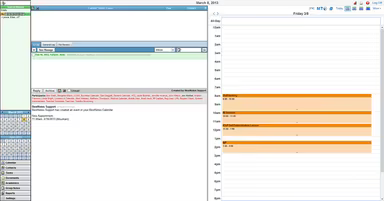
BestNotes EMR is tailored for facilities focused on addiction and behavioral health treatment. This web-based platform offers an extensive array of features aimed at assisting organizations in managing both clinical and administrative operations.
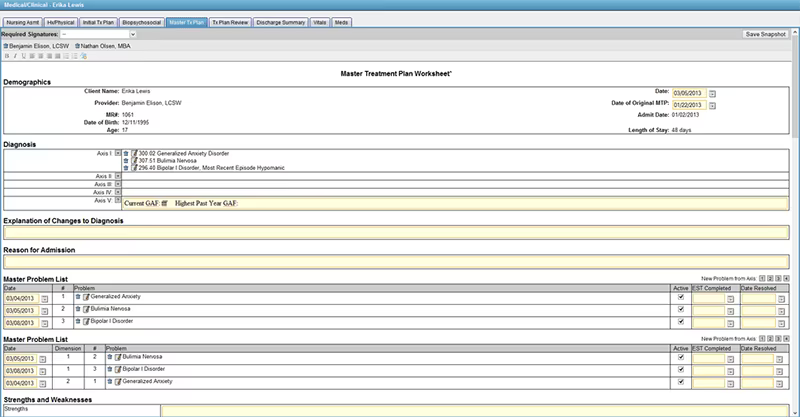
With BestNotes, therapists can utilize note templates to handle both group and individual notes all within one convenient interface. Additionally, clinics can monitor inquiries, manage cancellations, and oversee month-to-month contracts thanks to its integrated CRM capabilities.
What Is BestNotes EMR Best For?
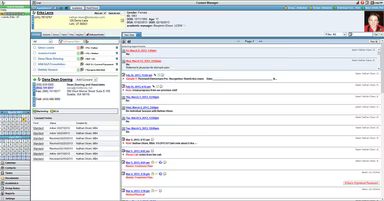
A key aspect that differentiates BestNotes is its integration of Customer Relationship Management (CRM) functionalities alongside its EMR features. This practice management software comes equipped with tools for managing communication, referrals, and reporting for various organizations. Users can monitor exchanges, phone calls, emails, and other communication forms while also setting reminders for follow-ups. Furthermore, it allows tracking of incoming and outgoing referral sources and provides automatic notifications for new leads or clients.
Another notable capability is its telehealth feature, which accommodates both individual and group therapy sessions. This telehealth functionality supports up to 50 participants simultaneously and is accessible on any device with internet connectivity and a web browser. BestNotes ensures secure communication during sessions through end-to-end encryption. Therapists can effortlessly send meeting links to clients with a single click or include meeting details in appointment reminders.
How Much Does BestNotes EHR Cost?
The vendor provides flexible pricing options that depend on the number of users within an organization:
1-10 Users: $58/user/month
11-100 Users: $24/user/month
101+ Users: $12/user/month
For a tailored cost estimate of BestNotes EHR software specific to your practice’s needs, please reach out to us.
Note: Pricing is subject to change.
BestNotes EHR Software Integrations
The software seamlessly integrates with various third-party applications and tools, including:
Salesforce
Microsoft Outlook
EZClaim
DrFirst
ClaimMD
Keragon
How Does BestNotes Software Work?
The installation process for BestNotes electronic health records varies based on the specific requirements of your healthcare organization. Below are some general steps to guide you:
First, evaluate the hardware and software requirements for BestNotes. Confirm that your organization meets technical specifications like internet speed and bandwidth.
Next, consult with a BestNotes representative who can assist in planning the installation process. They will provide insights into the specific needs of your organization and answer any questions you may have about the software.
After installing the software, ensure that your team receives adequate training on its use. BestNotes provides training resources including videos, webinars, and online sessions.
If transitioning from another EMR system, plan for data migration. BestNotes offers services to facilitate a smooth transition.
Once installation and training are complete, you can start using BestNotes. It's advisable to monitor the software in the initial weeks to confirm everything functions correctly and resolve any issues that may come up.
The installation process for BestNotes EHR software can be customized according to your healthcare organization's unique requirements. The software team also provides unlimited training for all users.
You can schedule a free demo of BestNotes EMR to gain a quick visual overview of its functionalities.
Who Is BestNotes EHR Software For?
This software is specifically designed for the behavioral health sector, catering to organizations of all sizes. It is commonly utilized by:
Psychoanalysts
Therapists
Social workers
Behavioral health specialists
Mental health institutions
Rehabilitation centers
BestNotes EMR Software Use Cases
The following scenarios have been identified from user feedback and our analysis of BestNotes’ electronic health record functionalities. These examples illustrate where the software excels operationally rather than merely listing its benefits or features.
New Behavioral Health Practices Needing Quick Implementation: Numerous users have noted that BestNotes is simple to set up and navigate, making it ideal for newer or smaller behavioral health practices. Its structured onboarding process and user-friendly interface enable clinicians and administrators to begin without extensive technical training.
Addiction and Recovery Centers Requiring Integrated Documentation: Facilities focused on treating substance use disorders appreciate BestNotes for consolidating treatment planning, group notes, and outcomes tracking within one platform. Feedback from users emphasizes its effectiveness in managing multiple programs under a single client record, which minimizes redundancy and ensures data consistency among counselors and case managers.
Multi-Provider Clinics Needing Centralized Coordination: Clinics employing various therapists or counselors utilize BestNotes to ensure continuity of care among providers. Shared access to notes, client progress updates, and communication logs keeps all team members aligned on treatment objectives while reducing miscommunication and duplicate efforts.
University Counseling And Student Wellness Programs: Campus mental health departments rely on BestNotes for secure documentation compliant with regulations. Its comprehensive note templates and audit-ready reporting align well with the structured needs of educational institutions. Users find that the platform simplifies tracking student sessions and outcomes throughout academic terms.
Budget-Conscious Practices Seeking Transparent Pricing: Smaller clinics and solo practitioners often cite the straightforward pricing of BestNotes as a deciding factor. The per-user pricing model is easy to anticipate and encompasses all essential functions without hidden charges, making it suitable for providers aiming to manage operational costs effectively while maintaining compliance.
BestNotes User Sentiments
Most Positive Sentiments
Ease of Use: 70% were Positive; 10% were Negative; 20% were Neutral. Many users express that BestNotes is easy to learn, particularly for new staff members. Although some find the interface somewhat dated, most consider it clear and manageable.
Integrated Clinical Workflow: 65% were Positive; 15% were Negative; 20% were Neutral. Users value the integration of documentation and notes within a single system, reducing reliance on multiple tools.
Customer Support And Responsiveness: 55% were Positive; 10% were Negative; 35% were Neutral. Several reviewers highlight prompt support during onboarding or when resolving issues.
Least Positive Sentiments
Limited Billing Functionality: 10% were Positive; 55% were Negative; 35% were Neutral. Users report that the built-in billing module does not meet expectations fully, often necessitating external tools or workarounds for comprehensive practice management.
Limited Customization in Forms And Reports: 10% were Positive; 35% were Negative; 55% were Neutral. Users mention challenges in adjusting certain templates or extracting data precisely as required due to limited flexibility outside the core system.
Occasional Loss of Unsaved Data: 20% were Positive; 45% were Negative; 35% were Neutral. Some users indicate instances where progress notes or entries were lost if not saved promptly or if a session closed unexpectedly.
Is BestNotes Right for You?
The BestNotes software occupies a significant role within the behavioral health sector. It excels in managing patient health information, client interactions, and billing codes reliably. Its fully integrated suite includes scheduling, practice management, documentation, medication administration, outcome tracking, e-prescribing, and lab tracking capabilities.
This software distinguishes itself with its built-in CRM functionalities, customizable note templates, and outcome measurement tools that aid in maintaining compliance throughout each patient's journey. Compliant with HIPAA regulations, BestNotes also provides mobile applications for both Android and iOS devices—ideal for practices prioritizing flexibility, compliance, and patient-centered care.
If you remain uncertain about whether BestNotes is suitable for you, feel free to connect with our customer support team at info@softwareseekers.com for additional assistance.