

blueEHR
Transform patient care with blueEHR, the intuitive healthcare solution that enhances practice efficiency and redefines electronic health records.
Experience the flexibility of blueEHR, an innovative healthcare platform transforming the landscape of electronic health records. Boasting a user-friendly interface and robust functionalities, it enhances both patient care and operational efficiency. With a focus on adaptability, blueEHR is an ideal choice for healthcare providers in search of all-encompassing and cutting-edge solutions.
What Is blueEHR Software?
Overview
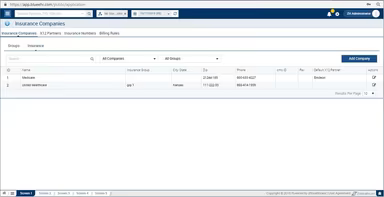
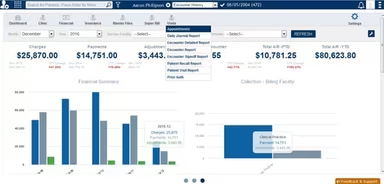
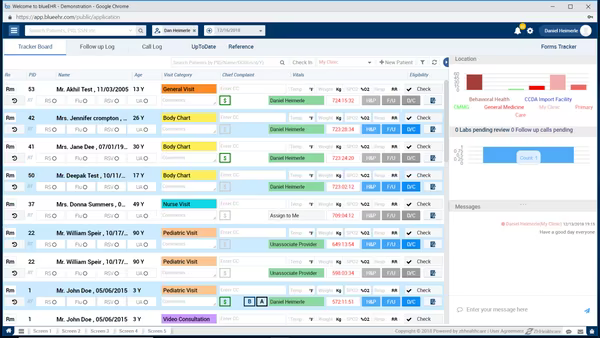
blueEHR is a cloud-driven solution that offers electronic health records (EHR) and practice management functionalities tailored for healthcare providers. This software aims to support medical professionals in handling patient data, scheduling appointments, documenting visits, prescribing medications, and executing various tasks essential for operating a healthcare practice.
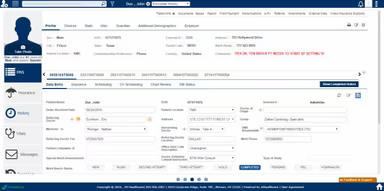
The platform features tools for managing patient demographics, medical histories, and appointment scheduling, alongside clinical decision support, e-prescribing, and electronic progress notes.
What Is blueEHR Software Best For?
blueEHR stands out for assisting healthcare providers who seek an all-encompassing behavioral health EHR solution to effectively manage patient records, appointment scheduling, and communication with patients or other healthcare professionals.
It is particularly recognized for its extensive range of features that facilitate the streamlining of clinical and administrative workflows within healthcare organizations. This includes functions such as appointment scheduling, management of patient demographics, e-prescribing, and clinical decision support.
How Does blueEHR Work?
Offered by the American company ZH Healthcare, blueEHR complies fully with HIPAA and ICD-10 regulations. To get started with blueEHR, healthcare providers typically need to create an account and log into the platform. After logging in, they gain access to various tools and features, including patient records, appointment schedules, billing information, and resources for clinical decision support.
The software is readily accessible from any device connected to the internet. Here’s a straightforward process to implement blueEHR in your medical practice:
Begin by signing up for a blueEHR account and establishing a user profile. This usually requires providing your name and contact information, along with setting up a username and password.
After creating an account, log in to the blueEHR software to start utilizing it. Depending on your role and permissions within the system, different features and modules may be accessible.
Create a new patient record using the intake form provided by blueEHR. This form enables you to input vital information about patients, such as personal details, medical history, and current health status.
Once a patient record is established, you can manage the patient's care through blueEHR. This may include scheduling appointments, ordering tests or procedures, and communicating with other healthcare professionals.
For a deeper understanding of the program's capabilities, consider arranging a complimentary demo of the blueEHR software.
Who Is blueEHR Software For?
blueEHR is ideal for healthcare organizations like hospitals, clinics, and private practices seeking a robust EHR solution to enhance their clinical and administrative operations. Various healthcare professionals—including doctors, nurses, and clinical staff—can utilize it to manage patient care effectively and enhance outcomes.
This software may also benefit specialty care practices since it incorporates tools designed for managing patient care across different specialties while facilitating coordination with other providers. Additionally, blueEHR supports mobile access through an app available on Android and iOS devices while being compatible with desktop platforms.
How Is blueEHR Different From Other Software?
Similar to other medical software options available today, blueEHR possesses unique characteristics that may make it more suitable for certain organizations. These include:
Customization and Ease of Use: Unlike some EHR systems that offer limited customization options, blueEHR allows users to tailor the system to meet their organization's specific requirements. Its intuitive user interface contrasts with other EHR systems that may present more complex navigation challenges.
Integration with Other Systems: blueEHR is designed for seamless integration with other healthcare software such as practice management systems and lab systems; conversely, some other EHR solutions may lack such extensive integration capabilities.
Functionality: Offering a wide array of features—including appointment scheduling, electronic prescribing, and patient portal access—blueEHR contrasts with other EHR systems that might have different feature sets.
Pricing Model: Operating on a subscription-based model, blueEHR differs from some electronic health record (EHR) systems that might require a one-time purchase fee or utilize alternative pricing structures.
Please reach out to us for a personalized pricing quote tailored specifically to your needs.
Is blueEHR Software Right for You?
widely adopted among diverse healthcare professionals, blueEHR provides user-friendly features aimed at streamlining repetitive clinical workflows in any medical practice or organization.
A multitude of user reviews highlight the platform's customizable functionalities alongside its rapid API-generated interface. Furthermore, its cloud-based deployment model alleviates organizations from the overhead costs associated with maintaining this application on-site.
However, some users have reported connectivity issues when interfacing with other software vendors. Being open-source can pose challenges when working alongside proprietary systems from different vendors. Additionally, upfront costs necessitate financial investment in both the software itself and staff training.