

CGM Aprima
Streamline your practice with Aprima EHR's all-in-one solution for documentation, billing, and care coordination, designed for comprehensive management.
Aprima EHR offers an extensive solution for managing medical practices, encompassing documentation, billing, and care coordination. It is well-regarded for its ability to customize templates to fit specific needs. However, smaller practices may experience a steep learning curve and unexpected expenses. Despite this, the platform’s integrated approach that combines clinical and administrative processes typically makes the investment worthwhile.

What Is Aprima EHR?
Overview
Aprima EHR stands out as a premier cloud-based electronic health record (EHR) solution designed for healthcare professionals aiming to enhance their clinical operations and patient management. This all-encompassing medical records system provides both EHR and practice management features. It digitizes and simplifies administrative duties such as scheduling, billing, and claims handling. Additionally, it offers vital clinical capabilities including e-prescribing, medical charting, and order entry. With Aprima EHR, healthcare practices can transition to a paperless environment, boost security, and access patient records from any location at any time.
What Is Aprima EHR Best For?
Aprima EHR excels with its customizable templates and adaptive learning features. The software observes workflow patterns and adjusts itself based on user interactions. It also boasts robust clinical decision support tools that enhance treatment strategies. Thanks to its flexible design, Aprima EHR can easily cater to various specialties and scale according to the specific needs of the practice.
Aprima EHR Pricing
The pricing for Aprima EHR is determined by the unique requirements of each customer. Reach out to us to discuss the pricing options available for Aprima EHR.
Aprima EHR Integrations
Details regarding its third-party integrations are currently unavailable.
How Does Aprima EHR Work?
To begin using the software after successful installation, follow these steps:
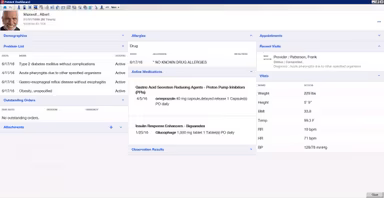
Log into the EHR software and navigate the main dashboard to locate key areas.
Set up your providers, staff members, patients, and billing accounts in the system.
Add existing patient information by either searching for them or creating new patient charts from scratch.
Start scheduling appointments in the calendar and link them to respective patients and providers.
Begin seeing patients while documenting visit notes, medications, orders, and diagnoses within the live chart.
Familiarize yourself with e-prescribing tools, built-in forms, and templates.
Review scheduling, billing, and accounting modules to understand operational workflows.
The demo for Aprima EHR provides a more detailed walkthrough of these steps.
Who Is Aprima EHR For?
This software is beneficial for various specialties including:
Home-based primary care
Primary care
Orthopedics
Pediatrics
Pain management
Surgical
Internal medicine
Is Aprima EHR Right For You?
If safeguarding your patients' data and effortlessly scaling your practice are priorities for you, then this software may be an excellent fit.
Aprima, a frontrunner in healthcare technology for over 15 years, prioritizes data security above all else. It complies with stringent industry standards such as HIPAA, HL7, NIST, among others. The system employs strong access controls, automatic backups, activity logs, and encryption to safeguard patient records. Regular audits by third parties ensure ongoing compliance.
The software is also constructed on a scalable cloud architecture. It can easily adapt to your practice’s growth whether you're adding a single provider or expanding with multiple locations. On-demand storage and processing capabilities ensure that performance remains optimal. You can access, modify, and share information from anywhere using any device that has internet connectivity.
If you’re still uncertain about whether it’s the right option for you, reach out to us at info@softwareseekers.com for assistance from our knowledgeable team in making an informed choice.