logo

Chiro QuickCharts

Is running your chiropractic office proving to be a challenge? Give Chiro QuickCharts a try! This software simplifies patient check-ins, billing, and record man...

0.00 | 0 Reviews

Is running your chiropractic office proving to be a challenge? Give Chiro QuickCharts a try! This software simplifies patient check-ins, billing, and record man...

Product Overview

Is running your chiropractic office proving to be a challenge? Give Chiro QuickCharts a try! This software simplifies patient check-ins, billing, and record management effortlessly. Focus more on providing care and reduce the time spent on administrative tasks. Discover its comprehensive features for enhanced practice management.
Product Snapshot

Product Details

What Is Chiro QuickCharts?

Overview

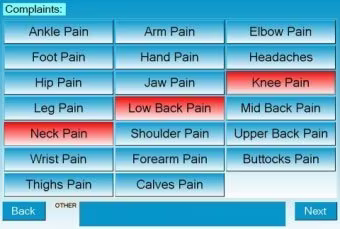
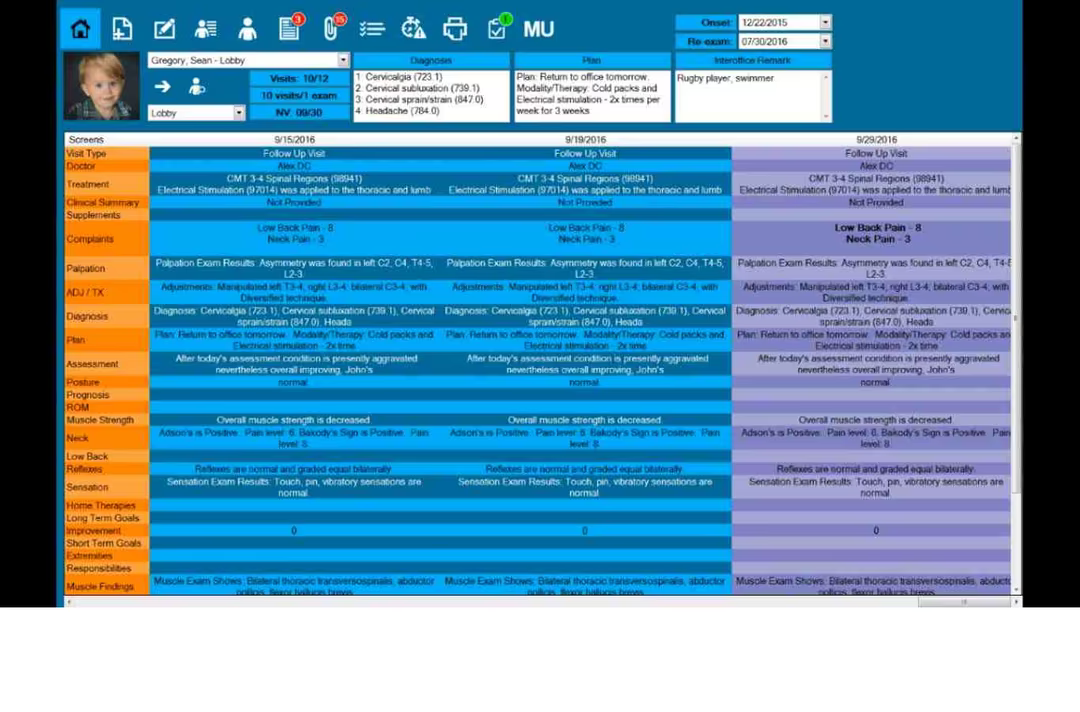
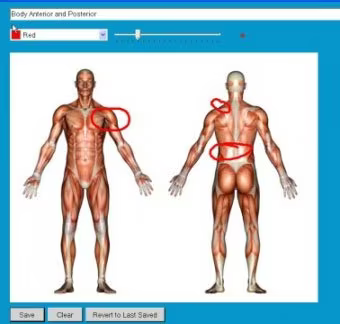
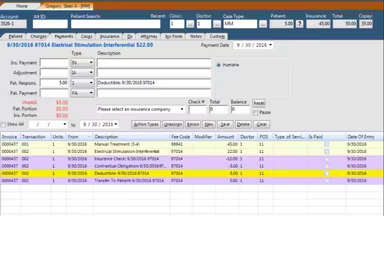
Chiro QuickCharts is a straightforward EHR and practice management solution specifically designed for chiropractors. This software enhances everyday tasks through an efficient, cloud-based platform, covering everything from patient check-in to billing and maintaining patient charts. By reducing paperwork, it significantly boosts productivity within your medical practice. Key features of Chiro QuickCharts include scheduling capabilities, a web portal, image management, customizable note templates, and various documentation tools.

What Is Chiro QuickCharts Best For?

The software excels in simplifying the chiropractic documentation process with its effective note templates. These templates are crafted to speed up daily note-taking and billing, enabling chiropractors to finish these tasks in less than 30 seconds. With a range of customizable templates available, practitioners can ensure that documentation is both thorough and accurate across different patient situations.

Chiro QuickCharts Pricing

There are three pricing tiers available for this software:

  • Starter - $99/month

  • Essentials - $199/month

  • Premium - $350/month

If you would like to discuss the specifics of Chiro QuickCharts' pricing, please reach out to our customer support team.

Please note: The pricing is subject to change.

Chiro QuickCharts Integrations

This software supports integration with pharmacy, lab, and payer systems. However, the vendor has not provided details about its third-party integrations.

How Does Chiro QuickCharts Work?

Here’s a brief guide on how to begin using the software after logging in:

  1. Create user profiles for your staff members.

  2. Add patient records into the system along with necessary information.

  3. Customize the appointment scheduling process to align with your practice needs.

  4. Enter billing and payment details for efficient financial oversight.

  5. Integrate the EHR and practice management software for improved functionality.

  6. Utilize customizable note templates to enhance documentation efficiency.

  7. Participate in training sessions or view training videos for greater insights.

You can also schedule a complimentary Chiro QuickCharts demo that will guide you through these steps in more detail.

Who Is Chiro QuickCharts For?

This chiropractic software is well-suited for clinics of all sizes. It serves both individual practitioners and larger healthcare facilities effectively.

Is Chiro QuickCharts Right For You?

If you are a chiropractor seeking a comprehensive EHR and practice management solution, Chiro QuickCharts could be precisely what your organization needs. This software provides an extensive array of features designed to optimize routine financial and administrative tasks. Additionally, it functions as a complete in-house solution that can be installed on your system. With strong security measures and scalability, Chiro QuickCharts adapts to the evolving demands of your chiropractic practice.

If you're still uncertain about whether it's the right option for you, please reach out to us at info@softwareseekers.com. Our knowledgeable team is here to help you make an informed choice.

EMR Software Features

dashboard
invoicing
reporting
timeclock
mobile app
purchasing
ai chatbots
appointments
sales orders
telemedicine
client portal
mobile access
time tracking
eprescriptions
patient portal
sales tracking
case management
e prescriptions
fuel management
hipaa compliant
lab integration
lead management
online payments
task management
audit management
lab integrations
order management
sales automation
accident tracking
activity tracking
billing invoicing
budget management
claims management
dictation support
driver management
email integration
project templates
sales forecasting
vendor management
contact management
customizable forms
project scheduling
route optimization
alertsnotifications
compliance tracking
document management
employee management
employee onboarding
reporting analytics
resource allocation
workflow automation
workforce analytics
inventory management
merchandise transfer
patient demographics
vehicle tracking gps
warehouse management
billing and invoicing
client management crm
compliance management
customer segmentation
patient client portal
maintenance scheduling
opportunity management
performance management
telematics integration
benefits administration
compensation management
customer servicesupport
reporting and analytics
telemedicine telehealth
cloud based emr software
deal pipeline management
social media integration
training and development
customizable formsreports
sales pipeline management
document automationassembly
incident and issue tracking
multi factor authentication
patient engagement software
attendance and time tracking
compliance security features
employee self service portal
fleet utilization monitoring
laboratory integration elabs
appointment scheduling widget
remote patient monitoring rpm
policy and document management
regulatory compliance tracking
risk assessment and mitigation
customer communication tracking
employee information management
practice analytics emr software
appointment managementscheduling
delivery planning and scheduling
appointment management scheduling
billing invoicing patient billing
customizable forms patient intake
immunization and allergy tracking
third partyvendor risk management
esg metrics tracking and reporting
insurance eligibility verification
recruitment and applicant tracking
customer relationship management crm
telehealthappointment managementscheduling
regulatory change monitoring and impact analysis
carbon emissions data capture and calculation tools

Pros

  • A user-friendly software product for billing
  • Seamlessly integrates with other systems
  • Intuitive dashboard and nice layout
  • Efficient documentation saves time

Cons

  • Programming changes can be a hassle
  • Customization complexity for some features
  • The program lacks ease of use when it comes to the reporting module, according to some Chiro QuickCharts reviews

Price

Professional

$99

Get Free Guidance from Our Solution Experts.

Ratings

0.00 | 0 reviews

Ratings Distribution

Positive

0%

Neutral

0%

Negative

0%

User Reviews

No reviews yet

Be the first to share your experience with Chiro QuickCharts.

Frequently Asked Questions

Find answers to the most common queries about our software recommendation service.

Chiro QuickCharts EHR Software primarily benefits health systems by providing a specialized solution for chiropractic care. It helps chiropractors manage patient records, scheduling, billing, and documentation.

Chiro QuickCharts offers support via form submission, email and phone.

Chiro QuickCharts is specifically designed for chiropractic practices of all sizes.

The pricing of the software starts from $99/month. It offers three pricing plans: Starter, Essentials and Premium. Request a customized quote based on your requirements today!

Users found Chiro QuickCharts quite easy to implement. The processing time can vary based on the complexity of your practice and your specific needs. Schedule a free demo to get more assistance.

Yes, it offers a free trial.

The overall rating of Chiro QuickCharts shows that users have praised the ease of use and functionality of the software and called it a great product. Moreover, the documentation and customizable templates make it possible for practitioners to keep a record of patient data.