

ChiroSpring
Simplify your chiropractic practice with ChiroSpring. Streamline appointments, manage patient records, and enhance data security effortlessly.
If you're a chiropractor dealing with the challenges of scheduling appointments, handling patient information, and managing billing, ChiroSpring has the solution for you. This platform is designed to make your practice more efficient. Its intuitive interface combined with powerful features simplifies your daily operations, improves data protection, and provides competitive pricing. Discover what this cutting-edge chiropractic practice management tool can do for you today!
What Is ChiroSpring?
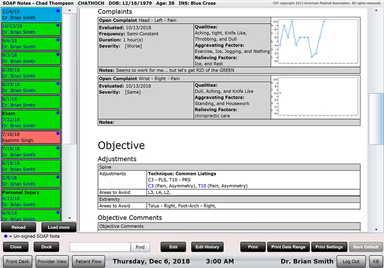
ChiroSpring is an innovative cloud-based software designed for chiropractic practice management. It aims to enhance the efficiency and smooth operation of your chiropractic practice, whether you're a single practitioner or overseeing multiple offices. The platform features an intuitive interface along with a variety of tools that facilitate patient scheduling, SOAP notes management, billing, and advanced reporting. Known for its affordability, ChiroSpring can be customized to meet the specific requirements of any practice size.
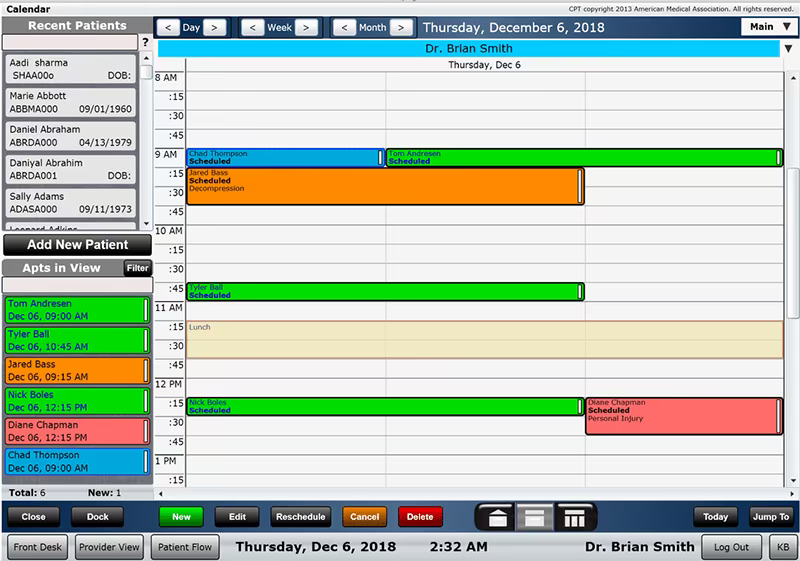
The ChiroSpring EHR simplifies appointment scheduling through an online booking system, making calendar management straightforward. Additionally, it integrates with various payment solutions to ensure a hassle-free billing process. Being cloud-based allows you to securely access your practice data from anywhere. Moreover, ChiroSpring is also beneficial for chiropractic educational institutions, making it a flexible option for both clinical and educational environments.
What Is ChiroSpring Best For?
ChiroSpring excels in providing robust and adaptable practice management features tailored specifically for chiropractic practices. Its unique selling points include extensive customizability, a cloud-based framework, and competitive pricing. This all-in-one software solution is perfect for chiropractors aiming to enhance their daily operations while delivering superior patient care.
How Much Does ChiroSpring Cost?
The starting price for ChiroSpring is $149 per provider per month for the 360 plan. The additional paid plans include:
360 Pro: $249/provider/month
360 Pro+: $299/provider/month
Beyond the base subscription fees, organizations should consider these additional costs:
Clearinghouse Integration: $149/month; includes claim management, ERA posting, and insurance verification.
GrowthHub or GrowthHub Pro: $99–$249/month; includes patient engagement tools, automated messaging, and review management.
ChiroSpring AI: $49/month; adds AI-assisted charting and claims support.
Transaction-Based or Overages: Minor per-unit fees apply for messaging and claim volume overages (typically $0.02/extra message or $0.35 per extra claim).
Implementation & Setup: Costs range from $500 to $5,000+; larger clinics or data migrations may incur higher fees.
Support And Maintenance: Included (Standard); optional premium plans are negotiable; industry estimates range from $100 to $300/year.
Users generally find ChiroSpring's pricing fair and its features beneficial; however, they note that add-ons and overage charges can lead to higher expenses—especially for larger practices with multiple providers.
For tailored pricing reflecting your organization’s specific requirements, it’s advisable to request a personalized ChiroSpring pricing estimate.
Please note that pricing is subject to change.
ChiroSpring Integrations
This software provides various integrations with third-party applications aimed at enhancing your practice's effectiveness. Popular integrations include pharmacy systems, lab connections, and payer systems to create a well-rounded healthcare ecosystem.
How Does ChiroSpring Work?
If you’ve successfully installed the software, here’s how to get started:
Log into your ChiroSpring account using your credentials.
Input your practice information such as clinic name, address, and contact details.
Create staff profiles for doctors, office managers, and front desk personnel.
Add patient records manually or import existing patient data.
Establish your appointment scheduling preferences and availability.
Get acquainted with the SOAP notes feature for documenting patient information.
Set up your billing preferences and integrate payment methods.
Utilize advanced reporting tools to evaluate your practice's performance.
Start using the online scheduling system to manage patient appointments effectively.
The ChiroSpring demo provides an in-depth walkthrough of these steps. Click Watch Demo to arrange it today!
Who Is ChiroSpring For?
This software is perfect for chiropractic practices of any scale—from individual practitioners to larger clinics with several locations. It specifically addresses the needs of the chiropractic field, assisting in streamlining operations while enhancing patient care.
Is ChiroSpring Right For You?
ChiroSpring has developed a solid reputation as an efficient practice management tool. It is trusted by chiropractors throughout the industry due to its scalability, security measures, and user-friendly design. If you're seeking ways to simplify your operations while improving patient care quality, ChiroSpring could be an excellent fit for your needs.
If you're still uncertain whether it's the right solution for you, reach out to us at info@softwareseekers.com. Our knowledgeable team is here to help you make an informed decision.