

Crystal Practice Management
Streamline your optometry practice with Crystal Practice Management, enhancing scheduling, billing, and patient management for efficient operations.
Key Insights
Derived from customer feedback
Crystal Practice Management serves as a comprehensive practice management and EHR solution utilized by front-desk personnel, healthcare providers, and billing departments. This platform is particularly advantageous for optometry practices. Users commend its seamless scheduling feature and operational efficiency, although they frequently point out challenges with billing intricacies and occasional system delays. Recently, the platform introduced a ‘cut’ feature for managing appointments, improvements in alert resizing, and enhancements in billing search functionalities. Additionally, Crystal Payments now enables practices to send SMS and email notifications while securely keeping payment options for expedited checkouts.
Our Assessment
Crystal Practice Management is a suitable option for small to medium-sized optometry clinics aiming to enhance their scheduling, billing, and patient management capabilities within a single platform. It is particularly effective for multi-provider teams, providing the necessary framework to handle a large volume of patients efficiently. The pricing structure is competitive with its features, making it a sensible and economical choice for expanding practices.
What Is Crystal Practice Management?
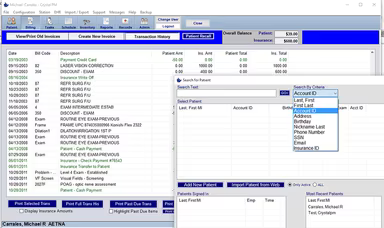
Crystal Practice Management is designed to streamline administrative operations in optometrist clinics and can be adapted for various other medical fields. This software, which operates in the cloud, facilitates the management of both administrative tasks and financial operations in medical practices.
By centralizing key operations into one system, it effectively addresses everyday challenges such as manual scheduling, reliance on paper records, and billing delays. It also securely integrates with the necessary office equipment. Medical practices can opt for either cloud-based hosting or on-premises deployment, depending on their preferences. More broadly, Crystal EMR assists healthcare providers with a range of functions including patient appointment scheduling, maintenance of electronic health records, and creation of financial reports.
What Is Crystal Practice Management Best For?
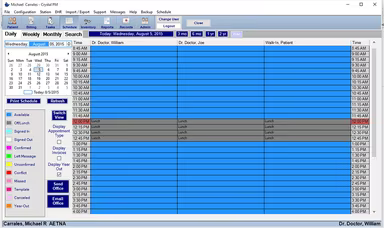
This software is recognized for its all-in-one, user-friendly scheduling capabilities that enhance workflow organization in medical practices. Featuring a color-coded scheduling tool, it integrates seamlessly with an intuitive calendar interface, making appointment management straightforward. The drag-and-drop functionality allows staff to easily adjust schedules while maintaining a smooth patient flow. It effectively manages waiting lists, room assignments, and missed appointments. Additionally, patients have the convenience of booking appointments online, which minimizes unnecessary phone calls.
How Much Does Crystal Practice Management Cost?
The pricing for this software begins at approximately $365 per user per month for the in-office version, while the cloud solution starts around $475 per user per month. This pricing is subject to change based on selected plans, number of users, and features chosen.
Crystal Practice Management offers several plans, each available at tailored pricing:
CRYSTAL ESSENTIALS
CRYSTAL PLUS
CRYSTAL PRO
Additional features, including 'Crystal Kiosk,' 'ePrescribe Controlled Substances,' and 'Two-Way Texting (up to 2,500 messages),' can also be added. Furthermore, practices should consider possible supplementary costs such as:
Training And Onboarding: Usually between $500 to $3,000 (one-time fee)
Payment Processing Fees: Typically around 2.5%–3.5% per transaction
Support and Maintenance: Roughly $1,000 to $1,500 per year
Machine And Device Integration: Approximately $50 to $300 per month or setup fee
AMA CPT Code License: About $10 to $50 per month or annual fee
Data Migration And Conversion: Between $500 and $5,000 (one-time fee)
Many users find the pricing of Crystal Practice Management flexible, but it’s essential to note that the base fee does not encompass all the expenses. Extra fees for features and services can lead to a higher overall cost than initially anticipated. While plans permit customization, some users believe the final expenses tend to be higher than expected when additional charges come into play.
Reach out to us today for a customized quote for Crystal Practice Management.
Disclaimer: Pricing information is based on publicly accessible third-party data and industry standards. Actual costs may vary.
Crystal Practice Management Integrations
This software connects with various third-party applications to enhance billing services, facilitate data exchange, and promote patient engagement. Some of the applications it integrates with include:
BillFlash
AutoRemind
Worldpay
Kno2
ABB Optical Group
How Does Crystal Practice Management Work?
To get started with Crystal EHR after installation, follow these steps:
Launch the software on your computer and complete the necessary setup steps, such as registration or activation.
Choose the specific data you wish to view and manage by customizing fields in the patient database.
Upload all relevant forms and documents essential for practice operations, including insurance papers and medical records.
Adjust settings in the software to align with the standards of your organization, such as methods for appointment confirmations or tracking rules.
You can also schedule a live demonstration of Crystal Practice Management to explore its features in greater detail.
Who Is Crystal Practice Management For?
Crystal Practice Management is designed for managing electronic medical records, secure electronic claims, and room scheduling. It features a scheduling system that supports multiple doctors, ensuring comprehensive management across the practice. The software caters to:
Optometric practices
Frame and lens shops
Pharmacies
Specialty-specific medical facilities
Crystal Practice Management Use Cases
Based on user feedback and the current features of Crystal Practice Management, several practical scenarios emerge where the software is highly beneficial for optometry and healthcare providers:
Multi-Location Clinics Managing Centralized Billing
This software assists practices with multiple locations by consolidating billing and insurance claims within a single system. This enables finance teams to monitor reimbursements effectively, reduce duplicate entries, and maintain uniform coding across different sites.
Optometry Practices Streamlining Patient Scheduling
For optometry offices facing appointment backlogs, Crystal Practice Management helps optimize patient scheduling, which decreases call volumes and no-show rates. The appointments integrate directly into Crystal's scheduling system, allowing front-office staff to spend less time on calls while maintaining real-time visibility of patient flow.
Independent Practices Needing Workflow-Adaptable, Customizable EHRs
Small and medium-sized clinics can take advantage of over 300 customizable EHR templates offered by Crystal. Providers can adjust exam forms, SOAP notes, and reports to suit their unique workflows, greatly enhancing clinical precision without needing external IT assistance.
Practices Managing In-House Optical Inventory
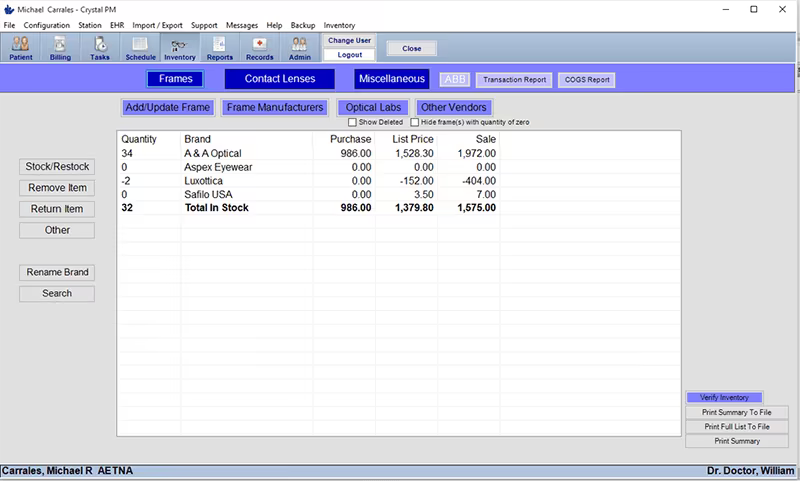
For clinics that provide eyewear and contact lenses, Crystal Practice Management streamlines inventory management, pricing, and sales tracking. The integration between optical inventory and patient records ensures accurate synchronization of dispensing details, warranties, and payments.
Clinics Prioritizing Compliance And Secure Data Exchange
Version 6.0 of Crystal Practice Management is ONC Health IT Certified, making it a good choice for organizations that need to adhere to federal requirements for security, interoperability, and protecting patient data. This feature aids clinics in remaining compliant while effectively sharing electronic data.
Crystal Practice Management User Sentiment
Most Positive Sentiments
Ease Of Use And Workflow Integration: 55% Positive, 30% Neutral/Mixed, 15% Negative
Scheduling And Appointment Management: 60% Positive, 25% Neutral/Mixed, 15% Negative
Compliance And Data Security: 50% Positive, 30% Neutral, 20% Negative
Least Positive Sentiments
Customer Support And Responsiveness: 25% Positive, 15% Neutral/Mixed, 60% Negative
Billing And Claims Complexity: 30% Positive, 20% Neutral/Mixed, 50% Negative
Compatibility And Platform Limitations: 20% Positive, 25% Neutral, 55% Negative
Users consistently commend Crystal Practice Management for its straightforward interface and seamless integration across billing, charting, and scheduling processes. Once users become accustomed to the system, operational efficiency improves significantly.
Experiences with support seem to vary. While some users appreciate the assistance received, others mention inconsistent response times or challenges resolving technical issues, especially during peak hours.
The flexible scheduling tools are popular, enhancing intuitive management of patient flow. The included 'Schedule Your Exam' feature encourages online bookings and ensures real-time calendar adjustments, thereby reducing manual workload for staff.
Regarding billing, while the functionality is comprehensive, many users report a considerable learning curve, with multi-step processes that may be perplexing without proper training. Issues have been noted with errors during insurance updates or claim submissions.
A user once remarked: “The billing system is powerful but hard to learn.”
Many appreciate that Crystal Practice Management holds ONC Health IT Certification, which assures data protection, interoperability, and compliance with U.S. healthcare regulations. Clinics dedicated to maintaining secure EHR systems find this certification very reassuring.
One user commented: “Knowing it’s certified for compliance gives confidence that patient data is safe and HIPAA-ready.”
However, the software performs better on Windows and has drawn criticisms regarding its compatibility with macOS and an outdated user interface. Some users described navigating it as non-intuitive on modern devices.
Is Crystal Practice Management Right For You?
If you're in search of a robust solution to oversee your optometry or healthcare practice, Crystal Practice Management has you covered. It provides a thorough billing module, customizable electronic health records, and effective inventory management tools.
Users can efficiently track lab orders, handle radiology data, and manage patient scheduling seamlessly. The software is compatible with most major insurance providers, simplifying revenue cycle management. Trusted by over 8,000 healthcare professionals, Crystal Practice Management v6.0 is also ONC Health IT Certified, ensuring adherence to U.S. federal regulations for healthcare software.
If you're uncertain whether Crystal Practice Management fits your needs, reach out to our customer service team at (661) 384-7070 for additional assistance.