

DrChrono EHR
Transform your practice with DrChrono, the user-friendly EHR that streamlines billing, scheduling, and telehealth for improved patient management.
Key Takeaways
Insights gathered from customer feedback
DrChrono is a cloud-driven electronic health record (EHR) and practice management solution utilized by healthcare providers and clinic personnel across various specialties. Users commend its user-friendly design, mobile functionality, and built-in billing capabilities. However, some have noted that customer support may occasionally be slow, and there can be minor performance hiccups within the system. Recently, DrChrono has launched a feature aimed at addressing interoperability issues.
Our Verdict
The DrChrono EHR is well-suited for small to medium-sized practices that need cohesive billing, scheduling, and telehealth functionalities. Its mobile-optimized interface accommodates dynamic and fast-paced operational needs. Pricing is tailored to individual requirements and is generally viewed as fair for expanding teams. In summary, it represents a reliable choice for practices that value integration, accessibility, and streamlined patient management.
What Is DrChrono EHR?
DrChrono EHR is a web-based electronic health record (EHR) and practice management application tailored for medical clinics. It offers a comprehensive solution encompassing medical billing, telehealth, and revenue cycle management. Furthermore, DrChrono enables healthcare professionals to oversee various elements of patient management, such as patient intake, clinical documentation, and scheduling appointments.
The platform includes numerous features, such as customizable medical forms, e-prescribing capabilities, real-time patient eligibility verification, and access to a patient portal.
What Is DrChrono EHR Best Known For?
DrChrono EMR is notably recognized for its user-friendly design. The intuitive interface allows healthcare practitioners to execute smooth workflows and enhance patient care quality.
How Much Does DrChrono Cost?
The starting price for DrChrono is around $199 per provider each month, according to publicly cited third-party estimates and standard entry-level pricing for cloud-based EHR systems. This entry point typically includes essential EHR functions like clinical charting, appointment scheduling, and basic patient engagement tools for a single provider.
Pricing is actually quote-based and can fluctuate based on factors such as the number of providers, chosen feature set, billing requirements, and the complexities of the practice. Below are the tiered plans:
Essentials (EHR and Practice Management): Custom pricing
Essentials Plus (EHR, E-Prescribe, and Practice Management): Custom pricing
Advanced (EHR, Practice Management, and Billing): Custom pricing
Advanced Plus (EHR, E-Prescribe, Practice Management, and Billing): Custom pricing
Elite (EHR, E-Prescribe, Practice Management, and Billing Services): Custom pricing
In addition to the fundamental subscription, practices should account for these supplementary cost factors:
Payment Processing Fees:
Credit/Debit Card Processing: 2.75% + $0.30 per transaction, $0.75 daily batch fee, $5.95 monthly PCI fee, $30 chargeback, 0.75% card-not-present surcharge, and $59.95 non-compliance
ACH (e-Check) Processing: 1% + $0.30 per transaction, $30 chargeback, $5 return fee
Optional Terminal Use Fees:
$7.50 per POS terminal/month
$1.50 per mobile terminal/month
Usage Overages:
Charges of $0.05 per text message, $0.07 per faxed page, and $0.10 per automated phone call for exceeding included plan limits
Per-Provider Add-On Fee: $30 per provider per month for specific premium features or integrations, such as broader lab access
Paper and Statement Fees:
$0.70 per paper insurance claim
$0.90 per mailed patient statement
$1.50 per Carisk (workers’ compensation/auto) claim
$0.59 per electronic patient statement
Data Migration Costs: Fees for migration vary based on the format and complexity of the source data, with some compatible formats being free or requiring an extra one-time payment for complex migrations
Users frequently find DrChrono’s pricing approachable, particularly for solo and small practices at entry levels, although it is noted that costs can escalate for larger practices due to additional billing services, greater usage volumes, integrations, and further billing-related expenses affecting overall affordability.
For precise pricing tailored to your organization, it’s best to request a custom estimate for DrChrono.
Disclaimer: Pricing references come from publicly accessible third-party information and industry benchmarks. Actual costs may vary.
DrChrono EHR Integrations
The DrChrono platform can integrate with various third-party applications, including:
Updox
Review Wave
Square
Solv Software
Birdeye
DeepScribe
Curogram
Additionally, an API is accessible for users of the software.
How Does DrChrono EHR Work?
Here’s how to begin using DrChrono EHR software after successful installation:
Log into your account using your credentials or create an account if you are a new user.
Set your practice details and preferences within the system.
Adjust user roles and permissions for your staff members.
Import or input patient information into the EHR system.
Customize medical forms and templates to fit your practice’s requirements.
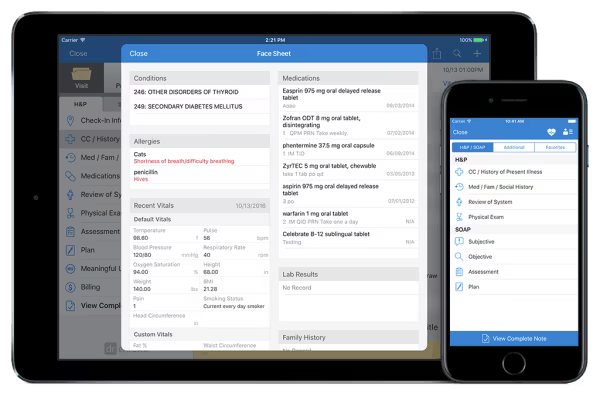
Learn to document patient encounters and clinical charting using the EHR.
Utilize e-prescribing features to send electronic prescriptions to pharmacies.
Use scheduling tools to manage appointments and patient calendars.
Confirm patient eligibility in real-time before delivering services.
Leverage the patient portal for managing medical records and scheduling visits.
Schedule your no-cost DrChrono EHR demo today to explore the platform’s features firsthand – limited spots are available!
Who Is DrChrono EHR For?
DrChrono EHR caters to healthcare practices of all sizes, from solo clinics to large multi-specialty practices. It is utilized across diverse medical specialties, including:
Family practice
Pain management
Pediatrics
Mental and behavioral health
Podiatry
Urgent care
DrChrono Use Cases
From user feedback and independent analysis, here are the types of organizations that benefit most from DrChrono EHR and the aspects users appreciate:
Mid-Sized Clinics Seeking Unified Operations
DrChrono is well-suited for mid-sized clinics and growing practices needing an all-in-one solution for managing EHRs, billing, scheduling, and telehealth. Users commend its user-friendly interface and cloud-based access, which simplify day-to-day operations and lessen administrative burdens. Many appreciate the advantages of customizable templates and integrated lab systems, stating that they help facilitate charting and patient management.
Healthcare Providers Offering Virtual Consultations
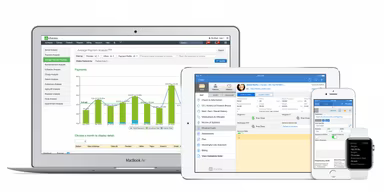
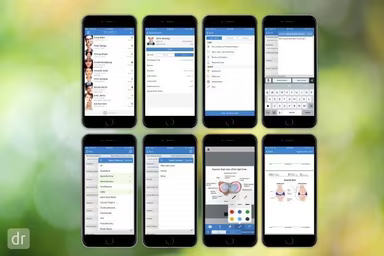
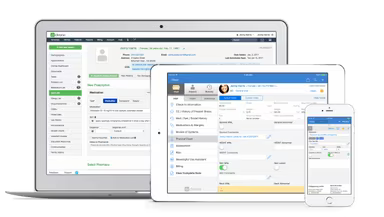
Practices concentrating on telehealth can depend on DrChrono’s robust virtual care tools. Its mobile-first design, available on both iPad and iPhone, lets providers conduct online consultations and access patient records remotely. Users appreciate the platform’s dependable telehealth experience and mobile-friendly design, highlighting how it enhances flexibility and supports smooth patient communication.
Practices with High Billing and Revenue Demands
Medical organizations with intricate billing needs can benefit from DrChrono’s integrated revenue cycle management tools. The software consolidates coding, claims submission, and payment monitoring while providing financial dashboards for performance oversight. Users value the automated billing processes and built-in analytics, which aid in minimizing manual errors and accelerating reimbursements. However, some note the necessity for periodic verification of reports to ensure precision.
Data-Driven Healthcare Organizations
Healthcare groups relying on analytics gain from DrChrono’s advanced reporting and API integrations. The platform supports tracking key performance indicators like patient volume, billing efficiency, and provider productivity. Users point out its custom reporting capabilities and insightful dashboards, allowing them to make decisions driven by data and continuously enhance practice performance.
DrChrono User Sentiment
Most Positive Sentiments
Ease Of Use/User-Friendliness: 88% were Positive, 8% were Negative, 4% were Neutral
Integrated All-In-One Platform: 82% were Positive, 12% were Negative, 6% were Neutral
Effective Mobile Functionality: 85% were Positive, 10% were Negative, 5% were Neutral
Least Positive Sentiments
Customer Support Responsiveness: 18% were Positive, 75% were Negative, 7% were Neutral
System Performance Slowdowns: 22% were Positive, 68% were Negative, 10% were Neutral
Limited Customization Options: 20% were Positive, 65% were Negative, 15% were Neutral
Many users regularly praise the platform for its easy-to-navigate design, which simplifies daily clinical tasks.
Conversely, a considerable number of users express annoyance at lengthy response times and unresolved support inquiries. To summarize user feedback: "Customer support can be slow to respond to issues."
The combination of scheduling, charting, and billing in one system is highly regarded for optimizing practice workflow. One user mentioned: "I like that it is an all-in-one system for scheduling, charting, and billing," while another noted, "Having everything integrated saves us time and reduces errors."
Problems are frequently reported regarding occasional system slowdowns, bugs, or unexpected errors that disrupt workflow.
Users appreciate the mobile application for its charting functions and on-the-go access.
However, some users feel that the software lacks the flexibility necessary to cater to their specific workflow requirements. One user remarked, "I wish there were more options to customize templates for our specialty," while another stated, "The reporting features could be more robust and customizable."
Is DrChrono EHR Right For You?
If you're seeking a comprehensive healthcare platform that delivers EHR, revenue cycle management, and telehealth capabilities, DrChrono might be the ideal solution for you. The software complies with all HIPAA requirements and is ONC-certified, ensuring data protection and security.
Moreover, its scalability makes it suitable for medical practices of all sizes, from smaller outpatient clinics to larger hospitals and healthcare organizations. DrChrono's pricing plans are adaptable and flexible, enabling you to find a solution that offers good value tailored to your budget and needs.
Additionally, the vendor has introduced the 2024 MIPS Assist Program, providing one-on-one consultations aimed at empowering your practice to optimize MIPS reporting. This program helps minimize penalties and enhances potential bonuses, enabling you to maximize your involvement in the MIPS program.
If you're interested in learning more about DrChrono, peruse DrChrono EHR reviews or contact us at (661) 384-7070 to discuss your specific requirements.