

logo

EyeMD EMR

Introducing EyeMD, an all-in-one solution designed specifically for ophthalmology practices. This platform offers essential features such as documentation, inte...

0.00 | 0 Reviews

Introducing EyeMD, an all-in-one solution designed specifically for ophthalmology practices. This platform offers essential features such as documentation, inte...

Product Overview

Introducing EyeMD, an all-in-one solution designed specifically for ophthalmology practices. This platform offers essential features such as documentation, integrated imaging capabilities, and comprehensive practice management tools. Streamline your clinical processes and enhance collaborative efforts within your team. Experience the benefits of EyeMD EMR software, tailored for improved operational efficiency in your practice.
Product Snapshot

Product Details

What Is EyeMD?

Overview

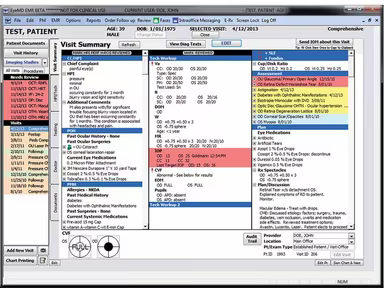
EyeMD is a robust electronic medical record (EMR) solution specifically designed for ophthalmology clinics. It offers flexible options that cater to the distinct workflows of both single-location and multi-location practices. This EMR software provides eye care practitioners with effective tools for clinical documentation, including functionalities for eye examinations, note-taking, imaging, and tracking prescription histories.

What Is EyeMD Best Known For?

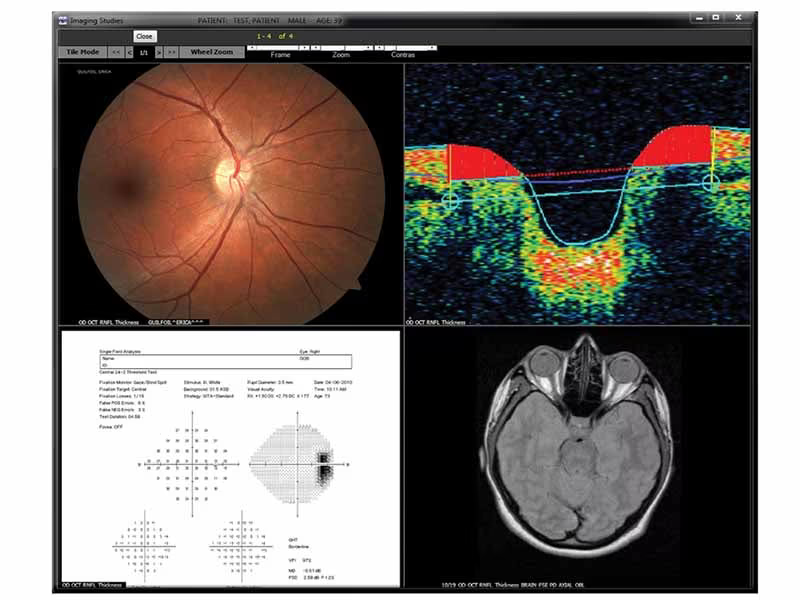
The standout feature of EyeMD is its integrated imaging software system, which allows healthcare providers to effortlessly view, analyze, and interpret diagnostic images right within the platform. The software’s compatibility with ophthalmic imaging devices follows DICOM standards, facilitating the easy linking of high-resolution images directly from diagnostic equipment to patient records.

EyeMD Pricing

The pricing for EyeMD varies based on the size of the ophthalmology practice. To receive a tailored quote that fits your specific needs, reach out today.

EyeMD Integrations

EyeMD supports integration with various third-party applications, including:

  • AdvancedMD

  • Allscripts

  • Athenahealth

  • DuxWare

  • Pulse systems

  • Intergy

  • MedEvolve

How Does EyeMD Software Work?

Here's a quick guide on how to navigate and utilize the features of the software:

  1. Log in using your credentials.

  2. Select File to access patient documents.

  3. Review examination results by choosing Imaging Studies.

  4. Access information from various visits and update records as needed.

  5. Click on Add New Visit to schedule the upcoming appointment.

  6. Open Reports to generate analytics and track trends.

You can also arrange an EyeMD demo to explore its features further.

Who Is EyeMD For?

The EyeMD electronic medical records software is suitable for small, medium, and large ophthalmology practices.

Is EyeMD Right For You?

If you are in search of an EMR solution tailored for ophthalmology that enhances both clinical and administrative workflows while providing exceptional imaging capabilities, then EyeMD could be the ideal choice for you. Its ICD-10 functionality ensures that examination results are correctly linked with billing codes, simplifying the process even for those unfamiliar with recent guidelines.

If you're still uncertain whether EyeMD EMR software aligns with your needs, consider checking out the reviews or reach out to us at info@softwareseekers.com. We’re here to assist you in making the best choice for your practice.

EMR Software Features

dashboard
invoicing
reporting
timeclock
mobile app
purchasing
ai chatbots
appointments
sales orders
telemedicine
client portal
mobile access
time tracking
eprescriptions
patient portal
sales tracking
case management
e prescriptions
fuel management
hipaa compliant
lab integration
lead management
online payments
task management
audit management
lab integrations
order management
sales automation
accident tracking
activity tracking
billing invoicing
budget management
claims management
dictation support
driver management
email integration
project templates
sales forecasting
vendor management
contact management
customizable forms
project scheduling
route optimization
alertsnotifications
compliance tracking
document management
employee management
employee onboarding
reporting analytics
resource allocation
workflow automation
workforce analytics
inventory management
merchandise transfer
patient demographics
vehicle tracking gps
warehouse management
billing and invoicing
client management crm
compliance management
customer segmentation
patient client portal
maintenance scheduling
opportunity management
performance management
telematics integration
benefits administration
compensation management
customer servicesupport
reporting and analytics
telemedicine telehealth
cloud based emr software
deal pipeline management
social media integration
training and development
customizable formsreports
sales pipeline management
document automationassembly
incident and issue tracking
multi factor authentication
patient engagement software
attendance and time tracking
compliance security features
employee self service portal
fleet utilization monitoring
laboratory integration elabs
appointment scheduling widget
remote patient monitoring rpm
policy and document management
regulatory compliance tracking
risk assessment and mitigation
customer communication tracking
employee information management
practice analytics emr software
appointment managementscheduling
delivery planning and scheduling
appointment management scheduling
billing invoicing patient billing
customizable forms patient intake
immunization and allergy tracking
third partyvendor risk management
esg metrics tracking and reporting
insurance eligibility verification
recruitment and applicant tracking
customer relationship management crm
telehealthappointment managementscheduling
regulatory change monitoring and impact analysis
carbon emissions data capture and calculation tools

Pros

  • Automated visual alerts
  • Pre-filled drop-down menu
  • Efficient DICOM imaging software
  • Easy to look at patient appointments and where they are routed
  • Good customer support functionality rating

Cons

  • Navigation can be improved
  • Current and previous examinations cannot be compared simultaneously

Price

Professional

Custom

Get Free Guidance from Our Solution Experts.

Ratings

0.00 | 0 reviews

Ratings Distribution

Positive

0%

Neutral

0%

Negative

0%

User Reviews

No reviews yet

Be the first to share your experience with EyeMD EMR.

Frequently Asked Questions

Find answers to the most common queries about our software recommendation service.

Yes, it can work with existing practice management system. Thus, you can analyze patient findings and access previous diagnostic tests with ease.

No, EyeMD EMR software does not offer an API.

EyeMDEMR optimizes your ophthalmology practice's efficiency by streamlining workflows and automating everyday tasks.

The features of EyeMD EMR Healthcare Systems include DICOM Imaging, Fog Computing, Clinical Insights, etc.

EyeMD cost varies as per your practice's size and patients. Discuss the customer support, functionality, pros, and pricing of the EMR company by contacting our team today!

EyeMD EMR software supports the English language.

EyeMD EMR software provides various support options, including a support portal, online chat, and phone and email support.

The typical users of EyeMD EMR include cornea pediatrics and glaucoma physicians, practice administrators, nurses, technicians, and billing staff at ophthalmology practices.