logo

MacPractice EHR

Explore the capabilities of MacPractice EHR, designed specifically for optometry and ophthalmology clinics. This electronic health record system allows you to e...

0.00 | 0 Reviews

Explore the capabilities of MacPractice EHR, designed specifically for optometry and ophthalmology clinics. This electronic health record system allows you to e...

Product Overview

Explore the capabilities of MacPractice EHR, designed specifically for optometry and ophthalmology clinics. This electronic health record system allows you to easily handle patient information, retrieve lab results, and improve your practice's efficiency. Optimize your workflows and create comprehensive reports using MacPractice EHR.
Product Snapshot

Product Details

What Is MacPractice EHR?

MacPractice EHR is an advanced practice management solution specifically crafted to cater to the distinct requirements of healthcare professionals, especially in ophthalmology and optometry. This cloud-driven platform encompasses a comprehensive range of features that enable physicians to access patient records, laboratory results, and clinical information.

The software enhances the efficiency of practice management tasks. Whether you operate a small clinic or a larger healthcare facility, MacPractice has tailored offerings for you.

What Is MacPractice EHR Best For?

MacPractice EHR excels due to its user-friendly design and exceptional integration capabilities. It is specifically designed for ophthalmologists and optometrists. Another notable aspect of the software is its ability to provide instant access to lab results, empowering doctors to make quick and informed choices.

MacPractice EHR Pricing

The pricing for MacPractice EHR is determined by the individual needs and requirements of each customer. Click on Get Pricing for a personalized quote.

MacPractice EHR Integrations

This software can integrate with the following third-party applications:

  • GoToConnect

  • Dolly Drive

  • AutoRemind

  • Aqua Connect

  • ComChart

  • Medstrat

How Does MacPractice EHR Work?

Here’s a step-by-step guide to getting started with the software once it’s installed:

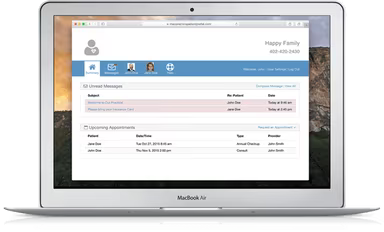
  1. Log in and navigate to the dashboard.

  2. Get acquainted with the user-friendly interface for smooth navigation.

  3. Create new patient profiles or import existing data into the software.

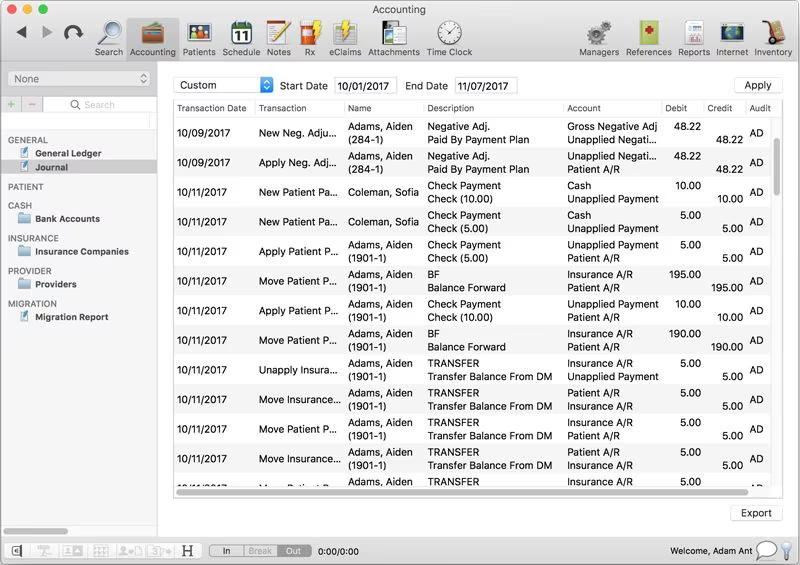
  4. Utilize MacPractice's integrated practice management features for scheduling appointments and planning treatments.

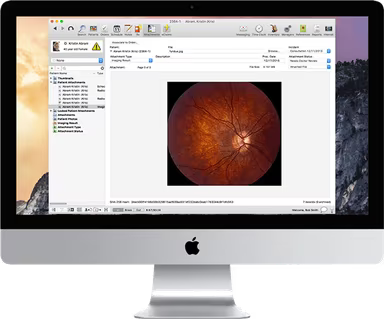
  5. Access lab results and clinical data directly from patient profiles to facilitate informed decision-making.

  6. Generate detailed reports and documents to ensure accurate and current patient records.

  7. Adjust your settings to fit the specific needs and preferences of your practice.

  8. Collaborate safely with your team by sharing access to secure patient data.

You can also arrange a complimentary MacPractice EHR demo to discover more about the software's capabilities.

Who Is MacPractice EHR For?

This software is suitable for practices of all sizes, from small clinics to extensive healthcare organizations. It is particularly designed for use in these medical fields:

  • Dental

  • Chiropractic

  • Optical

Is MacPractice EHR Right For You?

With its outstanding customer support and user-focused design, MacPractice EHR could be an excellent fit for your optometry and ophthalmology practice. Endorsed by a diverse array of respected clients, this software offers security, scalability, and various useful add-ons. It effectively tackles common challenges by simplifying practice management and ensuring easy access to crucial patient information.

If you are still uncertain whether it’s the right option for you, reach out to us at info@softwareseekers.com, and we will be happy to assist you in making the best decision for your needs.

EMR Software Features

dashboard
invoicing
reporting
timeclock
mobile app
purchasing
ai chatbots
appointments
sales orders
telemedicine
client portal
mobile access
time tracking
eprescriptions
patient portal
sales tracking
case management
e prescriptions
fuel management
hipaa compliant
lab integration
lead management
online payments
task management
audit management
lab integrations
order management
sales automation
accident tracking
activity tracking
billing invoicing
budget management
claims management
dictation support
driver management
email integration
project templates
sales forecasting
vendor management
contact management
customizable forms
project scheduling
route optimization
alertsnotifications
compliance tracking
document management
employee management
employee onboarding
reporting analytics
resource allocation
workflow automation
workforce analytics
inventory management
merchandise transfer
patient demographics
vehicle tracking gps
warehouse management
billing and invoicing
client management crm
compliance management
customer segmentation
patient client portal
maintenance scheduling
opportunity management
performance management
telematics integration
benefits administration
compensation management
customer servicesupport
reporting and analytics
telemedicine telehealth
cloud based emr software
deal pipeline management
social media integration
training and development
customizable formsreports
sales pipeline management
document automationassembly
incident and issue tracking
multi factor authentication
patient engagement software
attendance and time tracking
compliance security features
employee self service portal
fleet utilization monitoring
laboratory integration elabs
appointment scheduling widget
remote patient monitoring rpm
policy and document management
regulatory compliance tracking
risk assessment and mitigation
customer communication tracking
employee information management
practice analytics emr software
appointment managementscheduling
delivery planning and scheduling
appointment management scheduling
billing invoicing patient billing
customizable forms patient intake
immunization and allergy tracking
third partyvendor risk management
esg metrics tracking and reporting
insurance eligibility verification
recruitment and applicant tracking
customer relationship management crm
telehealthappointment managementscheduling
regulatory change monitoring and impact analysis
carbon emissions data capture and calculation tools

Pros

  • Innovative user-centric design
  • Integrates with lab results and clinical data seamlessly
  • Cost-effective software solution
  • Great customer support
  • Streamlined practice management and appointment scheduling

Cons

  • Sometimes the interface may freeze or lag, according to some reviews
  • Initial setup complexity for new users

Price

Professional

Custom

Get Free Guidance from Our Solution Experts.

Ratings

0.00 | 0 reviews

Ratings Distribution

Positive

0%

Neutral

0%

Negative

0%

User Reviews

No reviews yet

Be the first to share your experience with MacPractice EHR.

Frequently Asked Questions

Find answers to the most common queries about our software recommendation service.

MacPractice 20/20 EHR software streamlines practice management to enhance overall care coordination.

Yes, MacPractice EHR offers a mobile app for convenient access to patient information.

MacPractice EMR software was designed for use in the following medical departments: medical, dental, chiropractic, and optical.

The cost of MacPractice 20/20 EMR software depends on your individual requirements. For more detailed pricing information, click Get Pricing.

MacPractice 20/20 EHR software provides the following means of customer support: live chat, a help forum, a customer care phone helpline, and email support.