

MDToolbox
Experience seamless e-prescribing with MDToolbox, designed for clinicians and pharmacies seeking an intuitive interface and efficient workflows.
Key Insights
Derived from customer feedback
MDToolbox serves as an electronic prescribing (eRx) solution tailored for clinicians, pharmacies, and front-office personnel, utilized widely in general practice as well as specialty care. Many users commend its simple setup, user-friendly interface, mobile prescription capabilities, and streamlined process for prior authorizations. Nevertheless, a few have reported sporadic connectivity challenges.
Our Assessment
MDToolbox stands out as a dependable option for independent healthcare practices and small to medium-sized clinics in search of a user-friendly e-prescribing platform. The pricing is generally considered reasonable given its features, particularly for providers who handle numerous prescriptions on a daily basis. We suggest it to healthcare teams that value ease of use, regulatory compliance, and prompt electronic prescription processes.
What Is MDToolbox?
MDToolbox is a recognized e-prescribing platform tailored for medical practices of small to medium size, spanning various specialties. This software offers a range of modules and services, such as the electronic prescribing of controlled substances (EPCS), electronic prior authorization, direct messaging, and mobile access. It can function independently or be integrated with other office applications, enabling healthcare professionals to create and send electronic prescriptions, access drug information, and obtain prior authorization from insurance providers for their patients.
What Is MDToolbox Best Known For?
The standout feature of this software is the MDToolbox-Rx Mobile solution. It allows busy healthcare providers to electronically prescribe both controlled and non-controlled medications from any mobile device, including iPhones, Android phones, iPads, and tablets. This flexibility ensures that prescribers can manage prescriptions conveniently while on the move.
How Much Does MDToolbox Cost?
The pricing for MDToolbox begins at $30, and a 30-Day Free Trial is available. There are two main pricing tiers:
E-Prescribe Pro: $30/Month
E-Prescribe Complete: $38/Month
Additional add-ons are offered at different prices. Data Sync pricing includes complimentary manual uploads and free one-way HL7 automated patient synchronization. For organizations needing two-way patient data exchange (both uploading and downloading), there is a one-time setup fee of $700 per account. Monthly fees continue at $30 for two-way HL7 or CCD automated sync or $50 per month for two-way Patient API access using a secure API key. The Visit Notes Add-On is priced at $10 per provider per month, while Secure Messaging is available at $10 per address each month.
Many users find the pricing competitive and cost-effective compared to other options they have tried, especially for standalone e-prescribing solutions. However, some users outside of the main review groups have mentioned confusion regarding billing, particularly concerning annual versus month-to-month contracts.
If you need a customized pricing quote that meets your unique needs, feel free to reach out to us.
Note: Prices may vary over time.
MDToolbox Integrations
MDToolbox-Rx supports integration with various software systems; however, specific details about third-party integrations have not been disclosed by the vendor.
How Does MDToolbox Work?
To get started with MDToolbox, follow these steps:
Log in using your credentials.
Search for an existing patient in the database or add a new one.
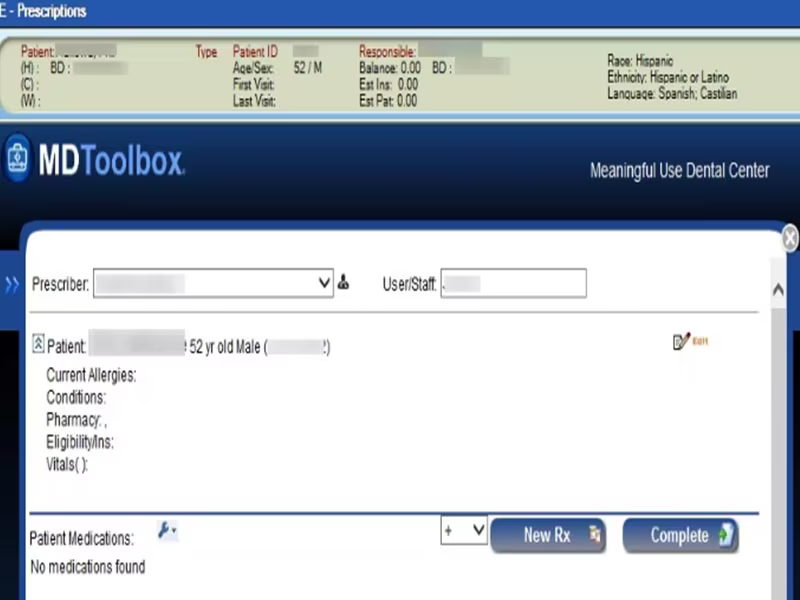
Select the medication and dosage to complete an electronic prescription and submit it to pharmacies.
Check insurance formulary information and verify prior authorization requirements.
Exchange secure clinical messages with other providers to coordinate care.
Utilize the mobile version of MDToolbox for on-the-go prescription management from any device.
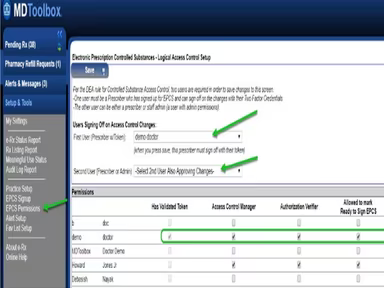
Use the EPCS module for electronically prescribing controlled substances.
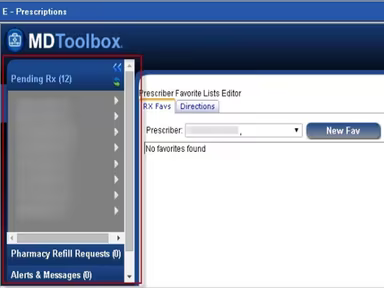
Access patient history and favorite lists to enhance your prescribing workflow.
You can also arrange a complimentary demo of MDToolbox to explore its features further.
Who Is MDToolbox For?
This platform is ideal for small to medium-sized medical practices across diverse healthcare specialties.
MDToolbox Use Cases
Based on our review of user feedback and current capabilities of MDToolbox, here are key scenarios where this e-prescribing software excels:
Practices Handling Controlled Substance Prescriptions: Clinics frequently prescribing controlled substances benefit from MDToolbox's DEA-certified EPCS module. It ensures secure and compliant prescription management while minimizing paperwork and enhancing patient safety.
Providers Needing Mobile Prescription Management: Physicians who require prescription management on the go appreciate MDToolbox-Rx Mobile. Its compatibility with devices like iPhones, iPads, and Androids allows prescribers to send prescriptions securely anytime and anywhere—especially advantageous for traveling or multi-site providers.
Clinics Seeking Efficient Prior Authorization Processes: Healthcare providers dealing with insurance prior authorizations will find value in the software's electronic prior authorization workflow that expedites approvals and reduces administrative delays in medication delivery.
Independent Providers Emphasizing Secure Communication: Individual practitioners who prioritize confidentiality can take advantage of MDToolbox's secure direct messaging feature that facilitates safe exchanges of patient information within a HIPAA-compliant framework.
MDToolbox User Sentiments
Most Positive Sentiments
Ease of Use And Mobile Access:
70% were Positive
10% were Negative
20% were Neutral/Mixed
User reviews often highlight the user-friendly interface and mobile prescription capabilities. One user noted: "The ease of operation helps us manage daily workflow in our busy office."
Integrated Workflow Efficiency:
60% were Positive
10% were Negative
30% were Neutral/Mixed
The ability to handle prescribing, refills, and prior authorizations in one system without switching tools is highly valued by reviewers.
Reliable Customer Support:
65% were Positive
15% were Negative
20% were Neutral/Mixed
User feedback frequently mentions responsive support during issues, aiding in resolution efforts.
Least Positive Sentiments
Pharmacy Connectivity Issues:
10% were Positive
75% were Negative
15% were Neutral/Mixed
A number of users report challenges with pharmacies not receiving prescriptions or delays in processing them. One user remarked: "There are many issues with pharmacies claiming they do not receive scripts."
Slowness & Occasional Lag:
15% were Positive
75% were Negative
10% were Neutral/Mixed
Certain users have noted occasional slow performance when navigating between patients or tasks, especially on mobile devices.
Limited Customization:
10% were Positive
55% were Negative
35% were Neutral/Mixed
A few clinicians express a desire for more flexibility in templates or deeper integrations with EHR systems. One user stated: “I wish there were more options to customize templates for our specialty.”
Is MDToolbox Right For You?
If you are looking for an affordable yet comprehensive e-prescribing solution designed specifically for small to medium-sized practices, then MDToolbox may be your best bet. It offers a robust suite of modules along with mobile access that streamlines everyday prescribing operations.
This ONC-certified 2015 edition platform combines advanced technology with extensive features to promote secure and efficient electronic prescribing. Its award-winning solutions paired with dedicated U.S.-based customer support reflect its commitment to enhancing user experience and satisfaction.
If you remain uncertain about whether MDToolbox is suitable for your needs, please contact us at info@softwareseekers.com, and we will assist you in making an informed choice.