

OpenEMR
Transform your clinic's workflow with OpenEMR, the free, open-source EHR platform designed for flexibility, customization, and multi-specialty support.
Key Insights
Insights derived from customer feedback.
OpenEMR is a no-cost, open-source electronic health record (EHR) solution utilized by both small clinics and healthcare providers around the globe. This platform facilitates multi-specialty workflows and offers extensive control over infrastructure. Users value its adaptability and customization options; however, numerous individuals have expressed concerns regarding customer support and the quality of documentation. Recently, the vendor has rolled out enhancements based on FHIR standards to improve interoperability.
Our Assessment
OpenEMR presents a practical choice for clinics that are conscious of their budgets and have internal IT capabilities along with specific customization requirements. It is particularly well-suited for smaller practices and international teams looking to maintain control over their infrastructure. Although the initial onboarding process may prove to be difficult, the long-term benefits can support flexible care models. We recommend OpenEMR for providers who are technically savvy and focused on cost savings, given that it is available at no charge.
What Is OpenEMR Software?
OpenEMR is a comprehensive, cloud-based software solution that is both free and open-source. This application delivers integrated tools for Electronic Medical Records (EMR), medical practice management, billing, and patient scheduling specifically designed for healthcare providers.
The primary aim of OpenEMR is to equip healthcare professionals with a centralized platform for managing patient data and administrative tasks. Its EMR system is fully customizable and interoperable, permitting practices to adjust the software to align with their unique needs.
What Does OpenEMR Excel In?
Unlike many other EMR systems, OpenEMR accommodates more than 30 languages within a single clinic utilizing UTF-8 (Uniform Transformation Format – 8 bits) encoding. This versatile encoding supports both spoken and non-spoken languages. Many EMR solutions do not allow multiple language options within one organization. OpenEMR includes languages such as English, Arabic, Czech, Danish, French, German, Greek, and more.
What Is the Cost of OpenEMR?
OpenEMR is available at no cost for download, usage, and customization for healthcare professionals in the United States. There is, however, an array of AWS Cloud packages, with associated costs (AWS fees) ranging from $5 to over $100 per month. To receive a tailored cost estimate for OpenEMR, please reach out to us.
Note: Pricing may vary over time.
OpenEMR Integrations
OpenEMR provides integration capabilities with the following tools and applications:
OfficeAlly
Waystar
PayPal software
How Does OpenEMR Operate?
Once installed, users can initiate the following steps to begin utilizing the software:
Log in and update the default password, then create new user accounts for all authorized personnel.
Adjust the application’s settings to match the workflow of your medical practice.
Input patient data, which includes personal details, medical history, and insurance information.
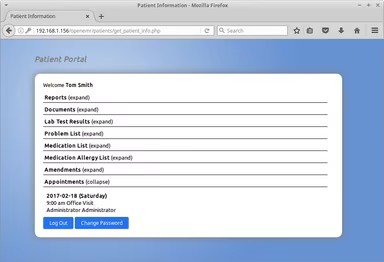
Utilize the scheduler tool to set appointments and manage patient flow.
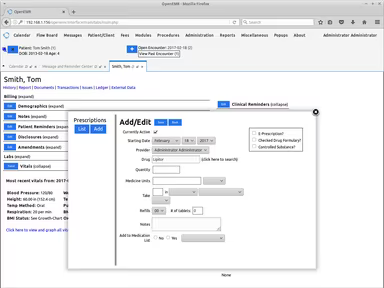
Document visits, diagnoses, treatments, and prescriptions for each patient.
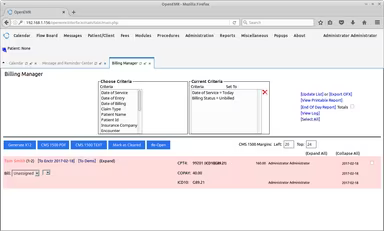
Handle all billing and financial operations through the integrated module.
Regularly generate backups of your OpenEMR data to ensure data security.
Consider watching a demo of OpenEMR to see how the software can be beneficial for your practice.
Who Can Benefit from OpenEMR?
OpenEMR is equipped with features tailored for practice management in the healthcare sector. Medical professionals can utilize it to optimize clinical administration and efficiently handle patient demographics, charting, and scheduling appointments.
OpenEMR is suitable for the following types of medical facilities:
Solo practices
Small group practices
Large group practices
Multi-specialty clinics
Hospitals
Community health centers
Urgent care centers
Telemedicine practices
Outpatient clinics
Furthermore, OpenEMR can support various medical specialties, including:
Family medicine
Pediatrics
Internal medicine
Obstetrics and gynecology
Psychiatry
Neurology
Cardiology
Oncology
Endocrinology
Geriatrics
OpenEMR Use Cases
Through the analysis of user feedback and OpenEMR’s capabilities, we have identified key scenarios where this software excels, particularly for outpatient clinics, community health centers, and independent practices:
Small Practices Seeking Cost-Effective EHR Deployment
Solo practitioners and smaller clinics often turn to OpenEMR as a low-cost, open-source alternative that covers essential clinical and administrative functions. These facilities frequently function with limited IT resources and favor systems that allow self-hosting or customization without being locked into a vendor's model. The modular approach of OpenEMR enables gradual scaling while preserving control over data and infrastructure.
Community Health Centers Meeting Diverse Patient Needs
Clinics focused on underserved populations or operating in multilingual scenarios profit from OpenEMR’s adaptable patient intake and documentation processes. The system accommodates multiple languages and includes customizable templates, facilitating staff adaptability to different clinical situations. Users note its effectiveness in environments where patient care must be customized to sophisticated social and medical needs.
International Clinics Adapting to Local Compliance
OpenEMR is extensively utilized in international healthcare settings where traditional EHR systems may not comply with local rules or infrastructure. Its open-source nature permits foreign providers to adjust the software to align with specific country regulations associated with privacy, billing, and reporting. This flexibility positions it as a suitable choice for clinics outside the U.S. healthcare system.
Multi-Specialty Groups Sharing Medical Records
Medical groups encompassing multiple specialties often leverage OpenEMR to consolidate patient records across various departments. Although not tailored for enterprise-scale use, it promotes shared access to clinical information, enabling cooperative care among general practitioners, specialists, and allied health professionals. This is particularly beneficial for mid-sized practices in need of integrated documentation without complicated licensing agreements.
Clinics Emphasizing In-House Technical Control
Organizations with dedicated internal IT teams typically favor OpenEMR to maintain complete oversight of system setup, updates, and data security. These teams appreciate the capacity to customize workflows, incorporate third-party tools, and manage hosting autonomously. This scenario is common among health facilities with technical expertise that prefer an open architecture rather than proprietary solutions.
User Sentiments on OpenEMR
Most Positive Sentiments
90% were Positive
8% were Neutral/Mixed
2% were Negative
Users widely commend OpenEMR for being free and open-source, making it particularly accessible for smaller clinics with tight budgets. One user remarked: “It’s free, open-source, and ONC certified—ideal for small practices avoiding steep EHR expenses.”
Least Positive Sentiments
10% were Positive
35% were Neutral/Mixed
55% were Negative
A number of users perceive the interface to be somewhat outdated and not user-friendly. Navigation can seem cumbersome, and the design lacks the modern aesthetics found in commercial EHR solutions. One user stated: “The UI feels like it’s stuck in the early 2000s—lots of clicking and hard to find things.”
Customization and Flexibility
80% were Positive
15% were Neutral/Mixed
5% were Negative
Users highly value the capability to tailor forms, workflows, and modules to their particular preferences. Especially for developers and tech-savvy individuals, the system's adaptability and source code access is notable. A user noted: “Highly customizable—if you know your way around code, you can make it do almost anything.”
Learning Curve and Technical Complexity
10% were Positive
40% were Neutral/Mixed
50% were Negative
Though powerful, OpenEMR may present challenges during setup and maintenance for those without technical skills. Non-expert users frequently struggle with installation, configuration, and upgrades. A user expressed: “It’s not plug-and-play—you need IT skills or a consultant to get it running smoothly.”
Feature Completeness for a Free System
75% were Positive
20% were Neutral/Mixed
5% were Negative
OpenEMR, despite being free, encompasses a comprehensive array of features including scheduling, billing, e-prescribing, and patient portals. A user mentioned: “It has everything you need—appointments, billing, charting, and even telehealth.”
Customer Support and Documentation
15% were Positive
40% were Neutral/Mixed
45% were Negative
Even though an active community exists, users express that official support is limited, and the documentation can be inconsistent. One user mentioned: “Support is mostly community-driven—great if you’re technical, but not ideal if you need hand-holding.”
How Does OpenEMR Stand Apart from Other Software?
OpenEMR distinguishes itself as a practice management solution highly regarded among healthcare practitioners. Here are several factors that contribute to its uniqueness:
Security and Compliance: OpenEMR adheres to data security and privacy standards like HIPAA, ensuring robust protection for patient information. It also includes audit trails for monitoring updates made to patient records.
Interoperability: The software facilitates data exchange with other healthcare systems, enabling shared access to patient information between different providers. This enhances the continuity of care.
Customization: OpenEMR allows healthcare providers to personalize forms, templates, and workflows tailored to specific practice needs, boosting efficiency in clinical operations.
Is OpenEMR the Right Choice for You?
As an open-source electronic medical record and medical practice management solution, OpenEMR can offer an affordable, customizable, and secure option for healthcare organizations. Whether it suits a particular organization depends on its specific needs, budget constraints, and technological capabilities.
OpenEMR complies with data security and privacy regulations such as HIPAA, ensuring patient data is secured. It also provides audit trails for monitoring changes made to patient records.
The application is ONC-Certified, fulfilling the benchmarks set by the U.S. Department of Health and Human Services. Additionally, it features a medical image viewer, Digital Imaging and Communications in Medicine (DICOM), and Voice Recognition functionalities (on Windows OS). Ultimately, the decision to choose OpenEMR should hinge on your specific requirements.
Users may also read OpenEMR reviews or arrange for a demo to witness it in action. Ultimately, it is up to the users to determine whether OpenEMR represents the appropriate next step for their practice.
For additional information about OpenEMR, schedule a call at 661-384-7070.