

PracticeQ
Streamline your wellness practice with PracticeQ, the all-in-one cloud-based management solution for scheduling, billing, and telehealth.
Key Insights
Derived from customer feedback, PracticeQ is a cloud-based solution designed specifically for professionals in wellness and therapy. It encompasses scheduling, intake, billing, and telehealth functionalities all within a single platform. Users find its straightforward design and client-oriented features beneficial; however, some have noted that customization options and the depth of reporting could be improved. The software integrates seamlessly into workflows for solo practitioners and small teams.
Recent updates include the introduction of appointment package intervals and a feature for client selection within the portal.
Our Assessment
PracticeQ stands out as a dependable choice for individual practitioners and small wellness or therapy clinics seeking an uncomplicated, unified system. It is particularly well-suited for teams dedicated to providing direct care while maintaining low IT demands. Additionally, its pricing structure is favorable for smaller practices, making it a strong recommendation for workflows that are straightforward and not overly complex.
What Is PracticeQ?
PracticeQ is a cloud-driven software solution designed for practice management and electronic health records (EHR). It simplifies the operations of healthcare practices by providing a range of tools for managing patient interactions, billing, and scheduling. Through automation and integrated solutions, this software enhances the quality of patient care.
Moreover, PracticeQ caters to various healthcare specialties with tailored solutions. It includes features such as patient onboarding and communication. The EHR functionality of PracticeQ enables medical professionals to concentrate on providing care while efficiently handling administrative responsibilities.
What Is PracticeQ Best For?
The platform is particularly recognized for its e-prescription functionality. This feature significantly boosts patient safety, minimizes prescription errors, and enhances medication adherence, making it a key highlight of PracticeQ’s healthcare management offerings.
How Much Does PracticeQ Cost?
PracticeQ's pricing begins at $54.90, with two primary plans available:
Starter – $54.90/month ($25/month/additional practitioner + $65/month for e-prescribing)
Pro – $79.90/month (Optional: $30/month/additional practitioner + $65/month for e-prescribing)
A free trial is also available. You can request a personalized quote for PracticeQ pricing that aligns with your organization's specific needs.
Please note: The pricing is subject to change.
PracticeQ Integrations
PracticeQ seamlessly integrates with several third-party applications, including:
athenaHealth
Elation Health
Office Ally Practice Mate
Zoom
Google Analytics
Rupa Health
How Does PracticeQ Work?
Here’s how to navigate the PracticeQ software effectively:
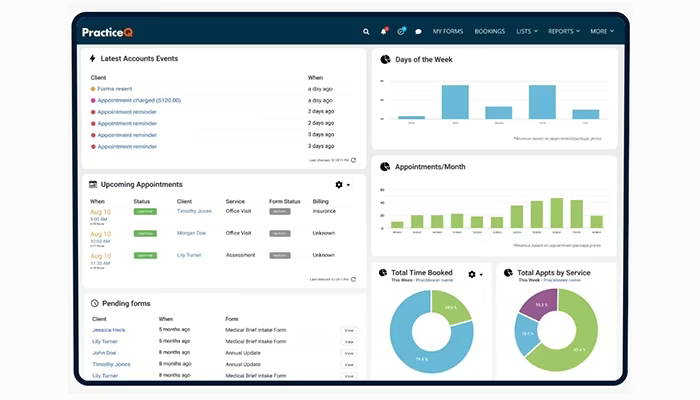
Log in using the credentials provided by the vendor to access your dashboard.
Manage appointments directly from the calendar section, including booking, rescheduling, or canceling them.
Utilize the patient management module to access records, update information, and track medical histories.
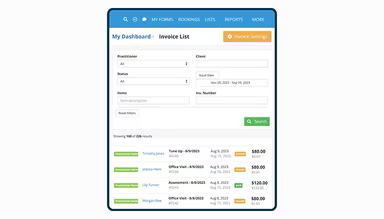
Create invoices, monitor payments, and handle billing tasks through the billing tab.
Use the reports section to generate and export customizable reports regarding practice performance.
Integrate all patient records, scheduling, and billing into one system for operational simplicity.
Utilize the built-in task management feature to assign, track, and complete tasks efficiently.
Access support resources or reach customer service via the help menu when needed.
You can also schedule a complimentary demo of PracticeQ to explore its capabilities firsthand.
Who Is PracticeQ For?
This software is utilized by various medical specialties such as:
Behavioral health
Chiropractic
Med spas
IV infusion clinics
Physical therapy
Direct primary care
PracticeQ Use Cases
An analysis of user feedback and current capabilities reveals key scenarios where this software excels for solo practitioners, wellness providers, and small therapy practices:
Independent Therapists Managing Client Workflows: Solo mental health professionals benefit from managing scheduling, intake, documentation, and payments without multiple systems. This ensures that providers can focus on delivering care while retaining administrative control.
Small Practices Offering Virtual And In-Person Sessions: Clinics that alternate between telehealth and in-office visits take advantage of integrated scheduling and communication tools. This flexibility aids in coordinating care based on client preferences and availability.
Wellness Providers Needing Client Self-Service Tools: Massage therapists and nutritionists often utilize PracticeQ to allow clients to book appointments, fill out forms, and process payments online. This reduces administrative tasks and promotes a more independent client experience.
Practitioners Transitioning From Paper-Based Systems: Solo practitioners moving away from paper records or fragmented tools require a solution that is easy to adopt without extensive training or IT support. PracticeQ provides a straightforward transition to digital systems without added complexity.
Multi-Provider Teams With Light Coordination Needs: Small groups of counselors or coaches working under one brand use PracticeQ to manage calendars and client records while maintaining individual autonomy. This arrangement works well for loosely affiliated providers sharing infrastructure but not needing intricate workflows.
PracticeQ User Sentiment
Most Positive Sentiments
Ease of Use & Workflow:
85% were Positive
10% were Neutral/Mixed
5% were Negative
User feedback consistently highlights PracticeQ’s intuitive interface along with efficient scheduling, intake, and billing workflows. Many solo practitioners find it easy to learn and operate without technical assistance. One user remarked: “It’s very user-friendly and makes managing appointments and payments seamless.”
Least Positive Sentiments
Reporting & Analytics Limitations:
< li>A few users noted that reporting tools lack depth and customization options. While basic metrics are available, more advanced analytics for financial or clinical tracking are limited. A user commented: “Reports are basic. I wish there were more options to filter and analyze data.”
Client Self-Service & Automation:
< li>User reviews praise the platform’s automation capabilities for intake processes, reminders, and payments. Clients can book appointments online, fill forms out digitally, and make payments independently—significantly lightening the administrative load for providers. One user shared: “I love how clients can do everything from booking to filling forms without needing my help.”
Limited Mobile Experience:
< li>The desktop experience receives positive feedback; however, mobile usability is criticized as inconsistent. Users report challenges in accessing full functionality on mobile devices. A user stated: “Mobile access is clunky—I prefer using it on a desktop for full control.”
Integration with External Tools:
< li>The smooth integration with platforms like Google Drive, Dropbox, Stripe, etc., receives praise from users. These integrations enable document management and payment processing without manual intervention. A user noted: “The integrations with Google Drive and Stripe make everything easier to manage.”
Customization Constraints:
< li>Certain users express concerns regarding limited layout and workflow customization options. Practices with specific needs or multi-provider configurations may find the system less flexible than desired. One user remarked: “It works well but I wish I could customize more of the intake flow and dashboard.”
Is PracticeQ Right For You?
If you are looking for a cloud-based EHR solution that can streamline your healthcare practice operations, then PracticeQ might be just what you need. The software provides numerous features designed to enhance patient care by alleviating administrative burdens.
Additioanlly, PracticeQ is fully HIPAA compliant which guarantees that patient information remains secure and confidential. Its cloud infrastructure allows for effortless scalability as your practice grows without sacrificing performance.
If you have any questions about PracticeQ or need further assistance, please reach out to our customer support team at (661) 384-7070. They are always available to help you make an informed decision.