

logo

Quanum Practice Management

.

0.00 | 0 Reviews

Product Overview

.

Product Snapshot

Product Details

Overview of Quanum Practice Management Software

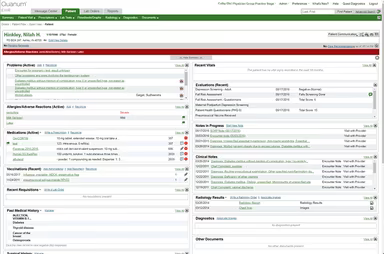
The Quanum Practice Management Software is designed to enhance efficiency and accessibility, making the daily tasks of your medical practice simpler. It ensures seamless data flow between the practice management (PM) system and your electronic health records (EHR), allowing for immediate access to vital patient information. In most cases, the necessary data is just a click away.

Many healthcare organizations across the United States are currently utilizing Quanum Practice Management. It has gained recognition for its ability to boost the productivity and effectiveness of clinical operations. Although one might expect a hefty price for such comprehensive EHR and PM solutions from Quanum 360, the entire suite is available at surprisingly affordable rates.

Features of Quanum Practice Management Software

This software boasts a variety of features, including:

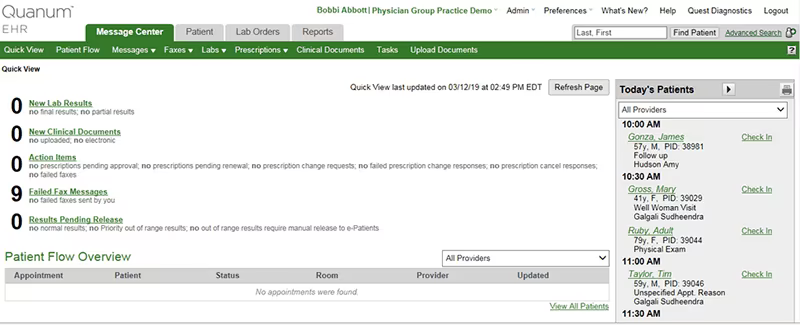
  • Customizable dashboard

  • Patient records management

  • Financial reporting

  • Appointment scheduling

  • Customizable accounts

  • Denial resolution management

  • Efficient payment processing

  • Collections management

The system is also accessible via mobile devices, enabling professionals to retrieve important patient information and related documents anytime and from anywhere. Users have the option to request a free demo of Quest Quanum to determine if the software meets their practice's needs.

Network Reach

With access granted to over 500,000 clinicians in more than 180,000 locations and facilities, the questquanum network is recognized for delivering quick, effective, and exceptional healthcare services.

Pricing Information for Quest Quanum

The vendor does not publicly disclose pricing details. To obtain a price quote, you may click on the 'Get Pricing' button.

Support Services

Support is available through mobile devices as well as online resources.

Advantages and Disadvantages

Pros:

  • The software interface is user-friendly.

  • Data flows smoothly into the software, which is crucial for quality patient care.

  • You can easily access detailed information on any patient.

Cons:

  • The analytics capabilities are not as robust compared to some other software options.

EMR Software Features

dashboard
invoicing
reporting
timeclock
mobile app
purchasing
ai chatbots
appointments
sales orders
telemedicine
client portal
mobile access
time tracking
eprescriptions
patient portal
sales tracking
case management
e prescriptions
fuel management
hipaa compliant
lab integration
lead management
online payments
task management
audit management
lab integrations
order management
sales automation
accident tracking
activity tracking
billing invoicing
budget management
claims management
dictation support
driver management
email integration
project templates
sales forecasting
vendor management
contact management
customizable forms
project scheduling
route optimization
alertsnotifications
compliance tracking
document management
employee management
employee onboarding
reporting analytics
resource allocation
workflow automation
workforce analytics
inventory management
merchandise transfer
patient demographics
vehicle tracking gps
warehouse management
billing and invoicing
client management crm
compliance management
customer segmentation
patient client portal
maintenance scheduling
opportunity management
performance management
telematics integration
benefits administration
compensation management
customer servicesupport
reporting and analytics
telemedicine telehealth
cloud based emr software
deal pipeline management
social media integration
training and development
customizable formsreports
sales pipeline management
document automationassembly
incident and issue tracking
multi factor authentication
patient engagement software
attendance and time tracking
compliance security features
employee self service portal
fleet utilization monitoring
laboratory integration elabs
appointment scheduling widget
remote patient monitoring rpm
policy and document management
regulatory compliance tracking
risk assessment and mitigation
customer communication tracking
employee information management
practice analytics emr software
appointment managementscheduling
delivery planning and scheduling
appointment management scheduling
billing invoicing patient billing
customizable forms patient intake
immunization and allergy tracking
third partyvendor risk management
esg metrics tracking and reporting
insurance eligibility verification
recruitment and applicant tracking
customer relationship management crm
telehealthappointment managementscheduling
regulatory change monitoring and impact analysis
carbon emissions data capture and calculation tools

Pros

  • No pros listed yet.

Cons

  • No cons listed yet.

Price

Professional

Custom

Get Free Guidance from Our Solution Experts.

Ratings

0.00 | 0 reviews

Ratings Distribution

Positive

0%

Neutral

0%

Negative

0%

User Reviews

No reviews yet

Be the first to share your experience with Quanum Practice Management.

Frequently Asked Questions

Find answers to the most common queries about our software recommendation service.

No FAQs available for this software.