

logo

Unified Practice

Unified Practice aims to enhance healthcare management by offering a wide array of features. With its powerful tools for appointment management and scheduling,...

0.00 | 0 Reviews

Unified Practice aims to enhance healthcare management by offering a wide array of features. With its powerful tools for appointment management and scheduling,...

Product Overview

Unified Practice aims to enhance healthcare management by offering a wide array of features. With its powerful tools for appointment management and scheduling, it facilitates effective patient flow and maximizes resource use. Although the breadth of its functionalities might appear daunting at first, Unified Practice ultimately provides a seamless, efficient experience that prioritizes patients across diverse medical settings.
Product Snapshot

Product Details

What Is Unified Practice EMR?

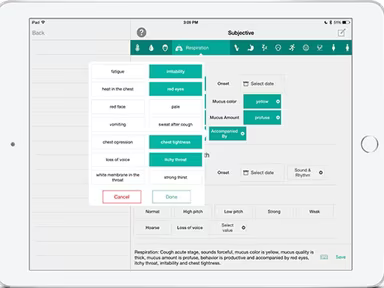
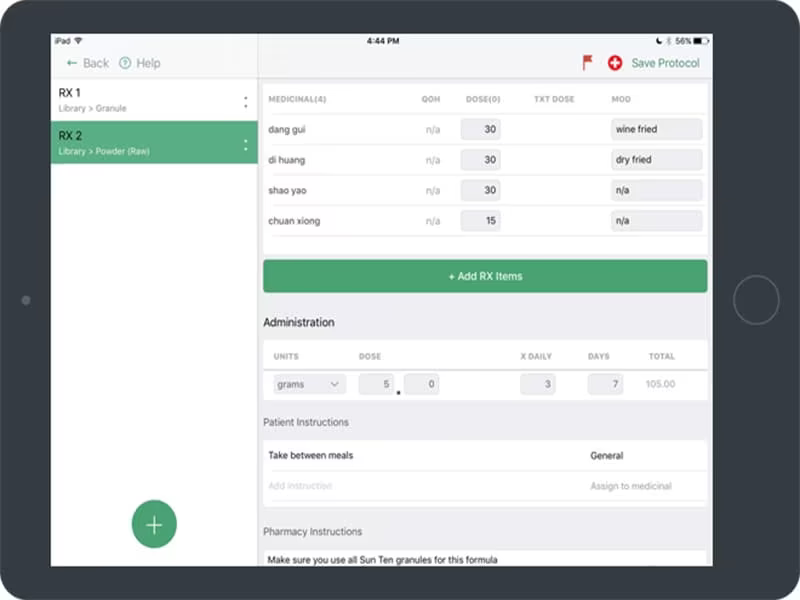
Unified Practice is a cloud-based electronic health record (EHR) system tailored for healthcare providers to effectively manage and organize clinical workflows. This comprehensive solution includes a variety of practice management tools, EHR capabilities, scheduling options, and features for patient communication. With Unified Practice, medical professionals can simplify administrative duties, elevate patient care, and boost overall operational efficiency.

Additionally, Unified Practice EHR is certified by ONC and adheres to HIPAA regulations, ensuring that sensitive patient data is handled within a secure framework.

What Is Unified Practice EHR Best For?

The platform is especially noted for its outstanding customer service. The support staff is well-informed, quick to respond, and committed to assisting healthcare providers in overcoming various challenges.

Unified Practice Pricing

The vendor presents three pricing tiers for Unified Practice, as detailed below:

  • Starter – $63/month

  • Enhanced – $95/month

  • Premium – $127/month

Contact us for a tailored quote that aligns with your budget and practice requirements.

Note: Pricing may vary over time.

Unified Practice EHR Integrations

Unified Practice software seamlessly integrates with various third-party applications, including:

  • Lifesize

  • Constant Contact

  • Handcraft Health

  • Acupbilling

How Does Unified Practice EHR Work?

The following steps outline how to navigate the dashboard and utilize the software's features:

  1. Log in to access the software dashboard.

  2. Set your user preferences such as language, time zone, and notification settings.

  3. Create user accounts to assign appropriate access levels and permissions.

  4. Import or manually input your patient information.

  5. Tailor your appointment types, durations, and availability to suit your practice schedule.

  6. Document patient visits and keep thorough records.

  7. Establish billing and invoicing options, including fee schedules and insurance details.

  8. Utilize patient communication features to send automated reminders and appointment confirmations.

You can also arrange a complimentary demo of Unified Practice to discover more about its capabilities.

Who Is Unified Practice EMR For?

This platform caters to medical entities of varying sizes. The following sectors benefit from using Unified Practice:

  • Acupuncture

  • Herbal medicine

  • Massage therapy

  • Yoga practices

  • Nutritional and lifestyle counseling

Is Unified Practice EHR Right For You?

If you're searching for a cloud-based EHR solution that optimizes your healthcare organization's operations, then Unified Practice may be the ideal option. This software provides numerous features that enhance practice management, including scheduling, charting, billing, and beyond.

The platform is also highly adaptable. It is designed to accommodate medical organizations of any size, including those with multiple locations.

If you still have questions or need assistance, reach out to us at info@softwareseekers.com. Our customer support team is ready to help you determine whether this software aligns with your healthcare organization’s needs.

EMR Software Features

dashboard
invoicing
reporting
timeclock
mobile app
purchasing
ai chatbots
appointments
sales orders
telemedicine
client portal
mobile access
time tracking
eprescriptions
patient portal
sales tracking
case management
e prescriptions
fuel management
hipaa compliant
lab integration
lead management
online payments
task management
audit management
lab integrations
order management
sales automation
accident tracking
activity tracking
billing invoicing
budget management
claims management
dictation support
driver management
email integration
project templates
sales forecasting
vendor management
contact management
customizable forms
project scheduling
route optimization
alertsnotifications
compliance tracking
document management
employee management
employee onboarding
reporting analytics
resource allocation
workflow automation
workforce analytics
inventory management
merchandise transfer
patient demographics
vehicle tracking gps
warehouse management
billing and invoicing
client management crm
compliance management
customer segmentation
patient client portal
maintenance scheduling
opportunity management
performance management
telematics integration
benefits administration
compensation management
customer servicesupport
reporting and analytics
telemedicine telehealth
cloud based emr software
deal pipeline management
social media integration
training and development
customizable formsreports
sales pipeline management
document automationassembly
incident and issue tracking
multi factor authentication
patient engagement software
attendance and time tracking
compliance security features
employee self service portal
fleet utilization monitoring
laboratory integration elabs
appointment scheduling widget
remote patient monitoring rpm
policy and document management
regulatory compliance tracking
risk assessment and mitigation
customer communication tracking
employee information management
practice analytics emr software
appointment managementscheduling
delivery planning and scheduling
appointment management scheduling
billing invoicing patient billing
customizable forms patient intake
immunization and allergy tracking
third partyvendor risk management
esg metrics tracking and reporting
insurance eligibility verification
recruitment and applicant tracking
customer relationship management crm
telehealthappointment managementscheduling
regulatory change monitoring and impact analysis
carbon emissions data capture and calculation tools

Pros

  • All-in-one solution for practice management
  • Intuitive and user-friendly interface
  • Comprehensive charting capabilities
  • Seamless online scheduling and appointment management
  • Efficient inventory management for streamlined operations

Cons

  • Initial setup complexity, according to some user reviews
  • The internal navigation feature is a bit complicated and needs improvement

Price

Professional

$63

Get Free Guidance from Our Solution Experts.

Ratings

0.00 | 0 reviews

Ratings Distribution

Positive

0%

Neutral

0%

Negative

0%

User Reviews

No reviews yet

Be the first to share your experience with Unified Practice.

Frequently Asked Questions

Find answers to the most common queries about our software recommendation service.

Unified Practice has three pricing plans: Starter, Enhanced, and Premium. Contact our team to learn more about United Practice pricing.

Unified Practice, a leading technology company, supports iOS and Android mobile devices.

The software offers several support options: chat, phone, email, help Desk, FAQs, and forums.

The software is used in the following industries: acupuncture clinics, herbal medicine, massage, yoga, and nutrition and lifestyle counseling.

Yes, Unified Practice software includes an app that existing and new patients can utilize.

The software supports the English language.

The software integrates with Lifesize, Constant Contact, Handcraft Health, and Acupbilling.