logo

VSee

VSee is an online telemedicine platform designed to make healthcare more accessible for organizations of any scale. It includes functionalities such as walk-in...

0.00 | 0 Reviews

VSee is an online telemedicine platform designed to make healthcare more accessible for organizations of any scale. It includes functionalities such as walk-in...

Product Overview

VSee is an online telemedicine platform designed to make healthcare more accessible for organizations of any scale. It includes functionalities such as walk-in notifications, digital payments, and video conferencing, providing a thorough solution for managing telehealth practices. Benefit from features like HIPAA compliance, appointment management, and secure communication. Explore the complete profile.
Product Snapshot

Product Details

What Is VSee?

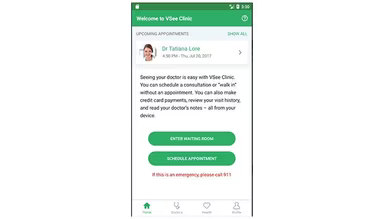
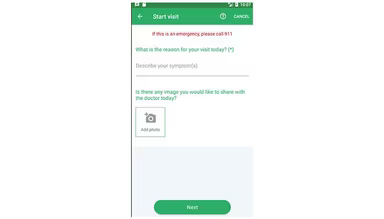
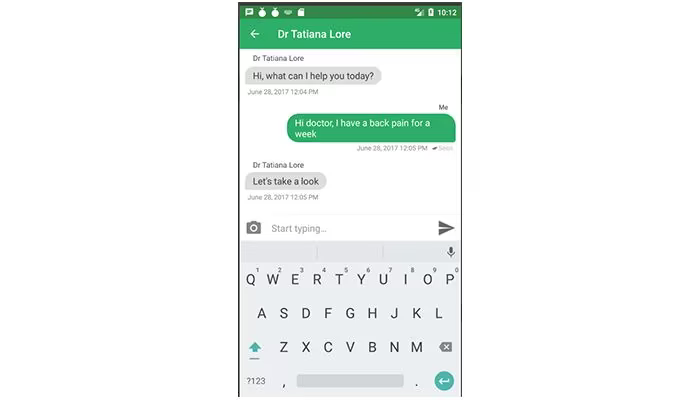
VSee is a telemedicine platform accessible via the web, tailored for organizations of any scale. Headquartered in the United States, the company provides a software solution known as Cloud Clinic. This platform comes equipped with features such as walk-in alerts, adherence to regulations, online payment processing, chat support, messaging, video conferencing, and much more. It serves as a comprehensive telehealth practice management tool that includes patient self-scheduling and virtual waiting room functionalities.

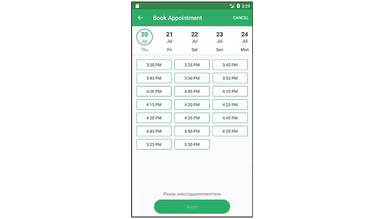
Additional features encompass HIPAA compliance, appointment scheduling, e-prescribing, reminders for appointments, management of employees, billing and invoicing, calendar integration, guest invitations, and others. VSee simplifies telemedicine for healthcare professionals while ensuring security and accessibility globally.

If you're interested in exploring the software's full suite of capabilities, consider arranging a complimentary VSee Telemedicine demonstration.

This telehealth platform streamlines workflows for remote wellness checks, sign-ins, and urgent care services. VSee is user-friendly and facilitates connections between doctors and patients worldwide. After installation, users can assess audio and video quality prior to any calls or meetings. Furthermore, the software operates efficiently even on low bandwidth, making it convenient for users to communicate with patients from home.

It supports both mobile devices and desktop PCs, providing flexibility for both healthcare providers and patients. Teams can exchange information securely without compromising privacy or data integrity. VSee ensures high-quality video and audio during telehealth sessions and allows users to have signed Business Associate Agreements (BAA).

How Much Does VSee Cost?

VSee offers a free version (with limited features), alongside paid plans beginning at $29 per month. There are three distinct plans available:

  • Plus: $29/month

  • Premium: $49/month

  • Enterprise: Personalized Quote

To obtain more details regarding the software's pricing options, reach out to our sales team today.

Product Advantages

The customer support provided is swift and attentive. VSee is regarded as being more secure than Skype, making it particularly suitable for telemedicine applications. Additionally, it offers impressive productivity tools that enhance user interactivity. As a HIPAA-compliant platform, it also includes a mobile application which is extremely beneficial for clients with limited access to advanced technology.

Product Limitations

Some users have reported occasional lagging with the software, and there are instances of echo during meetings with other participants. Delays may occur due to the level of encryption this telemedicine service provides.

EMR Software Features

dashboard
invoicing
reporting
timeclock
mobile app
purchasing
ai chatbots
appointments
sales orders
telemedicine
client portal
mobile access
time tracking
eprescriptions
patient portal
sales tracking
case management
e prescriptions
fuel management
hipaa compliant
lab integration
lead management
online payments
task management
audit management
lab integrations
order management
sales automation
accident tracking
activity tracking
billing invoicing
budget management
claims management
dictation support
driver management
email integration
project templates
sales forecasting
vendor management
contact management
customizable forms
project scheduling
route optimization
alertsnotifications
compliance tracking
document management
employee management
employee onboarding
reporting analytics
resource allocation
workflow automation
workforce analytics
inventory management
merchandise transfer
patient demographics
vehicle tracking gps
warehouse management
billing and invoicing
client management crm
compliance management
customer segmentation
patient client portal
maintenance scheduling
opportunity management
performance management
telematics integration
benefits administration
compensation management
customer servicesupport
reporting and analytics
telemedicine telehealth
cloud based emr software
deal pipeline management
social media integration
training and development
customizable formsreports
sales pipeline management
document automationassembly
incident and issue tracking
multi factor authentication
patient engagement software
attendance and time tracking
compliance security features
employee self service portal
fleet utilization monitoring
laboratory integration elabs
appointment scheduling widget
remote patient monitoring rpm
policy and document management
regulatory compliance tracking
risk assessment and mitigation
customer communication tracking
employee information management
practice analytics emr software
appointment managementscheduling
delivery planning and scheduling
appointment management scheduling
billing invoicing patient billing
customizable forms patient intake
immunization and allergy tracking
third partyvendor risk management
esg metrics tracking and reporting
insurance eligibility verification
recruitment and applicant tracking
customer relationship management crm
telehealthappointment managementscheduling
regulatory change monitoring and impact analysis
carbon emissions data capture and calculation tools

Pros

  • High-quality video and audio for clear communication
  • Secure and HIPAA-compliant virtual visits for patient privacy
  • User-friendly interface for easy navigation and use
  • Customizable workflows to fit different practice needs
  • Mobile and web apps for convenient access from anywhere

Cons

  • Subscription costs might be higher than some alternatives
  • Potential learning curve for new users
  • Limited features for large-scale telemedicine operations

Price

Professional

$0

Get Free Guidance from Our Solution Experts.

Ratings

0.00 | 0 reviews

Ratings Distribution

Positive

0%

Neutral

0%

Negative

0%

User Reviews

No reviews yet

Be the first to share your experience with VSee.

Frequently Asked Questions

Find answers to the most common queries about our software recommendation service.

The typical users of VSee include healthcare practices of all types and sizes.

Yes, VSee supports mobile devices.

VSee provides knowledgebase and online contact form support options.

VSee offers four pricing plans: Free ($0/month/provider), Plus ($29/month/provider), Premium ($49/month/provider), and Enterprise (Custom Pricing). Request a personalized pricing quote for your practice today!

The main features of VSee include appointment scheduling, staff optimization, form builder, queuing system, remote monitoring, and revenue cycle management.