

Salesforce Maps
Enhance your field sales and service efficiency with Salesforce Maps, the powerful mapping tool for optimized routes and effective territory planning.
Key Takeaways
Insights gathered from customer feedback
Salesforce Maps serves as a mapping solution tailored for field sales and service, leveraging the Salesforce platform for sales teams, service representatives, and territory managers. Users appreciate its ability to optimize routes and effectively plan territories, enhancing the efficiency of their visits. However, there are some constraints related to data dependencies. Recent enhancements have significantly upgraded the mobile functionality within the Salesforce application.
Our Verdict
Salesforce Maps is a location intelligence solution designed for field sales and service teams within medium to large enterprises that oversee widespread territories. Although costs may rise with additional Salesforce modules, it provides considerable value through organized planning and alignment with CRM systems. We endorse it for its capacity to facilitate scalable field operations rather than focusing solely on cost-effectiveness.
What Is Salesforce Maps?
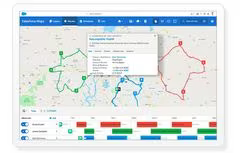
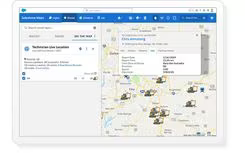
Salesforce Maps is an advanced location intelligence tool—previously known as MapAnything—that brings Salesforce CRM data to life through interactive mapping. This platform empowers sales teams to pinpoint valuable accounts, streamline visit scheduling, and enhance territory management. It combines business, demographic, and property information while offering features like sophisticated route planning, live location tracking, and territory management.
The application allows users to prioritize accounts based on CRM insights and promotes collaboration across teams for effective territory and visit planning, which boosts productivity in the field. While it does require some time to master due to its intricate settings and advanced workflow configurations, the seamless integration with Salesforce, coupled with comprehensive territory and performance analytics, enhances both sales planning accuracy and execution efficiency.
What Is Salesforce Maps Best For?
Salesforce Maps excels in optimizing routes for field teams utilizing the Salesforce CRM. The tool aids sales representatives, service technicians, and territory managers in minimizing travel time between customer appointments while eliminating the hassle of manual route planning. It tackles issues related to inefficient scheduling and fragmented field coordination by automatically generating and modifying visit sequences based on CRM account locations and events. Unlike third-party routing solutions, it operates natively within Salesforce using real-time CRM data.
How Much Does Salesforce Maps Cost?
The starting price for Salesforce Maps is $75 per user per month for the standard plan, with the advanced version priced at $125 per user per month. The provider also offers a 30-day free trial, allowing teams to assess essential mapping, routing, and territory planning features before making a commitment.
In addition to the basic maps pricing, costs may rise with additional Salesforce ecosystem add-ons based on specific usage needs:
Sales Planning — Starting from $75/user/month
Sales Programs — Starting from $100/user/month
Salesforce Spiff — Starting from $75/user/month
Revenue Cloud — Starting from $200/user/month
Users typically report significant benefits from routing capabilities and map-based visibility, particularly for field sales teams. However, some mention that expenses can increase when incorporating extra Salesforce modules. Overall, feedback on core functionality and everyday usability remains largely positive.
Request a personalized quote for Salesforce Maps tailored to your business today!
Please note: Pricing is subject to change.
Salesforce Maps Integrations
Seamlessly integrated with Salesforce CRM and Sales Cloud, Salesforce Maps utilizes CRM data for insightful location-based analysis. It also allows for the enhancement of mapped data using external business, property, and demographic datasets through data layers from third-party sources like ATTOM and DatabaseUSA.com. As a result, CRM records enriched with external data are further enhanced within the Salesforce environment.
How Does Salesforce Maps Work?
The typical navigation process for users of Salesforce Maps is as follows:
After logging into Salesforce, users access Salesforce Maps by selecting the Maps app from the navigation menu with appropriate permissions enabled.
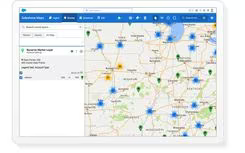
The interface displays CRM data directly on an interactive map, showcasing records such as accounts, leads, and opportunities.
Users can transition between sidebar tabs like Layers, Routes, Schedule, and List to navigate mapping, planning, and analysis views.
The Layers tab lets users manage markers, shapes, data layers, and live overlays to customize what is visible on the map.
The List tab assists users in sorting, filtering, and acting on mapped records without leaving the map interface.
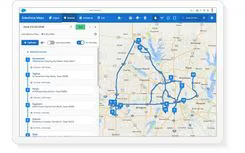
The Routes tab enables users to create and manage optimized travel routes for customer visits.
User can modify the map view using tools such as search functions, zooming capabilities, drawing tools, and display options like traffic or satellite views.
Request a complimentary demo of Salesforce Maps to explore its integration features further.
Who Is Salesforce Maps For?
This solution is particularly beneficial for sales teams and managers across industries that require geographic visualization of sales data along with route optimization, territory management, and improved CRM adoption. Key user groups include:
Field sales organizations
Service teams
Partner relationship managers
Territory planners
Salesforce Maps Use Cases
An analysis of Salesforce Maps' capabilities reveals several scenarios where this software is particularly advantageous for field sales and service-focused organizations:
Field Sales Teams Managing Large Geographic Territories
Salesforce Maps is ideal for companies with sales teams operating over extensive or complex areas. It provides insights into account concentration and opportunity distribution geographically. This functionality is especially advantageous for field representatives who need to organize their schedules based on location rather than static lists of accounts. It facilitates structured coverage for sales managers overseeing scattered teams.
Organizations With Frequent On-Site Customer Visits
Your organization will benefit from Salesforce Maps, especially if regular in-person meetings are part of your routine. Sales representatives can arrange customer visits based on proximity to minimize travel time between appointments. This capability allows teams to prioritize their daily activities around location rather than relying on manual scheduling methods.
Enterprises Focused On Territory Alignment And Coverage Planning
This tool is frequently utilized by organizations needing to establish or refine their sales territories. It assists teams in aligning accounts across different regions according to business criteria such as geography or account characteristics. This aspect is particularly relevant for sales operations teams tasked with ensuring balanced coverage across various markets.
Sales Organizations Working With CRM-Heavy Workflows
If your company already heavily utilizes Salesforce CRM, then Salesforce Maps integrates seamlessly into your existing workflows. It enables users to engage with account data in a geographic context without needing to switch between systems. This feature is beneficial for teams requiring a spatial perspective of CRM records to aid in planning and decision-making processes.
Is Salesforce Maps Right For You?
Salesforce Maps serves as an excellent solution for businesses that are deeply invested in the Salesforce ecosystem while managing field-based sales or service teams. If your organization seeks to enhance field team efficiency, balance sales territories effectively or gain geographical insights into customer data, then Salesforce Maps offers a well-integrated solution. Additionally, it supports structured alignment of territories directly within Salesforce workflows so that teams can maintain consistent coverage while improving execution efficiency in the field.
If you still have questions about Salesforce Maps, please reach out to our support team at info@softwareseekers.com for additional assistance.