logo

Service Fusion

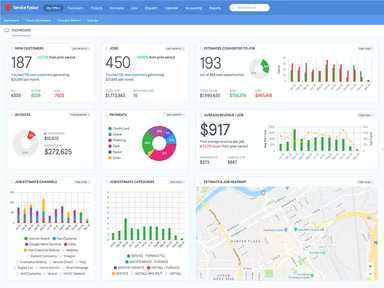
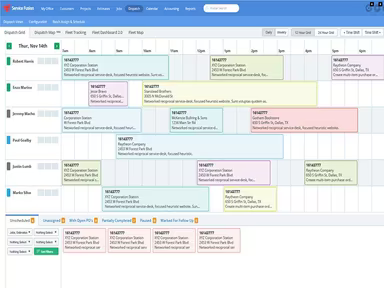
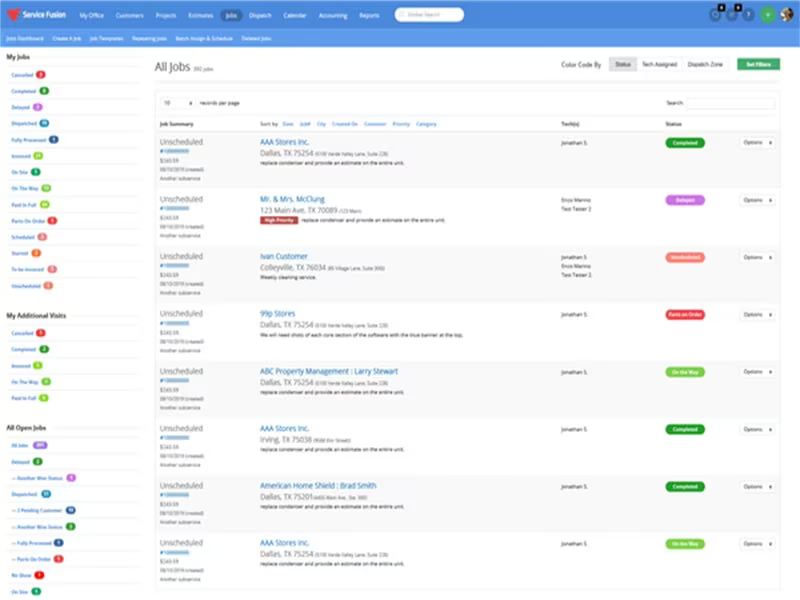
Service Fusion provides an all-encompassing solution for managing field services, improving the efficiency of scheduling, dispatching, and invoicing processes....

0.00 | 0 Reviews

Service Fusion provides an all-encompassing solution for managing field services, improving the efficiency of scheduling, dispatching, and invoicing processes....

Product Overview

Service Fusion provides an all-encompassing solution for managing field services, improving the efficiency of scheduling, dispatching, and invoicing processes. Although the reporting features may lack some detail, its robust integration with QuickBooks and intuitive mobile application significantly enhance operational efficiency and precision.
Product Snapshot

Product Details

What Is Service Fusion?

Overview

Service Fusion is an innovative cloud-based field service management (FSM) platform that aims to enhance business operations for mobile teams. This all-in-one solution in the FSM arena is notable for its flexibility, catering to a variety of business sizes and specific industry requirements. It aids in streamlining operations by improving scheduling, optimizing dispatching, simplifying invoicing, and much more.

What Is Service Fusion Best For?

One of the standout features of Service Fusion is its flawless integration with QuickBooks. This capability removes the need for manual data entry and guarantees that financial information transitions smoothly across platforms. With this real-time financial insight, businesses can make informed decisions and improve their profitability.

Service Fusion Pricing

The pricing plans available are as follows:

  • Starter - $195/month (unlimited users)

  • Plus - $295/month (unlimited users)

  • Pro - $495/month (unlimited users)

This software presents various pricing tiers to accommodate the evolving requirements of diverse organizations. For a personalized quote on Service Fusion, feel free to request further details.

Please note that pricing may change over time.

Service Fusion Integrations

The software seamlessly integrates with several third-party applications, including:

  • Profit Rhino

  • Service Nation

  • PulseM

  • Coast

  • Nexa

  • Out Of The Box

  • FieldPoint

  • Baytek

How Does Service Fusion Work?

To get started with the Service Fusion dashboard after logging in, follow these steps:

  1. Configure company settings such as service areas, pricing structures, and business hours.

  2. Create user accounts for office personnel, dispatchers, and field technicians.

  3. Develop a service catalog that includes detailed job types, descriptions, and pricing information.

  4. Import your existing customer database or add new customer profiles manually.

  5. Customize scheduling preferences and technician availability.

  6. Establish automated workflows for routine service tasks.

  7. Integrate with accounting software and payment gateways.

  8. Create tailored forms for job estimates, work orders, and invoices.

You can also watch a free demo of Service Fusion to explore its capabilities further.

Who Is Service Fusion For?

The Service Fusion software is ideal for small to medium-sized businesses across various sectors, including:

  • HVAC

  • Plumbing

  • Electrical services

  • Appliance repair

  • Property maintenance companies

  • Security systems providers

Is Service Fusion Right For You?

If managing a mobile workforce and optimizing field service operations feels overwhelming, then Service Fusion could be your solution! Balancing scheduling, dispatching, invoicing, and customer interactions can be challenging. Service Fusion simplifies these tasks by automating them and consolidating everything into one platform, ultimately saving you both time and money.

Your data's security and scalability are paramount with Service Fusion. The platform incorporates strong security protocols to safeguard your information, including industry-standard encryption and access controls. Additionally, Service Fusion is designed to grow alongside your business needs, ensuring your FSM software evolves with you.

If you're still uncertain whether Service Fusion is the right fit for your needs, reach out to our customer support team at info@softwareseekers.com for assistance in making an informed decision.

Enterprise Resource Planning Software Features

crm
dashboard
invoicing
reporting
timeclock
dashboards
mobile app
mobile crm
purchasing
erp systems
job costing
online help
audit trails
gps tracking
integrations
sales orders
cost tracking
mobile access
time tracking
bid management
call recording
call scripting
sales tracking
tax management
call monitoring
crm integration
data management
human resources
lead management
quality control
rent collection
report analyzer
task management
accounts payable
asset management
barcode scanning
expense tracking
labor management
lease management
maintenance logs
order management
sales automation
web pos software
activity tracking
budget management
capacity planning
email integration
invoicing billing
order fulfillment
project templates
safety management
sales forecasting
tenant management
vendor management
contact management
equipment tracking
invoice management
mobile pos systems
payment processing
payroll processing
predictive dialing
project management
project scheduling
shop floor control
accounts receivable
alertsnotifications
analytic accounting
bank reconciliation
contract management
customer management
document management
employee management
facility management
financial reporting
incident management
management customer
omnichannel support
production planning
property accounting
real time dashboard
reporting analytics
resource allocation
treasury management
workflow automation
accounting reporting
document managements
equipment management
financial management
inventory management
maintenance requests
merchandise transfer
performance tracking
process erp software
real time monitoring
warehouse management
bill of materials bom
business intelligence
compliance management
customer segmentation
ecommerce integration
equipment maintenance
inspection management
productivity tracking
work order management
e commerce integration
facilities maintenance
fixed asset management
multi currency support
opportunity management
preventive maintenance
procurement management
sales and distribution
sales order management
scheduling dispatching
analytics and reporting
change order management
customer servicesupport
real time notifications
relationship management
reporting and analytics
supply chain management
business intelligence bi
deal pipeline management
manufacturing management
procurement supply chain
social media integration
subcontractor management
budgeting and forecasting
equipment rental software
retail inventory software
sales pipeline management
compliance risk management
human resources management
retail accounting software
retail management software
sales marketing automation
scheduling and dispatching
small business pos systems
service contract management
call reporting and analytics
integration with other tools
compliance and risk management
human resources management hrm
interactive voice response ivr
sales and marketing automation
subscription recurring billing
customer communication tracking
project planning and scheduling
customer relationship management
delivery planning and scheduling
manufacturing management partial
product lifecycle management plm
procurement purchasing management
voicemail and callback management
supply chain management integration
customer relationship management crm
business intelligence via power bi integration
customer relationship management crm integration

Pros

  • Automatic customer notifications improve communication with reminders and updates
  • Efficient data management simplifies tracking and managing customer data, jobs, and service records
  • Allows access via mobile devices, enabling on-the-go management
  • Regular updates keep the software current and address issues
  • Excellent customer support with a responsive and knowledgeable team

Cons

  • Integration with other tools besides QuickBooks may be limited
  • Lacks in-app inspection report editing

Price

Professional

$195

Get Free Guidance from Our Solution Experts.

Ratings

0.00 | 0 reviews

Ratings Distribution

Positive

0%

Neutral

0%

Negative

0%

User Reviews

No reviews yet

Be the first to share your experience with Service Fusion.

Frequently Asked Questions

Find answers to the most common queries about our software recommendation service.

Yes, the software does offer an API.

No, the software is not free to use.

The software offers several pricing plans, including the Starter plan at $225 per month, the Plus plan at $350 per month, and the Pro plan at $575 per month for unlimited users. Get in touch for a customized Service Fusion pricing quote.

Yes, Service Fusion software offers cloud-based services.

You can request a free Service Fusion demo to gain a comprehensive overview of its features and capabilities. The demo will offer an in-depth exploration of what Service Fusion has to offer.

The software primarily supports the English language.

Service Fusion integrates with various software, including but not limited to Profit Rhino, Service Nation, PulseM, Coast, and Nexa.

The typical users of Service Fusion are professionals across various industries, including plumbing, electrical, HVAC, and landscaping.

Service Fusion offers support through phone, knowledge center, email, and form submission.