

Badger Maps
Boost your sales with Badger Maps' route optimization and lead management tools, simplifying workflows and maximizing productivity for field service businesses.
Badger Maps enhances sales performance through its route optimization and lead management features tailored for field service companies. Although the options for customization are somewhat restricted, it allows users to download in-depth data reports for better analysis. In summary, Badger Maps makes workflows more efficient, reduces travel time, and boosts productivity for organizations aiming to optimize their operations effectively.
What Is Badger Maps?
Badger Maps serves as a field service software tailored for sales professionals, providing features like route optimization, lead management, and insightful data analysis. This tool is designed to help users save time, lower travel expenses, and enhance overall efficiency. With its user-friendly interface and comprehensive reports, Badger Maps empowers various businesses to make informed decisions. It is particularly beneficial for sales teams in multiple sectors, facilitating territory planning and maximizing productivity while ensuring smooth daily operations and improved sales outcomes.
What Is Badger Maps Best Known For?
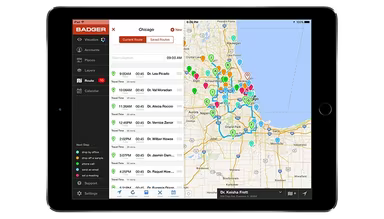
The platform is widely recognized for its map-centric route planning and territory management specifically designed for outside sales teams. It transforms CRM data into optimized daily routes, allowing representatives to spend less time on the road and more time engaging with clients. A notable feature is its mobile-first approach, which integrates scheduling, customer mapping, and multi-stop route optimization all in one convenient location.
How Much Does Badger Maps Cost?
The pricing structure for Badger Maps begins at around $69 per month per user for the Business plan and approximately $109 per month per user for the Enterprise plan. The software operates on a per-user basis that adjusts according to CRM usage, territory dimensions, and routing requirements. Users can take advantage of a 14-day free trial along with a 90-day money-back guarantee.
Industry estimates typically fall within these ranges:
Small Outside Sales Teams / Solo Reps: ~$60–$150/month per user
Mid-Sized Field Sales Teams: ~$1,000–$5,000/month based on users and integrations
Large Enterprise Sales Teams: ~$5,000–$15,000+/month for multi-region field operations
The Territory Management Suite is offered as an add-on and can be acquired separately or included in your current plan. It features:
Badger Align (Territory Management): ~$20/territory/month for creating, balancing, and optimizing sales territories
Badger Lead Routing: ~$16–$18 per rep/month for automatic lead assignment following territory rules
Badger Insights (Analytics & Dashboards): ~$50–$60/user/month for heat maps, performance tracking, and reporting
Badger Scoreboard (Gamification & KPIs): ~$12–$14/user/month for leaderboards and performance tracking
Additional costs may apply when using Badger Maps software:
CRM Integration And Onboarding: ~$500–$3,000 based on complexity
Territory Setup And Data Structuring: ~$300–$2,000 one-time fee for cleaning and organizing accounts
Optional Enterprise Customization/API Support: Prices vary based on workflow intricacy and internal systems
This suite is crafted so that companies can begin with routing + CRM mapping and later incorporate territory management, analytics, and automation as their field sales operations expand.
You can request a personalized quote to get a cost estimate for Badger Maps tailored to your business.
Please note: Pricing is subject to change.
Badger Maps Integrations
Badger Maps supports integration with various applications such as:
Salesforce
Microsoft Dynamics
HubSpot
Zoho
Insightly
NetSuite
Oracle NetSuite
How Does Badger Maps Work?
This software operates by converting your CRM data into a map-based workspace designed for field sales. It enables users to plan visits, optimize routes, and oversee customer interactions from a single platform.
Link your CRM (Salesforce, HubSpot, Zoho, etc.) or upload a CSV file to import all customer data into the system.
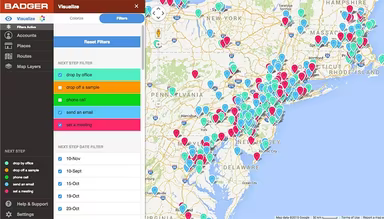
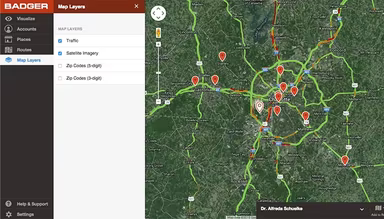
Visualize all accounts on an interactive map to better understand your territory and customer distribution.
Utilize key CRM fields like revenue, last visit date, account type, or custom tags to filter and segment accounts for priority visits.
Select customers on the map using tools such as the Lasso feature to choose multiple accounts for scheduled visits over a day or week.
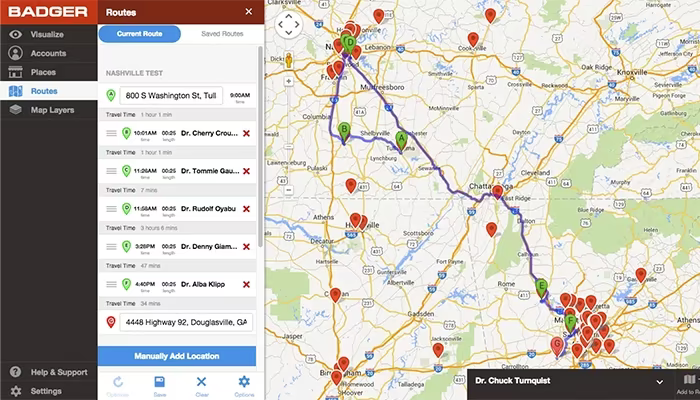
Create an efficient multi-stop driving route that organizes visits automatically to save time during travel.
Edit and save routes for recurring visits or adjust them while out in the field.
Log each visit by checking in, adding notes, or uploading photos; all activities sync back to your CRM automatically.
Monitor field activities through summaries and reports that assist managers in tracking visits, routes, and rep productivity.
Easily scale territory management with advanced tools like territory alignment, lead routing, and performance dashboards suitable for larger sales teams.
You can schedule a free demo of Badger Maps for a comprehensive walkthrough of the platform.
Who Is Badger Maps For?
This software is specifically designed for field sales and service teams and is well-suited for:
Sales managers
Sales representatives
Sales trainers
Team leaders
Badger Maps Use Cases
User feedback highlights several scenarios where Badger Maps excels for field and outside sales teams:
Field Sales Reps Managing Large Territories With Packed Daily Schedules: When reps cover 50–200 accounts across vast areas, significant time goes into determining which customers to visit first. This planning often interferes with actual client interactions. Teams in distribution, pharmaceuticals, and B2B manufacturing leverage Badger Maps to organize daily visits into clear driving paths. This is especially advantageous when reps juggle existing clients alongside new prospects in the same region.
Sales Teams Utilizing CRM Systems While Spending Most Time In The Field: In many sales organizations focused on fieldwork, representatives using Salesforce, HubSpot, or Microsoft Dynamics typically update records post-visit rather than during appointments. Details about visits are often reconstructed later in the day leading to incomplete entries. Badger Maps is employed when reps need to capture visit details while transitioning between appointments. Companies implement it when they seek consistent CRM updates without altering their fieldwork approach.
Organizations Redefining Territories After Expansion Or Restructuring: As companies onboard new representatives or expand into fresh regions after acquisitions, maintaining balanced territories can be challenging. Spreadsheet-based planning often obscures overlaps between reps or accounts that fall through the cracks. Sales operations teams turn to Badger Maps when they need to redraw coverage areas and redistribute accounts based on geography and workload—particularly crucial during rapid growth or organizational changes.
Field Reps Seeking Nearby Prospects Between Scheduled Visits: While traveling between appointments, sales representatives frequently pass potential customers without engaging due to limited visibility of nearby accounts. Over time, these missed opportunities can diminish overall coverage in route-based selling strategies. Badger Maps is utilized by reps wanting to pinpoint nearby prospects and integrate them into their day without overhauling their entire schedule—common in sectors like medical devices and wholesale distribution.
Sales Managers Overseeing Activity Across Distributed Field Teams: For managers supervising multiple field reps, grasping actual customer visit patterns can be tricky when updates rely on manual reporting. Self-reported activities often lack specifics about which accounts were visited versus those skipped. Badger Maps assists managers seeking clearer insights into territory coverage and daily field activities without necessitating separate reporting processes from reps. This clarity helps leadership identify gaps in coverage effectiveness across regions.
Is Badger Maps Right For You?
If you're part of a field sales team looking to enhance efficiency and productivity, Badger Maps could be your solution. It provides route optimization features along with CRM integration and real-time access to customer information. Its straightforward interface ensures secure data handling while functionalities like route planning and lead management help streamline daily tasks effectively. Badger Maps aids sales professionals in focusing on crucial activities that drive business growth while improving performance consistently—making it a preferred choice among numerous businesses including Cutter & Buck, NCR Aloha, and Cargill.
If you still have questions about Badger Maps software or need further assistance, reach out to our experts at info@softwareseekers.com.