logo

Zoho Forms

With its intuitive interface and flexible features, Zoho Forms simplifies the process of form creation. While there may be some occasional challenges with file...

0.00 | 0 Reviews

With its intuitive interface and flexible features, Zoho Forms simplifies the process of form creation. While there may be some occasional challenges with file...

Product Overview

With its intuitive interface and flexible features, Zoho Forms simplifies the process of form creation. While there may be some occasional challenges with file uploads, the platform truly shines in its ability to organize, display, analyze, and enhance data. Overall, Zoho Forms enables users to design tailored, secure, and code-free forms that enhance workflows and boost productivity throughout teams.
Product Snapshot

Product Details

What Is Zoho Forms?

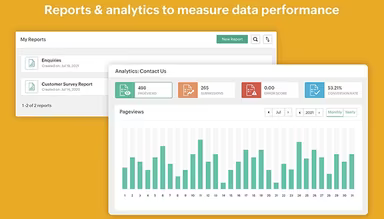
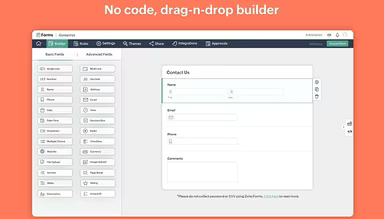
Zoho Forms is an effective tool for building forms, tailored for a variety of businesses. Its intuitive drag-and-drop interface allows users to create personalized forms with ease and speed. This solution proves to be reliable for marketing initiatives, gathering data, and optimizing workflows. Zoho Forms offers smooth integration with both Zoho applications and numerous third-party tools, facilitating effortless data transfer. With strong reporting capabilities, customizable fields, and simple sharing options, it stands out as a trustworthy option across multiple sectors.

Zoho Forms Pricing

The pricing structure for Zoho Forms includes five distinct plans:

  • Free: $0/month (1 user)

  • Basic: $12/month (1 user)

  • Standard: $30/month (10 users)

  • Professional: $60/month (25 users)

  • Premium: $110/month (100 users)

You can request a comprehensive analysis of the options to determine which plan best fits your business needs.

Disclaimer: Prices may vary.

Zoho Forms Integrations

Zoho Forms works in conjunction with Zoho and various third-party applications, which include:

  • Office 365

  • G Suite

  • Salesforce

  • Zapier

  • Microsoft Teams

  • Google Sheets

  • WordPress

You can view a complimentary demo of Zoho Forms to discover more about its integration capabilities.

Who Is Zoho Forms For?

This tool is beneficial for organizations of all sizes across a range of industries, including:

  • HR

  • Sales

  • Marketing

  • Education

  • NGOs

  • Legal

Is Zoho Forms Right For You?

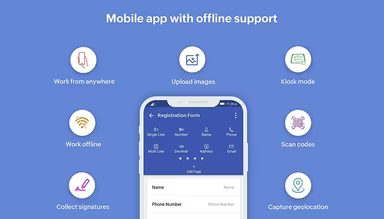
If you are seeking a straightforward and flexible method to gather data, organize workflows, and securely handle submissions, Zoho Forms could be the right fit. It is designed for businesses that require a no-code solution equipped with robust integrations and mobile accessibility. With features such as offline image work, code scanning, and image capture, it remains a preferred choice for many organizations. Users appreciate its adherence to modern data regulations like HIPAA & CCPA compliance, SSL certification, and ISO/IEC standards.

If you still have questions about Zoho Forms, feel free to reach out to our support team at info@softwareseekers.com for further assistance.

Field Service Software Features

market
routing
dashboards
mobile app
mobile crm
purchasing
scheduling
job costing
gps tracking
hr compliance
mobile access
time tracking
offline access
gis integration
lead management
service history
task management
asset management
code enforcement
contact database
maintenance logs
billing invoicing
email integration
inventory control
invoicing billing
permit management
contact management
customizable forms
payment processing
alertsnotifications
customer management
document management
mobile data capture
reporting analytics
scheduling dispatch
workflow automation
workflow management
workforce analytics
electronic signature
equipment management
inventory management
workforce management
invoicing and billing
work order management
facilities maintenance
performance management
preventive maintenance
realtime notifications
scheduling dispatching
analytics and reporting
compensation management
customer servicesupport
real time notifications
reporting and analytics
deal pipeline management
field service management
citizen request management
scheduling and dispatching
service contract management
attendance and time tracking
employee self service portal
health and safety management
market scheduling dispatching
customer communication tracking
employee information management
integration with marketing tools
integration with third party apps
recruitment and applicant tracking
field service work order management
customer relationship management crm

Pros

  • Integrates easily with Zoho app suites and third-party solutions
  • Customizable fields for user data
  • Supports adding logos and signatures to forms
  • Generates reports and data analysis efficiently

Cons

  • According to some software users, its geolocation feature needs improvement
  • Some users note occasional file upload issues

Price

Professional

Custom

Get Free Guidance from Our Solution Experts.

Ratings

0.00 | 0 reviews

Ratings Distribution

Positive

0%

Neutral

0%

Negative

0%

User Reviews

No reviews yet

Be the first to share your experience with Zoho Forms.

Frequently Asked Questions

Find answers to the most common queries about our software recommendation service.

Yes, Zoho Forms provides an API.

Yes, Zoho Forms has a mobile app for Android and iOS users.

Zoho Forms supports several languages, such as English, Spanish, Portuguese, German, Dutch, Japanese, Arabic, Indonesian, Thai, Vietnamese, and Chinese languages.

The Zoho Forms cost comes in five different plans: Free ($0/month for one user), Basic ($12/month for one user), Standard ($30/month for 10 users), Professional ($60/month for 25 users), and Premium ($110/month for 100 users).

Zoho Forms integrates smoothly with Zoho apps as well as third-party tools like Zapier, Microsoft Teams, Office 365, WordPress, Salesforce, Google Sheets, and G Suite.

The typical users of Zoho Forms are businesses of all sizes from industries like HR, sales, marketing, education, legal, and others.

Zoho Forms offers support through email, FAQs, and a knowledge base.