

Record360
Streamline inspections, claims, and equipment rentals with Record360’s user-friendly features and reliable support for optimal asset protection.
Record360 assists users in overseeing inspections, claims, and equipment rentals without introducing unnecessary complications. While it offers a limited range of data categorization options, Record360 effectively manages rental processes to promote organized operations. The platform features an intuitive interface and dependable support, which together foster efficient workflows and ensure optimal asset protection for businesses, regardless of their size.
What Is Record360?
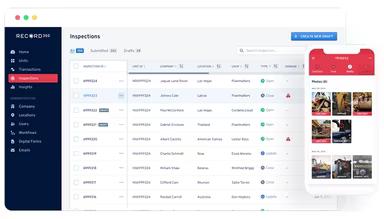
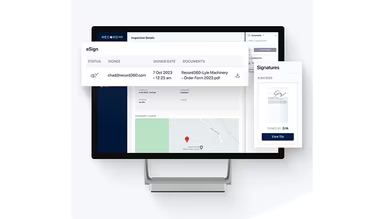
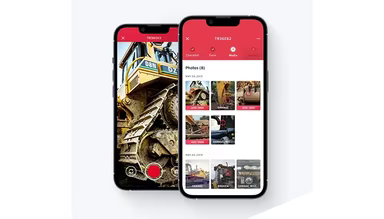
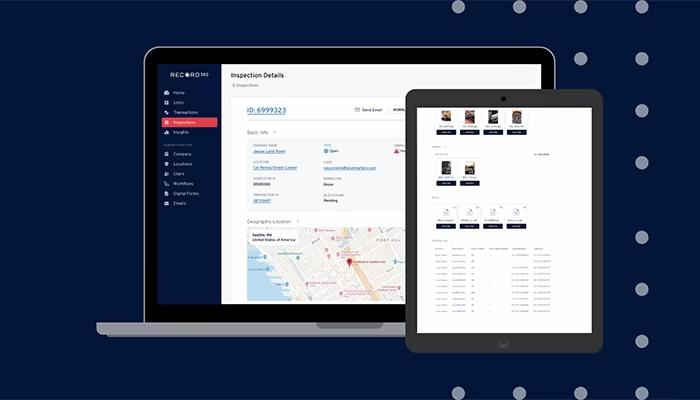
Record360 offers a dependable solution for businesses involved in equipment rentals, vehicle inspections, and claims management. This platform is tailored for a variety of industries and features cloud-based storage, user-friendly workflows, and immediate damage alerts. It streamlines rental operations by capturing photo and video documentation that is timestamped at the point of pickup and return, generating digital condition reports, and ensuring a verifiable record trail for each asset. The system enhances efficiency and asset protection effectively. With straightforward functionalities and reliable support, it assists businesses in managing their operations, improving documentation through customizable inspection templates and digital signatures, as well as maintaining better control over assets using real-time condition data and evidence ready for claims. Its user-friendly design and practical features make it a preferred option for professionals in search of trustworthy management solutions.
What Is Record360 Best Known For?
Record360 is particularly recognized for its mobile inspection system that captures photo and video documentation of vehicle and equipment conditions during check-in and check-out processes, resulting in clear, time-stamped records. This technology replaces traditional inspections with standardized digital proof that minimizes disputes and enhances accountability. Rental companies, fleet operators, and dealerships mainly utilize the software to optimize inspections, reduce damage conflicts, and boost operational efficiency.
How Much Does Record360 Cost?
The pricing for Record360 generally starts at $300 per month, reaching up to $1,500 for small to mid-sized operations. For larger enterprises with multi-location fleets and advanced workflow automation needs, costs can range from $2,000 to over $10,000 monthly, influenced by usage levels and contract specifics. In addition to the standard subscription fee, users should be aware of potential hidden costs such as:
Implementation And Onboarding Setup Fees: Typically estimated between $1,000 and $7,500 based on fleet size and inspection workflow complexity.
Device And Hardware Configuration Costs: Can vary from approximately $500 to $5,000 depending on the need for rugged devices, camera setups, or kiosk-style inspection stations.
Integration With ERP, Rental, And Fleet Systems: Expected additional costs range from $2,000 to $15,000 for connecting systems like rental management platforms or custom internal databases.
Training And Workforce Enablement Programs: Generally estimated between $500 and $4,000 based on the number of technicians, inspectors, and managers requiring training.
Data Storage And Media-heavy Usage Scaling Costs: Might amount to approximately $50 to over $500 monthly.
Premium Support And SLA-Based Service Tiers: May add around $200 to $2,000 per month for enhanced response times and dedicated account management.
Request a personalized quote tailored to your organization's needs regarding Record360 pricing.
Disclaimer: Pricing references are based on publicly accessible third-party information and industry standards. Actual costs may differ.
Record360 Integrations
Record360 offers integration capabilities with various applications including:
Idealease
Procede
Zapier Software
NationaLease
TSD
HBS Systems
Karmak
How Does Record360 Work?
If you want to start using Record360 after logging in, follow these steps to manage inspections and workflows throughout your organization:
Access the main dashboard to view inspection activities, asset status updates, and pending tasks within your organization.
Set up user roles and permissions to delegate responsibilities among field staff, managers, and administrators.
Create or assign inspection templates to standardize vehicle and equipment check-in/out procedures.
Navigate the inspection portal to monitor real-time submissions from mobile users operating in the field.
Review photo and video inspection records to confirm asset conditions and track damage reports.
Establish workflow routing to automatically assign inspection tasks and approvals to appropriate teams.
Utilize the reporting section to evaluate inspection trends, compliance status, and operational performance.
Manage communication tools to send updates, approvals, and notifications across teams and clients.
Track integration settings to connect inspection data with external systems while automating workflows.
Schedule a complimentary demo of Record360 to explore its features and functionalities further.
Who Is Record360 For?
The software is designed for rental companies, dealerships, and service providers across various sectors including:
Truck
Auto rental
Heavy equipment
Record360 Use Case
An analysis of the platform’s capabilities reveals key scenarios where this software excels in rental operations focused on fleets and equipment:
Rental Companies Managing High-Volume Check-In And Check-Out Processes: Businesses with frequent asset turnover often face challenges in maintaining consistent condition records across shifts. Without standardized documentation practices, disputes over damage can become costly. Record360 is well-suited for these environments where teams require an organized method for capturing asset conditions throughout each rental cycle.
Fleet Operators Standardizing Vehicle Condition Documentation Across Locations: Organizations with distributed fleets may encounter inconsistencies in inspection methods among teams. Different locations might adopt varying documentation practices leading to discrepancies. Record360 is frequently utilized in such cases to ensure uniformity in inspection workflows across multiple sites.
Equipment Rental Businesses Reducing Damage Disputes With Customers: Providers of heavy equipment rentals often face disagreements regarding existing damages or wear with customers. These conflicts can disrupt billing cycles and damage customer relationships. By supporting structured visual documentation during equipment exchanges, Record360 provides a reliable reference point that clarifies responsibility when issues arise post-use.
Dealerships Handling Trade-Ins And Used Asset Evaluations: Vehicle dealerships typically require a clear process for assessing trade-in conditions. Manual evaluations can lead to inconsistencies among staff members that weaken negotiation accuracy. Utilizing Record360 within these workflows helps standardize inspection records during both intake assessments and resale evaluations.
Service And Maintenance Teams Tracking Asset Condition Over Time: Service providers maintaining vehicle or equipment fleets often lack continuous visual histories of asset conditions. Without structured records in place, tracking wear patterns or identifying recurring damages becomes difficult. Record360 facilitates consistent documentation throughout service cycles enabling teams to maintain clearer operational histories for each asset over time.
Is Record360 Right For You?
If you’re searching for seamless communication solutions alongside efficient workflows and transparent service processes, Record360 could be an excellent fit for your business. It empowers teams with dependable photo/video evidence while automating tasks that enhance customer satisfaction—ultimately boosting productivity while minimizing errors effortlessly.
The platform also simplifies fleet inspections by adhering to Federal Motor Carrier Safety Administration (FMCSA) standards. Trusted by numerous organizations such as Midway Chevrolet, Synergy Equipment, and Flint Equipment, this software is highly scalable catering effectively to growing business needs.
If you still have questions regarding Record360 software, feel free to reach out via email at info@softwareseekers.com for further expert assistance from our team.