

Darwinbox
Transform your HR processes with Darwinbox, the AI-driven recruitment platform designed for large enterprises, enhancing efficiency and analytics.
Key Insights
Derived from customer feedback, Darwinbox serves as a recruitment tool favored by human resources departments in sizable organizations within the IT, manufacturing, retail, and banking industries. Users appreciate its features driven by artificial intelligence, streamlined workflows, and accessibility on mobile devices. However, some common issues raised include the complexity of setup and delays in support responses. The latest enhancements include analytics powered by AI and improved onboarding processes.
Our Assessment
Darwinbox stands out as a dependable option for medium to large companies in search of a comprehensive HR and recruitment platform that incorporates AI capabilities. It is particularly suitable for enterprises with dispersed teams or intricate HR needs, providing robust analytics and automation features. Pricing is customized to fit the scale of enterprise operations. This platform comes highly recommended for teams that require integrated solutions for HR, recruitment, and payroll management.
What Is Darwinbox?
Darwinbox is a comprehensive, cloud-based HRMS/HCM platform designed to help organizations oversee the complete employee lifecycle. This includes everything from recruitment and onboarding to payroll, performance management, and offboarding, all within a single interface. The software features several modules such as Core HR, Time and Attendance, Payroll and Expenses, Recruitment and Onboarding, Talent and Performance Management, as well as People Analytics and Reporting.
With a mobile-first design, Darwinbox enables employees to handle HR tasks directly from their smartphones. The platform supports customizable workflows, role-based permissions, and processes for employee transitions, making it ideal for organizations with diverse departments, locations, or intricate HR frameworks. This setup equips HR teams with the necessary tools to maintain consistent processes throughout the company while granting employees easy access to pertinent HR information.
What Is Darwinbox Best For?
Darwinbox excels in recruitment through its integrated Applicant Tracking System (ATS), which simplifies job postings, candidate shortlisting, and onboarding. Its automated resume parsing and AI-enhanced shortlisting capabilities minimize manual screening efforts and accelerate the search for the best candidates. The ATS seamlessly connects with core HR and onboarding modules, ensuring that new hire information is automatically incorporated into employee records.
Darwinbox Pricing
The pricing structure for Darwinbox is customized and based on quotes tailored to the specific needs of each organization. The cost of the software varies depending on factors such as employee count, chosen modules, and compliance needs based on location.
To get detailed information regarding pricing, consider scheduling a consultation for a personalized quote on Darwinbox.
Darwinbox Integrations
Darwinbox can integrate with several third-party applications including:
Kissflow
AuthBridge
Tydy
ADP Workforce Now
Ascent
Qualtrics
How Does DarwinBox Work?
To get started with Darwinbox, log in using your credentials and follow these steps:
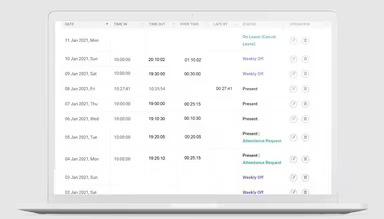
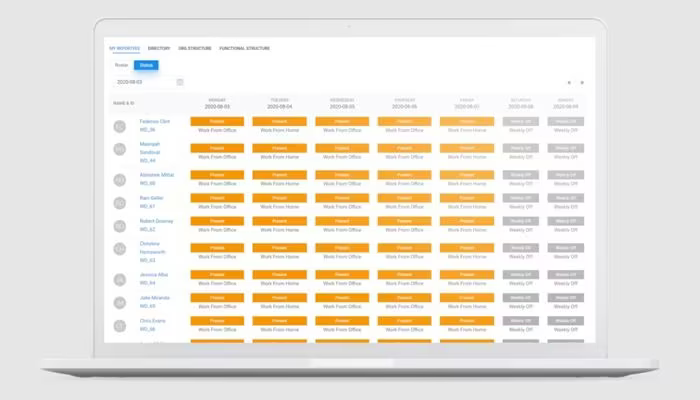
Access the dashboard to view employee records, approvals, attendance logs, and essential HR tasks.
Edit or manage employee profiles, documents, compensation details, and reporting structures.
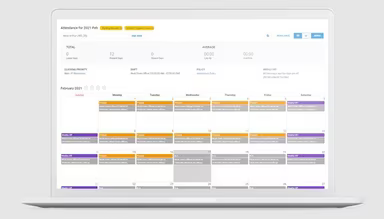
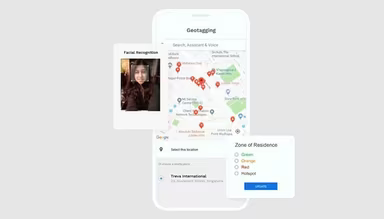
Monitor attendance through mobile check-ins, geo-tagging, or integrated biometric devices.
Review and authorize leave requests, timesheets, and workflow tasks assigned to you.
Manage recruitment by posting job listings, tracking applicants, and beginning the onboarding process.
Handle payroll by syncing attendance data, salary components, and deductions to create pay slips.
Utilize the mobile app to carry out daily HR duties like submitting leave requests, approvals, and documents.
You can also view a demo of Darwinbox to explore its features further.
Who Is Darwinbox For?
This platform is designed for large enterprises, non-profit organizations, and public administrations across various industries that need efficient workforce management solutions. Key sectors include:
Banking and Financial Services
IT and ITE
Manufacturing
Retail
Darwinbox Use Cases
Based on an evaluation of Darwinbox's features and typical enterprise applications, we have identified several scenarios where this platform is particularly effective. Some use cases are straightforward while others involve more intricate HR processes requiring extensive configuration:
Managing Large, Distributed Workforces
Darwinbox aids HR teams in overseeing attendance, payroll, and role modifications across various locations. Many companies face challenges when different sites implement varying procedures—especially concerning travel expenses or HR documentation. The platform centralizes these records and includes facial recognition for attendance verification for field or shift-based teams.
Organizations That Need Configurable HR Processes
Certain companies utilize custom workflows for internal approvals, manpower budgeting, and position management. Others need restricted access controls for sensitive data protection. Darwinbox accommodates these requirements by helping teams formalize screening processes while streamlining forms without relying on multiple tools.
Enterprises With Frequent Role Changes
Growing organizations often deal with regular promotions, transfers, and departmental updates. Darwinbox manages these changes in real-time to ensure that payrolls, records, and analytics remain synchronized without manual intervention.
Teams Prioritizing Mobile HR Tasks
A significant number of employees prefer handling routine tasks via their mobile devices. The mobile-first design of Darwinbox facilitates check-ins, approvals, document access, and signature requirements without needing desktop access. This reduces delays while simplifying the HR workload.
Businesses Looking For Consolidated People Analytics
Certain HR teams require quick metrics while others depend on detailed analytics to monitor recruitment funnels, workforce patterns, and performance outcomes. Darwinbox integrates data from attendance records, recruitment efforts, and core operations to assist in both daily decision-making as well as long-term planning.
Organizations Focusing On Engagement And Recognition
Companies aiming to motivate their employees can leverage built-in communication tools and reward systems. This fosters connectivity among employees while enabling HR teams to enhance engagement without switching between different platforms.
Darwinbox User Sentiments
Most Positive Sentiments
User Experience And Ease of Use: 70% Positive; 15% Negative; 15% Neutral/Mixed
Performance And Speed: 10% Positive; 70% Negative; 20% Neutral/Mixed
The user-friendly design of Darwinbox is frequently praised along with its mobile-first approach which allows HR tasks such as attendance tracking and leave management accessible across devices. One user remarked that "the interface is straightforward and user-friendly—making HR processes far more efficient."
Least Positive Sentiments
Automation And Workflow Efficiency: 65% Positive; 10% Negative; 25% Neutral/Mixed
Customization Complexity: 15% Positive; 65% Negative; 20% Neutral/Mixed
The automated workflows offered by Darwinbox are appreciated by many users—especially in areas like recruitment onboarding which saves time while minimizing errors. One reviewer noted that "integration with our payroll system has significantly reduced the time spent on repetitive tasks."
However, some users have pointed out that configuring the system for complex organizational needs can be labor-intensive. According to one reviewer: "It took longer than expected to set up custom workflows across multiple departments."
Mobile-First Employee Access Support And Issue Resolution
User Sentiment: 60% Positive; 15% Negative; 25% Neutral/Mixed
User Sentiment: 20% Positive; 60% Negative; 20% Neutral/Mixed
The mobile application is found useful by both employees and managers for accessing pay slips as well as leave balances—enhancing transparency in operations. One user stated that "accessing pay slips via the app is incredibly convenient."
A downside reported by some users includes slow responses from support services along with difficulties in resolving technical issues which can hinder daily operations. A user mentioned that "support tickets take longer than anticipated to resolve affecting our HR operations."
Is Darwinbox Right For You?
If you are contemplating whether Darwinbox is suitable for your organization, it's essential to evaluate your specific processes along with your organizational size and needs. Its unique value proposition offers a highly adaptable HRMS solution that comes with robust analytics for informed decision-making while ensuring protection for sensitive employee data. You will benefit from customizable workflows that align with your specific HR processes.
If you still have uncertainties about this software solution after reviewing it thoroughly? Please reach out to our customer support team at info@softwareseekers.com for assistance in making an informed decision.