

ezClocker
Streamline your workforce management with ezClocker, the cloud-based time tracking solution designed for small businesses and mobile teams.
Key Insights
Derived from customer reviews
ezClocker is a time tracking solution hosted in the cloud, tailored for managers, small business owners, and hourly employees. It finds its primary applications in sectors like retail, construction, healthcare, and mobile services. Feedback from users frequently points out its mobile clock-in feature as a significant advantage, while concerns about app stability have also been raised. Recent updates to the product have mainly focused on enhancing mobile time tracking capabilities and integrating payroll systems.
Our Assessment
ezClocker is particularly beneficial for small enterprises with hourly or mobile teams that seek straightforward time tracking with minimal administrative hassle. It caters to organizations that prioritize swift setup and basic oversight of employee hours. Many users find the pricing reasonable for smaller teams; however, growing businesses might encounter limitations with the tiered pricing structure. In summary, it is highly recommended for companies that have uncomplicated workforce monitoring needs.
What Is ezClocker Software?
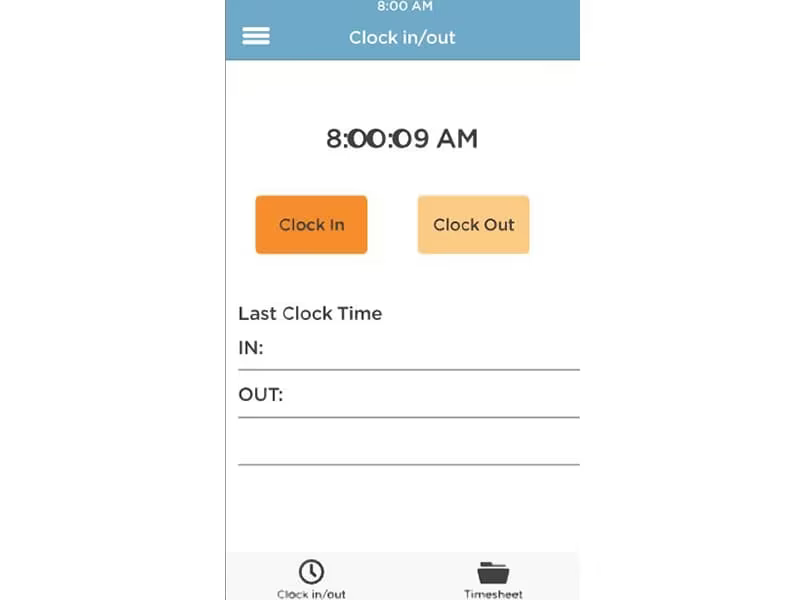
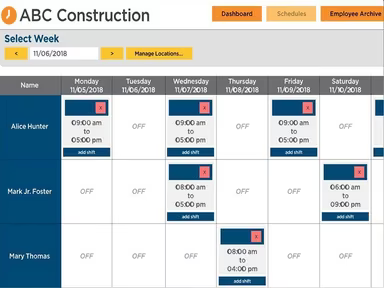
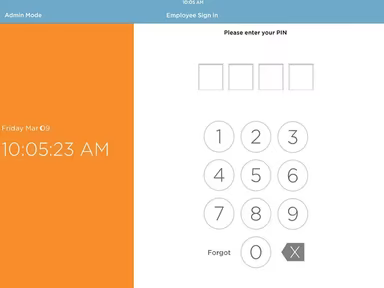
ezClocker provides essential tools for tracking employee hours, managing timesheets, and creating schedules. With a straightforward interface and fundamental time clock features, it enables businesses to enhance their time management practices and boost productivity. Employees can conveniently clock in and out from their mobile devices, ensuring precise time-tracking information for payroll and billing needs.
ezClocker Integrations
ezClocker streamlines your payroll processes by integrating with top payroll software providers. Notable integrations include:
ADP Workforce Now
Paychex
ACS Technologies
Gusto Payroll
QuickBooks
What Is ezClocker Best For?
As a comprehensive employee time tracking solution, ezClocker offers businesses an effective way to oversee their workforce. Its standout features include flexibility and user-friendliness. Companies can tailor their online scheduling systems, delegate shift responsibilities, and modify employee time entries effortlessly.
How Much Does ezClocker Cost?
ezClocker follows a tiered subscription model with plans suitable for small to expanding teams, providing adaptability in both employee coverage and pricing. A free trial is available, allowing potential users to evaluate the software prior to making a commitment. Here’s the pricing breakdown:
Basic - $15/month
Standard - $30/month
Premium - $60/month
Request a customized ezClocker pricing quote from us today.
Please note that pricing may change.
How Does ezClocker Work?
To start using the ezClocker project management tool, follow these steps:
Log in to ezClocker with your provided credentials.
Create your business profile by inputting your company details.
Add employees to the system by entering their information.
Set up your company's work schedule and shifts by choosing the days of the week and working hours.
Assign employees to their designated work shifts and schedules.
Select your preferred clock-in and clock-out methods, such as biometric fingerprint scanning, QR code scanning, or manual time entry.
Train your employees on utilizing the platform effectively.
Start tracking employee clock-in and out times.
Generate timesheets and payroll reports for your staff using the software.
Monitor attendance and punctuality through the reporting and analytics features available in the software.
Make necessary adjustments to schedules or work hours based on insights provided by the software.
Watch an ezClocker demo to explore the various features of the software.
Who Is ezClocker For?
The ezClocker software serves as a straightforward time tracking solution tailored for small businesses. It is particularly useful for organizations with hourly employees who need an uncomplicated method for tracking attendance without unnecessary complexities. Industries that can benefit from ezClocker include:
Healthcare
Hospitality
Retail
Construction
ezClocker Use Cases
User feedback highlights several scenarios where ezClocker excels. It is especially beneficial for small businesses with hourly workers requiring simple time tracking solutions.
Small Businesses With Hourly Workforces
ezClocker is ideally suited for smaller organizations that employ hourly staff and seek an effective way to monitor hours worked. Users commonly praise its simplicity for daily clock-ins and outs without adding unnecessary administrative burdens, making it attractive to owners who desire clear visibility into employee hours without implementing a full workforce management system.
Mobile Or Field-Based Teams Requiring Location Context
Companies with employees working remotely or at various locations often depend on ezClocker to confirm when and where work begins and ends. Feedback suggests that the platform is particularly useful when basic location awareness is necessary for time entries, fostering accountability without needing close supervision.
Organizations Moving Away From Manual Time Tracking
A common use case for ezClocker involves teams transitioning from paper timesheets or spreadsheet-based methods. Reviews indicate that it helps minimize disputes over recorded hours and reduces manual adjustments during payroll processing.
Teams With Straightforward Scheduling Needs
Companies with consistent schedules and simple shift requirements frequently find ezClocker sufficient for managing employee work hours. Users report that it supports basic visibility into schedules and allows minor adjustments, positioning it as a practical option for teams not needing advanced scheduling or workforce planning capabilities.
ezClocker User Sentiment
Most Positive Sentiments
GPS Location Tracking & Accountability:
User feedback indicates that GPS-based clock-ins are beneficial for monitoring remote or field employees.
A user mentioned that the software “Keeps track of hours with GPS clock in/out.”
Ease of Use for Employees:
The majority of users find ezClocker easy for daily operations. Team members can effortlessly clock in/out via the mobile app, minimizing training needs.
A user stated, “It is easy for team members to clock in/out on their app. Location is available. If there are errors, they are easy to correct from admin.”
Time Export & Payroll Preparation:
The time export feature receives positive feedback as a practical way to create clean, review-ready timesheets.
A reviewer noted, “The export time feature makes it easy to put together a submittable timesheet for sending and/or reviewing.”
Least Positive Sentiments
App Stability & Reliability:
A few users report occasional performance issues with the mobile app, including bugs requiring closure and reopening of the application to restore functionality.
Limited Guidance During Setup:
A number of users indicated a lack of built-in instructions or tips during employee schedule configuration.
A user remarked that while setup is relatively straightforward, having some minor guidance would be beneficial when setting up employee schedules and date ranges.
Additonal Formatting/Customization:
User feedback suggests that further formatting or edits may be needed to incorporate job-level details or meet internal reporting standards, adding extra steps for teams relying on exports for job costing or payroll reviews.
Is ezClocker Right For You?
If you're a small business seeking a basic yet dependable solution for tracking employee hours, then ezClocker could be your answer. This mobile time clock application allows employees to clock in/out from any location using their mobile devices, offering businesses flexibility in accurately capturing worked hours.
The application also prioritizes security and compliance by providing multiple safety features such as password protection, encryption, and regular data backups to safeguard employee information. Additionally, it adheres to regulations like the Fair Labor Standards Act (FLSA) while offering detailed timesheet reports for payroll processing.
You may want to explore existing client reviews on ezClocker to gain insights into user experiences. For more information, reach out to Software Finder at info@softwareseekers.com.