

Homebase
Streamline your small business HR with Homebase—an intuitive platform for scheduling and time tracking that enhances workforce management effortlessly.
Key Insights
Derived from customer feedback
Homebase serves as a comprehensive HR and workforce management solution tailored for small enterprises. It is particularly favored by managers and hourly staff within the retail and service industries. Users commend its user-friendly design and the seamless integration of scheduling with time tracking. However, some common issues include sluggish customer support and inconsistent auto-scheduling features. Recent enhancements feature AI Assistants aimed at improving hiring processes and scheduling.
Our Assessment
Homebase excels as a fundamental, all-in-one workforce management tool for small businesses that oversee hourly employees. This platform is particularly beneficial for single-location establishments or startups that value straightforward, compliant scheduling along with precise time-to-payroll calculations. Although the starting price is attractive because of the free tier, costs can rise swiftly if additional locations are added or if payroll capabilities necessitate a paid upgrade. We endorse Homebase for small teams seeking simplicity alongside dependable core functionalities.
What Is Homebase?
Homebase is a human resource (HR) management platform that operates in the cloud. It streamlines fundamental tasks such as tracking time, processing payroll, scheduling employees, and facilitating team communication. This tool is ideal for small businesses, integrating essential functions into one platform that can be accessed through both mobile and desktop applications.
Moreover, the software tackles frequent challenges encountered by HR teams, such as conflicts in scheduling and breakdowns in communication. This leads to improved operational efficiency and minimizes the risk of errors.
What Is Homebase Best For?
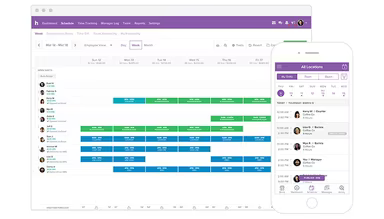
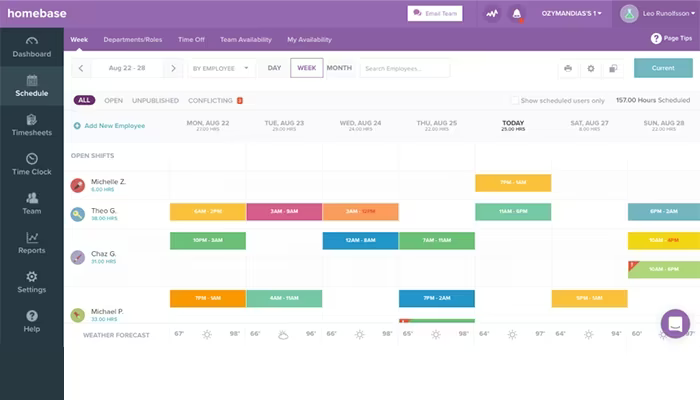
The software is particularly well-known for its user-friendly employee scheduling feature. Managers can easily create and modify schedules without any complications. These schedules can be updated instantly and shared with just one tap, ensuring that all employees are informed of their shifts and minimizing absenteeism and scheduling issues.
Assigning shifts is a simple process thanks to its drag-and-drop interface, which makes it quick and efficient. Additionally, team members receive automatic notifications about their shifts and any schedule alterations, further diminishing the chances of confusion. With shift data readily available to managers, they can effectively manage labor costs.
How Much Does Homebase Cost?
Homebase offers several pricing plans tailored to meet the varied needs of businesses. The available options include:
Basic: $0 (for 1 location, up to 20 employees)
Essentials: $30/location/month (unlimited employees)
Plus: $70/location/month (unlimited employees)
All-in-One: $120/location/month (unlimited employees)
The vendor also provides a 14-day free trial. For a customized Homebase payroll pricing plan, reach out to us at info@softwareseekers.com.
Please note: Pricing may change.
Homebase Integrations
The software seamlessly integrates with various third-party applications and systems, including:
Gusto HR software
QuickBooks
Square Payroll
Heartland
Rippling HR
How Does Homebase Work?
To get started with Homebase, log in using your credentials and follow these steps:
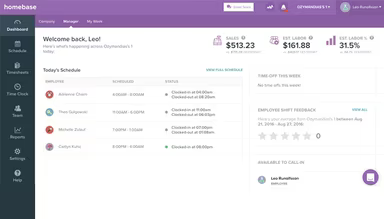
Go to the dashboard for an overview of your team's schedules, payroll, and time clock.
Utilize the drag-and-drop features to create, assign, and modify shifts.
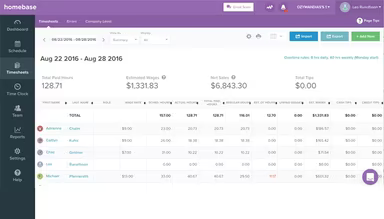
Track hours worked and overtime using the time-tracking feature.
Access the payroll module to convert timesheets into paychecks automatically for salary processing.
Employ performance tools to monitor employee productivity.
You can schedule a free demo of Homebase payroll to explore its features in depth.
Who Is Homebase For?
The Homebase Payroll service is designed for small businesses across various sectors, including:
Retail
Medical
Food and beverages
Hospitality
Education
Homebase Use Cases
Based on insights from user reviews and current capabilities of Homebase, we have identified specific scenarios where this software excels for businesses with hourly, shift-based teams:
New Businesses And Startups Seeking Immediate HR Infrastructure: Small to mid-sized businesses (SMBs), especially those utilizing hourly shift-based labor in areas like retail or hospitality, need a foundational system that can be quickly implemented with minimal costs. Homebase’s Basic free plan provides essential scheduling and time-tracking for up to 20 employees at one location.
Multi-Location Service Businesses Managing Decentralized Teams: For companies operating across multiple physical locations like franchises or retail chains, centralized oversight and compliance are critical. Homebase allows management of all locations from a single dashboard, simplifying logistics by enabling employees to clock in wherever they are assigned. The system aggregates hours from different sites accurately calculates overtime and ensures compliance with local regulations regarding tax rates and ordinances at each location.
Operations Transitioning From Manual Time-To-Payroll Processing: A standout feature of this platform is its integrated design that mitigates the high risk of errors associated with manual payroll processes. Homebase works particularly well for sectors focused on compliance that require precision in hourly wages, overtime calculations, and tip distributions. As employee hours flow directly from the time clock into payroll processing, managers can complete payroll tasks in minutes rather than hours while ensuring federal, state, and local taxes are automatically calculated, withheld, and filed to maintain audit readiness.
Teams Focused On Real-Time Labor Cost Optimization: Businesses facing high labor variability, such as those in food and beverage services, need immediate financial insight to optimize profitability during changing demand. Homebase serves as a real-time financial management tool enabling managers to schedule according to sales forecasts while receiving instant notifications when employees approach overtime limits.
Homebase User Sentiments
Most Positive Sentiments
User-Friendly Interface And Ease Of Use:
80% were Positive
5% were Negative
15% were Neutral/Mixed
The platform's straightforward design is frequently commended for facilitating quick implementation with minimal training needed for both administrators and hourly staff. One user remarked on how easy it is to train managers with the system.
Least Positive Sentiments
Lack Of Responsive Customer Support:
10% were Positive
75% were Negative
15% were Neutral/Mixed
A significant number of users have expressed dissatisfaction with support responsiveness when resolving technical issues.
User Feedback on Mobile Features
The Reliability Of The Mobile Time Clock:
75% were Positive
10% were Negative
15% were Neutral/Mixed
A seamless transition to the mobile time clock has been reported by users who find it enhances productivity significantly. However, some have pointed out flaws in the auto-scheduling feature that need attention.
User Feedback on All-In-One HR Consolidation For SMBs Pricing Model Requirements:
User Sentiments Related To Pricing Model:
< li>Total Positive Feedback: 70% were Positive 10% were Negative 20% were Neutral/Mixed
Users appreciate having key workforce management tools in one place instead of juggling multiple systems. However, some users feel that after surpassing the free tier, the per-location pricing model could become expensive.
Is Homebase Right For You?
If you manage a business with hourly teams seeking an HR platform equipped with strong payroll features, then Homebase Payroll could be an excellent fit for you. This comprehensive software is trusted by prominent companies across various fields.
Awarded multiple accolades, Homebase Payroll boasts robust compliance features alongside security protocols that ensure adherence to local regulations while safeguarding sensitive employee information. It is designed for small businesses with single or multiple locations. Its flexibility and scalability allow it to meet the unique demands of each organization effectively.
If you still have uncertainties about whether Homebase suits your business needs, please contact us at info@softwareseekers.com for expert advice from our knowledgeable software consultants.