

iSpring LMS
Transform your training with iSpring LMS, a scalable and mobile-friendly learning management system perfect for enhancing employee development and compliance.
Key Insights
Insights drawn from customer feedback highlight that iSpring LMS, a cloud-based learning management system, is utilized by HR and L&D teams for the training of employees, partners, and customers. The industries that gain the most advantages include manufacturing, retail, healthcare, and automotive sectors. While users appreciate its mobile learning capabilities and user-friendly interface, many have expressed dissatisfaction with the limited options for customizing reports. A notable recent enhancement is the AI-driven content creation feature found in iSpring Suite.
Our Assessment
For businesses ranging from small to large that are in search of scalable and mobile-optimized training management solutions, iSpring LMS stands out as a reliable option. Its features supporting blended learning, 360-degree feedback, and automated course delivery are particularly beneficial for HR and L&D teams. With reasonable pricing tailored for mid-sized to larger organizations, it aligns well with those that emphasize employee growth and regulatory compliance.
What is iSpring LMS?
iSpring LMS, formerly known as iSpring Learn, is an exceptionally user-friendly cloud-based learning management system (LMS) tailored for the creation, hosting, and delivery of eLearning content. This system is ideal for both small to medium-sized businesses (SMBs) and large corporations, facilitating a variety of training scenarios, including onboarding, compliance training, and education for customers and partners.
The LMS significantly automates the learning process by enrolling learners in courses and dispatching notifications and reminders concerning deadlines. If you choose a blended learning approach, scheduling virtual sessions and face-to-face workshops can be done seamlessly within the LMS calendar. The system will also send invitations for upcoming events and gather attendance statistics.
Apart from standard LMS features, iSpring LMS includes distinct tools for businesses, such as an interactive organizational chart, a built-in newsfeed, and a module for evaluating employee performance. You can effortlessly integrate iSpring Learn with other tools you already utilize via its API to enhance your workflow and improve the overall learning experience.
What is iSpring LMS Best For?
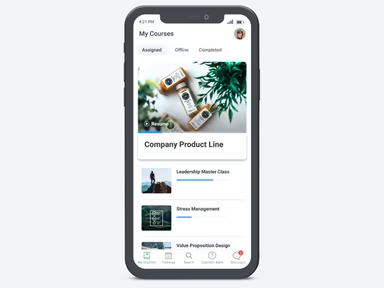
iSpring LMS is renowned for its mobile-friendly learning capabilities. It enables employees to access courses on both iOS and Android devices anytime and anywhere, allowing them to continue their training even without an internet connection. This ensures that remote workers or those who travel can keep up with their learning without any interruptions.
The process of engaging with training materials is straightforward. Learners can view courses, complete quizzes, and monitor their progress directly from their mobile devices. Notifications and reminders help keep them updated on upcoming deadlines and virtual sessions.
How Much Does iSpring LMS Cost?
There are two subscription types available: Business and Enterprise, with the Enterprise plan offering more advanced features. The pricing varies based on the number of users and the selected subscription tier. The costs for the Business plan are as follows:
300 users: $4.46/user/month ($16,050 annually)
500 users: $3.97/user/month ($23,790 annually)
1,000 users: $3.58/user/month ($42,930 annually)
Additionally, an Enterprise plan is available at custom pricing for up to 150,000 users along with a 30-day free trial that allows organizations to explore the platform's features without needing a credit card.
Please note that pricing may change over time.
iSpring LMS Integrations
This software is compatible with various third-party applications and systems, such as:
Zoom
Microsoft Teams
Google Meet
Shopify software
BambooHR
OrangeHRM
Udemy Business
How Does iSpring LMS Work?
To get started with iSpring LMS, log in using your credentials and follow these steps:
Navigate to the dashboard for an overview of courses, learners, and training progress.
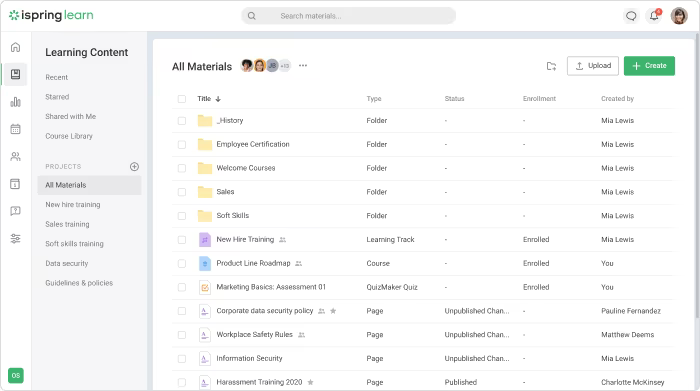
Create new courses or upload existing materials like PowerPoint presentations, videos, SCORM files, or PDFs.
Assign courses to individuals or groups, establish deadlines, and automate notifications and reminders.
Schedule live or blended learning events directly on the LMS calendar.
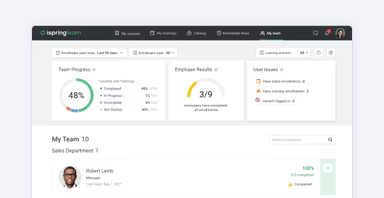
Monitor learner progress by tracking quiz results and generating detailed reports to evaluate training effectiveness.
You can also request a personalized live demo of iSpring to determine if it meets your requirements.
Who Is iSpring LMS For?
iSpring LMS serves organizations across various industries in delivering effective training programs for both employees and clients. Key sectors include:
Healthcare
Retail
Automotive
Manufacturing
iSpring Use Cases
Onboarding Programs For New Employees
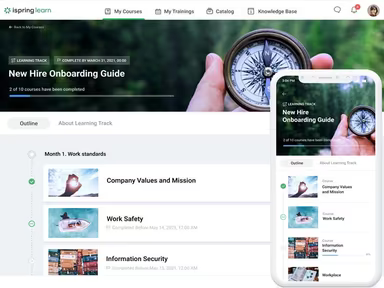
This platform enables organizations to expedite the integration of new hires through comprehensive online onboarding programs. With automated notifications and progress tracking, it ensures that learners complete all necessary training without requiring manual follow-ups.
Managing Compliance Training Across Teams
iSpring LMS aids organizations in delivering consistent regulatory and safety training. This feature is particularly beneficial for companies with distributed teams or complex compliance mandates as it helps managers monitor completion rates while maintaining readiness for audits.
Training Customers And Partners
Businesses can provide education to external audiences about their products or services through branded portals featuring interactive content that enhances engagement and retention while enabling tracking, certification, and automatic course enrollment for new users.
Supporting Mobile And Remote Learning
The mobile applications of iSpring LMS allow employees to learn while on duty or traveling. This capability ensures that organizations with remote or traveling staff can maintain uninterrupted training sessions while keeping team skills current.
iSpring User Sentiments
Most Positive Sentiments
Ease Of Use And Workflow:
80% were Positive
10% were Negative
10% were Neutral/Mixed
User feedback often highlights the intuitive interface of iSpring LMS along with its effective course management capabilities. A user remarked: 'An exceptionally well-designed application that reflects thoughtful functionality and high quality.'
Customer Support:
75% were Positive
10% were Negative
15% were Neutral/Mixed
A number of reviewers commend the responsive support team who provide practical assistance during setup and troubleshooting. One user noted: 'A special shout-out to Damian, our Customer Success Manager, who guided us expertly through implementation.'
Mobile And Self-Paced Learning:
70% were Positive
10% were Negative
20% were Neutral/Mixed
The flexibility offered by mobile access enables learners to complete courses at their convenience. A user stated: 'Learners can finish courses on their own schedule, which is very convenient.'
Least Positive Sentiments
Reporting And Customization Limitations:
15% were Positive
65% were Negative
20% were Neutral/Mixed
A few users express concerns regarding limited reporting options along with insufficient customization for complex analytics needs. One commented: ‘the reporting options for learning history are hard to customize.’
Content Sequencing And Catalog Control:
20% were Positive
70% were Negative
10% were Neutral/Mixed
A minority of reviewers faced challenges in ordering course catalogs effectively. A user mentioned: 'You also cannot control the order of courses in a catalog.'
Gamification And Interactive Features:
< li >25 % were Positive < li >70 % were Negative < li >5 % were Neutral/Mixed < p > Some reviewers note that while iSpring excels in core LMS functionalities; it falls short in advanced gamification features or social learning capabilities. As one user put it: 'It doesn't provide much in terms of gamification or user collaboration.' h2 > Is iSpring LMS Right For You? p > If you seek a cloud-based LMS that streamlines course creation, delivery of training materials, and management of learners,< strong > iSpring LMS could be an excellent match for your organization. Its intuitive layout coupled with versatile features caters to a broad spectrum of training requirements across sectors such as healthcare, retail, manufacturing, and automotive.< / p > p > The platform is engineered to expand alongside your business needs. Whether you're operating a small venture or managing a large enterprise,< strong > iSpring LMS is equipped to accommodate growing teams while adapting to evolving training demands. It also incorporates robust security measures designed to safeguard learner information and educational resources—such as Single Sign-On (SSO), encryption protocols, and adherence to international security standards.< / p > p > Trusted by organizations globally,< strong > iSpring LMS stands out due to its comprehensive reporting capabilities, mobile learning options, and performance management tools—making it an outstanding choice for businesses prioritizing employee development and compliance.< / p > p >< em > Still uncertain whether iSpring LMS fits your needs? Reach out to our expert team at info@softwareseekers.com to arrange a complimentary 30-day trial or personalized demonstration.< / em >