

Kin HR
Streamline your HR management with Kin HR. Enjoy effortless time-off tracking, employee data management, and performance reviews tailored for small businesses.
Introducing Kin HR, a cutting-edge tool designed for small enterprises in need of streamlined human resources management. This platform enhances HR operations through functionalities such as tracking time-off, managing employee information, and facilitating performance evaluations. While there are slight drawbacks in employee monitoring, its extensive capabilities render it a superb option for companies aiming to refine their HR workflows.
What Is Kin HR?
Kin HR Software, currently rebranded as People by Wagepoint, serves as a robust tool aimed at streamlining and overseeing human resources (HR) functions for small enterprises. It encompasses a variety of features that assist businesses in managing essential HR tasks efficiently, including employee onboarding, time-off tracking, and performance management.
What Is Kin HR Best For?
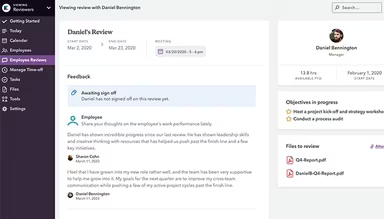
This software is particularly recognized for its capabilities in managing employee performance and tracking. It allows organizations to consolidate performance-related data, facilitating effective communication and alignment of team objectives. By centralizing feedback processes and tracking goals, Kin HR empowers managers to make informed decisions regarding employee development and promotions over time.
How Much Does Kin HR Cost?
The pricing structure for the software begins at $3 per user per month for the Startup plan. Other available plans include:
Studio - $5/user/month
Growth - $6/user/month
Enterprise – Custom Pricing
Additionally, users should be aware of potential extra costs associated with Kin HR:
Implementation And Setup Fee: $1,000 – $5,000
Employee Training: $50 to $150 per trainer/session
Onboarding: $500 – $5,000
NSF/Rejected Deposit Or Wire Transfer Handling: $10 – $50 per occurrence
Please note that pricing is subject to change.
Kin HR Integrations
The platform supports integration with various third-party applications, including Xero.
How Does Kin HR Work?
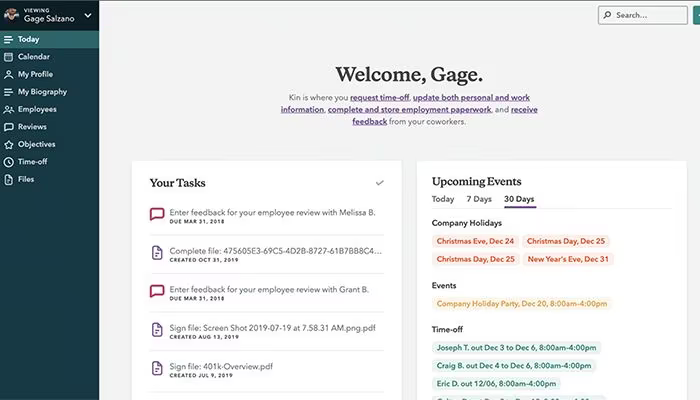
After logging in, users can navigate through the dashboard and utilize Kin HR's features by following this step-by-step guide:
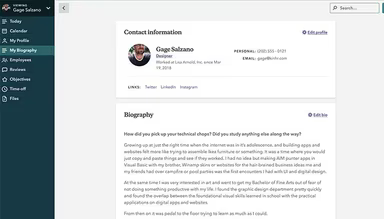
Explore the 'Employee Management' section to view, manage, and add new employees, update their details, and track employment records.
Go to the 'Payroll' section to manage payroll processing for employees, review payroll reports, calculate deductions, and generate pay stubs.
Use the 'Time and Attendance' feature to monitor employee attendance and handle time-off requests; approve or reject requests and view attendance history.
For managing employee benefits, access the 'Benefits Administration' section to enroll employees in benefit plans, update coverage information, and manage open enrollment periods.
Dive into the 'Performance Management' module to set employee goals, conduct reviews, track performance metrics, and give feedback.
Visit the 'Reports and Analytics' section to create detailed reports on various HR metrics like payroll summaries and employee time-off balances.
Check the 'Compliance and Documentation' section to ensure adherence to legal standards and access vital documents such as employee handbooks.
Customize software settings based on your organization’s requirements; configure payroll preferences, set company policies, and manage user permissions.
Utilize the 'Help Center or Support feature' to find resources, FAQs, or contact customer support for assistance while using the software.
You can also schedule a complimentary demo of Kin HR to explore its features further.
Who Is Kin HR For?
The software is suitable for various industries including:
Hospitality
Information Technology
Telecommunications
Kin HR Use Cases
An examination of user reviews alongside Kin HR's functionality reveals several scenarios where this software shines:
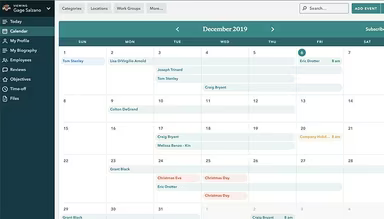
Businesses with Multiple Departments Needing Leave Tracking: Organizations with several departments can utilize Kin HR to standardize leave approvals and absence tracking across teams. Feedback indicates that managers can oversee time-off requests while HR maintains centralized control over all employee documentation. This reduces reliance on email communications and ensures operational continuity through clear leave visibility.
HR Teams Handling High Volumes of Documentation: Companies operating in regulated sectors or those frequently updating policies can depend on Kin HR for organized employee records. This is especially pertinent for businesses preparing for audits or managing large-scale onboarding processes.
Small Businesses Requiring Structured Onboarding: Startups and smaller organizations can leverage Kin HR to formalize their onboarding processes that might otherwise be challenging to manage manually. This structured method helps reduce inconsistencies as hiring accelerates.
Tight-Knit Teams Standardizing Performance Reviews: Smaller companies often engage in informal performance discussions which can lead to inconsistencies. Kin HR enables these teams to standardize feedback mechanisms, goal tracking, and performance discussions. This is particularly beneficial for growing teams where employees report to multiple managers simultaneously.
Is Kin HR Right For You?
If you're in search of HR software that facilitates the creation of meaningful workplaces while efficiently locating employee records, then Kin HR could be an excellent fit. It particularly benefits small to medium-sized businesses seeking streamlined management of time-off requests.
The software employs advanced security measures to safeguard sensitive employee information, ensuring both confidentiality and privacy. It complies with industry standards regarding data protection regulations. Furthermore, Kin HR is designed to scale according to the evolving needs of growing businesses.
If you're still uncertain about using this platform or need more information, feel free to reach out at info@softwareseekers.com for assistance in making your decision.