logo

ManageEngine Remote Access Plus

ManageEngine Remote Access Plus is an all-in-one remote access tool designed to help IT teams effectively resolve issues on endpoints using advanced diagnostic...

0.00 | 0 Reviews

ManageEngine Remote Access Plus is an all-in-one remote access tool designed to help IT teams effectively resolve issues on endpoints using advanced diagnostic...

Product Overview

ManageEngine Remote Access Plus is an all-in-one remote access tool designed to help IT teams effectively resolve issues on endpoints using advanced diagnostic tools. Although certain users have mentioned that the interface could use some improvements, the inclusion of features like Wake on LAN and robust reporting adds significant benefits. In summary, Remote Access Plus stands out as a formidable option for managing endpoints.
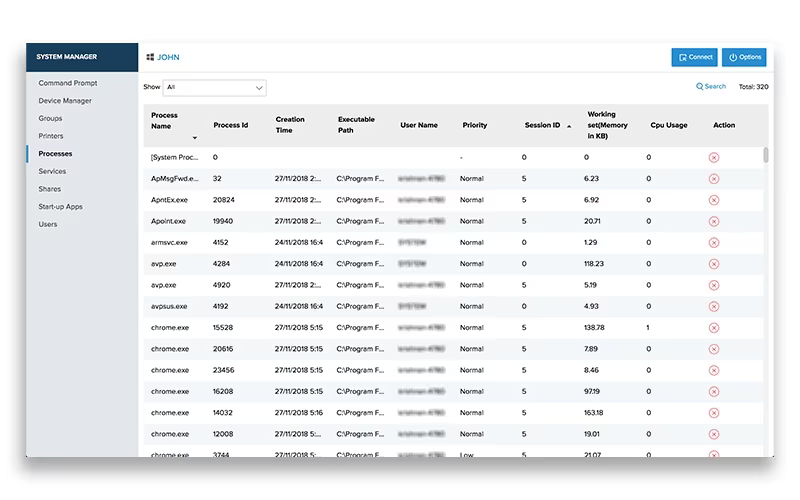
Product Snapshot

Product Details

What Is ManageEngine Remote Access Plus?

ManageEngine Remote Access Plus is a robust enterprise solution designed for remote troubleshooting, enabling system administrators to streamline their routine tasks from a centralized interface. This HIPAA-compliant tool enhances the efficiency of remote troubleshooting, minimizes resolution times, and effectively oversees a remote workforce through an integrated dashboard.

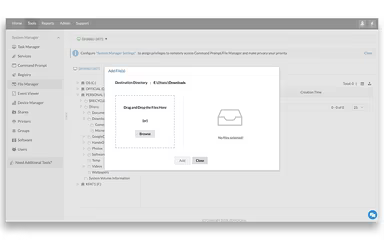
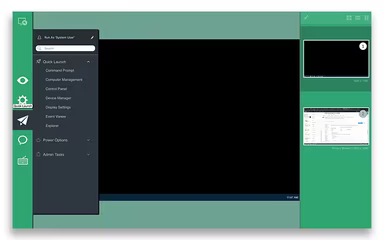
The all-encompassing remote desktop management software equips IT administrators to address any situation with ease. It includes features such as unattended remote access, file transfer capabilities, screen recording, advanced power control, and much more.

ManageEngine Remote Access Plus Pricing

The pricing structure for Remote Access Plus is flexible and tiered, varying based on the deployment model, selected edition, and the number of computers and technicians needed. Here are the pricing details:

  • Free (On-Premises and Cloud): $0 for 1 technician and up to 10 computers

  • Standard (Cloud): Starts at $10/month for 5 technicians and 25 computers

  • Professional (Cloud): Starts at $15/month for 5 technicians and 25 computers

  • Standard (On-Premises): Starts at $75/year for 5 technicians and 25 computers

  • Professional (On-Premises): Starts at $95/year for 5 technicians and 25 computers

Contact us today for a customized pricing quote tailored to your business needs!

Please note that pricing may change.

ManageEngine Remote Access Plus Integrations

This software seamlessly integrates with various systems and platforms, including:

  • ManageEngine ServiceDesk Plus

  • ManageEngine AssetExplorer

  • ServiceNow HR

Check out the demo of Remote Access Plus to discover more about its integration capabilities.

Who Is ManageEngine Remote Access Plus For?

Remote Access Plus serves a diverse array of sectors, including:

  • Agriculture

  • Healthcare

  • Retail

  • Legal

  • Education

Is ManageEngine Remote Access Plus Right For You?

If you're facing challenges in efficiently managing and troubleshooting an increasing number of remote endpoints across various operating systems, then ManageEngine Remote Access Plus could be your solution. As part of Zoho Corp's enterprise IT management division, it provides a consolidated toolkit for system administrators to identify and resolve issues from a single console.

This software is highly regarded for its performance and is relied upon by esteemed organizations like K.M Trading, Carter Newell Lawyers, FutureQuals, and First Oklahoma Bank. Its highlights include enterprise-level security with support for HIPAA compliance, ISO/IEC 27001 standards, and 256-bit AES encryption, ensuring that your remote connections remain secure.

If you’re still uncertain whether ManageEngine Remote Access Plus is suitable for you, reach out to our customer support team at info@softwareseekers.com for assistance.

IT Management Software Features

dashboard
reporting
automation
dashboards
mobile app
mobile crm
purchasing
job costing
audit trails
gps tracking
mobile access
time tracking
web filtering
call recording
call scripting
cloud security
tax management
call monitoring
crm integration
data encryption
lead management
task management
asset management
audit management
expense tracking
maintenance logs
patch management
sales automation
security measure
activity tracking
budget management
context awareness
email integration
invoicing billing
project templates
safety management
sales forecasting
vendor management
contact management
content scheduling
content versioning
invoice management
payroll processing
predictive dialing
project management
project scheduling
visual recognition
alertsnotifications
bank reconciliation
customer management
document management
employee management
financial reporting
firewall protection
incident management
intrusion detection
it asset management
omnichannel support
phishing prevention
real time dashboard
reporting analytics
resource allocation
template management
threat intelligence
workflow automation
financial management
inventory management
performance tracking
smart data discovery
bot design deployment
role based permission
work order management
zero touch deployment
customizable templates
facilities maintenance
multi currency support
multi language support
scheduling dispatching
user activity tracking
analytics and reporting
customer servicesupport
customizable dashboards
predictive capabilities
reporting and analytics
security and compliance
self service dashboards
supply chain management
manufacturing management
media library management
multi channel publishing
vulnerability management
web application security
budgeting and forecasting
natural language dialogue
sales pipeline management
agentic workflow automatio
automated patch management
battery usage optimization
agentic workflow automation
anti virus and anti malware
fan noise reduction control
incident and issue tracking
multi factor authentication
call reporting and analytics
ai driven root cause analysis
security audits and reporting
text to speech speech to text
compliance and risk management
human resources management hrm
interactive voice response ivr
policy and document management
regulatory compliance tracking
risk assessment and mitigation
sales and marketing automation
incident and request management
optimization profile management
predictive maintenance analytics
real time temperature monitoring
remote monitoring and management
it operations management software
third partyvendor risk management
voicemail and callback management
esg metrics tracking and reporting
version control and change tracking
customer relationship management crm
entity extraction with text analytics
real time asset discovery and inventory
content creation and editing tools wysiwyg
anomaly detection and predictive maintenance
integration with help desk and support systems
security information and event management siem
regulatory change monitoring and impact analysis
carbon emissions data capture and calculation tools

Pros

  • Has a simple setup and deployment process
  • Offers easy access and manages multiple systems across different operating systems
  • Allows IT staff to provide timely and seamless support to users

Cons

  • A few users have reported occasional issues with phrasing or grammar
  • Some operations like large file transfers, can be slow due to network bandwidth

Price

Professional

Custom

Get Free Guidance from Our Solution Experts.

Ratings

0.00 | 0 reviews

Ratings Distribution

Positive

0%

Neutral

0%

Negative

0%

User Reviews

No reviews yet

Be the first to share your experience with ManageEngine Remote Access Plus.

Frequently Asked Questions

Find answers to the most common queries about our software recommendation service.

Remote Access Plus seamlessly connects with popular IT and service management tools including ServiceNow HR, ManageEngine AssetExplorer, and ManageEngine ServiceDesk Plus.

ManageEngine Remote Access Plus follows a flexible, tiered pricing model based on the deployment method and selected edition. A Free plan is available for both cloud and on-premises users and supports 1 technician and up to 10 computers. The Standard cloud edition starts at $10/month for 5 technicians and 25 computers, while the Professional cloud edition starts at $15/month for the same capacity. For on-premises deployments, the Standard edition starts at $75/year and the Professional edition at $95/year, both supporting 5 technicians and 25 computers. Organizations with specific requirements can request a customized quote on Remote Access Plus cost.

Yes, Remote Access Plus offers an API.

The software offers various support options including email, chat, and phone support.

Yes, the software offers a mobile app that can be downloaded on iOS and Android devices.

ManageEngine Remote Access Plus is designed for organizations across diverse industries and sectors such as healthcare, education, retail, legal, and agriculture.

The platform supports the English language.