logo

GoTo Meeting

GoTo Meeting facilitates effective remote collaboration by providing dependable video conferencing and screen sharing capabilities. With its smart meeting assis...

0.00 | 0 Reviews

GoTo Meeting facilitates effective remote collaboration by providing dependable video conferencing and screen sharing capabilities. With its smart meeting assis...

Product Overview

GoTo Meeting facilitates effective remote collaboration by providing dependable video conferencing and screen sharing capabilities. With its smart meeting assistant, communication is enhanced through features like automated transcription and key highlights. While the initial setup is straightforward, mastering the more advanced functionalities might necessitate some learning. In summary, GoTo Meeting offers outstanding usability and robust security measures, making virtual teamwork seamless from anywhere.

Product Snapshot

Product Details

What Is GoTo Meeting?

Overview

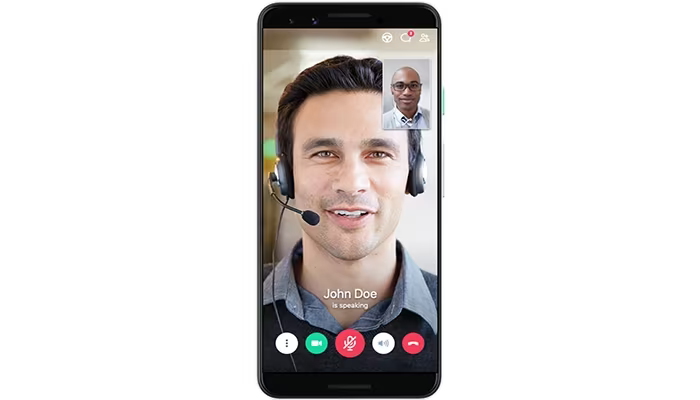
GoTo Meeting stands out as a premier cloud-based solution for online meetings and web conferencing. It enables users to effortlessly host virtual gatherings and presentations, fostering remote teamwork. With secure and dependable online meeting spaces, teams can engage face-to-face from any location using desktops, mobile devices, or conference room setups. This software meets the demand for flexible work arrangements by providing quick and secure access to virtual meetings. Its enterprise-level security is noteworthy, and it boasts an impressive 99.999% service uptime, establishing it as a trustworthy option in the market.

What Is GoTo Meeting Best For?

A standout aspect of GoTo Meeting is its intelligent meeting assistant. This feature automatically transcribes discussions, highlights important points, and identifies action items. Additionally, it captures various sets of presentation slides and organizes them chronologically into a shareable PDF. This capability not only boosts meeting efficiency but also removes the hassle of manual note-taking. The result is a complete record of the meeting that ensures no vital details are missed and simplifies referencing and follow-up.

GoTo Meeting Pricing

GoTo Meeting provides several pricing plans tailored to diverse business needs and budgets. The options include:

  • Professional: $12 per organizer per month (billed annually)

  • Business: $16 per organizer per month (billed annually)

  • Enterprise: Custom Pricing

Consider trying our free trial of GoTo Meeting before making a subscription decision, or contact us for a customized pricing quote.

Please note that pricing may change.

GoTo Meeting Integrations

This software seamlessly integrates with various third-party applications, including:

  • Zoho CRM

  • Docebo

  • CirQlive

  • Microsoft Office 365

  • Salesforce

  • Slack

  • Procore

How Does GoTo Meeting Work?

Follow this guide to navigate the dashboard and utilize the features of the software:

  1. Log in using your GoTo Meeting credentials provided during setup.

  2. The 'Meetings' page will display any upcoming or previous meetings once logged in.

  3. Select the 'Start a Meeting' button at the top to initiate a new meeting.

  4. Set up your video meeting details such as topic, date, time, and recurrence, then invite participants via email.

  5. Your participants can click on the 'Join Meeting' link in their confirmation email when ready to join.

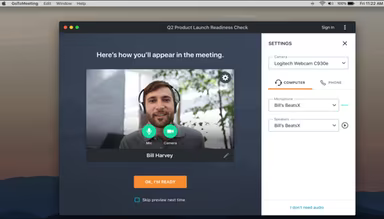
  6. Accept any prompts from your browser for microphone and camera access.

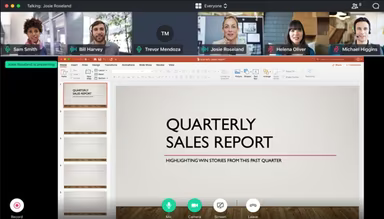
  7. Dive into the in-meeting controls to share your screen, mute or unmute audio, or start recording.

  8. The meeting host can communicate with attendees through voice, chat, or a virtual hand-raising signal.

  9. Conclude the meeting by clicking the 'Leave Meeting' button once your discussion is finished.

You can also schedule a free demo of GoTo Meeting for an extensive look at its features.

Who Is GoTo Meeting For?

GoTo Meeting is utilized by organizations of all sizes across various industries and sectors including:

  • Legal

  • Healthcare

  • Aerospace

  • Education

  • Information Technology

Is GoTo Meeting Right For You?

If you seek a dependable virtual meeting platform to connect remote teams and conduct professional client meetings through secure video conferencing, then GoTo Meeting might be the ideal solution for your organization.

This service is recognized as the largest online meeting provider with over 800k organizations globally relying on it. It guarantees consistent connectivity through proven scalability and an impressive 99.999% uptime. Joining sessions is straightforward, while features like small group virtual meetings, screen sharing, file transfers, and VoIP conferencing enhance productivity for distributed teams.

The software employs military-grade security measures such as AES 256-bit encryption to safeguard all video conferences and data transmissions. Features like mandatory passcodes, attendance reports, and host controls contribute to secure collaboration. Additional functionalities like reliable VoIP calling, automated meeting transcripts, cloud recording, and integrations with leading platforms such as Outlook and Slack enrich the virtual meeting experience. As the 'Best Overall Web Conferencing Solution', GoTo Meeting continues to be a favored choice for efficient and budget-friendly virtual collaboration.

If you require assistance assessing whether GoTo Meeting fits your organization's needs, please reach out to us at info@softwareseekers.com. We are here to help you select the right secure video conferencing platform for effective face-to-face virtual collaboration anytime and anywhere.

Legal Software Features

dashboard
invoicing
redaction
reporting
automation
dashboards
ediscovery
esignature
mobile app
mobile crm
purchasing
e signature
integration
audit trails
file sharing
sales orders
telemedicine
client portal
clio software
collaboration
mobile access
time tracking
learner portal
sales tracking
tax management
case management
lead management
online payments
rent collection
task management
asset management
customer support
expense tracking
lease management
legal accounting
maintenance logs
order fulfilment
order management
sales automation
trust accounting
activity tracking
billing invoicing
budget management
claims management
client management
context awareness
data importexport
document analyzer
email integration
project templates
safety management
sales forecasting
tenant management
vendor management
activity dashboard
applicant tracking
contact management
content scheduling
content versioning
data visualization
demand forecasting
invoice management
meeting scheduling
payroll processing
project management
project scheduling
returns management
visual recognition
ai powered insights
alertsnotifications
attendance tracking
bank reconciliation
collaboration tools
compliance security
compliance tracking
document automation
document management
employee management
employee onboarding
facility management
financial reporting
incident management
property accounting
reporting analytics
resource allocation
template management
training management
workflow automation
workflow management
client communication
financial management
inventory management
maintenance requests
merchandise transfer
patient demographics
performance tracking
smart data discovery
warehouse management
asynchronous learning
billing and invoicing
bot design deployment
business intelligence
client management crm
customer segmentation
ecommerce integration
inspection management
litigation management
role based permission
work order management
customizable templates
customizable workflows
e commerce integration
facilities maintenance
legal billing software
legal spend management
multi currency support
multi language support
opportunity management
performance management
procurement management
reporting and analytic
supply chain analytics
user activity tracking
analytics and reporting
benefits administration
certification licensing
compensation management
compliance and security
customer servicesupport
customizable dashboards
mobile access web based
predictive capabilities
reporting and analytics
self service dashboards
supply chain management
alerts and notifications
business intelligence bi
case management software
deal pipeline management
e signature capabilities
logistics transportation
manufacturing management
media library management
multi channel publishing
social media integration
training and development
bot design and deployment
budgeting and forecasting
customizable formsreports
legal workflow automation
natural language dialogue
sales pipeline management
trust accounting software
access controlspermissions
human resources management
legal research integration
account and case management
compliance security feature
customer contact management
document automationassembly
attendance and time tracking
compliance security features
court calendaring scheduling
document automation assembly
employee self service portal
task and activity management
text to speech speech to text
ai facilitated legal solutions
compliance and risk management
customizable forms and reports
human resources management hrm
sales and marketing automation
compliance and security feature
customer communication tracking
employee information management
appointment managementscheduling
compliance and security features
court calendaring and scheduling
customer relationship management
delivery planning and scheduling
integration with marketing tools
supplier relationship management
integration with third party apps
text to speech and speech to text
client relationship management crm
integration with third party tools
legal document management software
recruitment and applicant tracking
reporting and analytics dashboards
legal knowledge management software
customer relationship management crm
entity extraction with text analytics
legal calendaring and docketing software
content creation and editing tools wysiwyg
anomaly detection and predictive maintenance
client portal ediscovery portal for defense attorneys

Pros

  • Video conferencing with signed business associate agreement
  • Active speaker view and participant controls for moderators
  • Reliable audio and video quality
  • Excellent screen sharing and file-sharing features

Cons

  • Limited customization options for meetings
  • Initial setup might take some time

Price

Professional

$12

Get Free Guidance from Our Solution Experts.

Ratings

0.00 | 0 reviews

Ratings Distribution

Positive

0%

Neutral

0%

Negative

0%

User Reviews

No reviews yet

Be the first to share your experience with GoTo Meeting.

Frequently Asked Questions

Find answers to the most common queries about our software recommendation service.

Yes, it has an API to use.

It supports the English language.

GoToMeeting software integrates with many third-party applications that include Salesforce, Zoho CRM, Microsoft Office 365, Procore, Docebo, Slack, and CirQliv.

Yes, it is optimized for mobile devices.

GoToMeeting prices are flexible and tailored to meet different business needs and budgets. The plans include GoTo Meeting Professional at $12 per organizer per month (billed annually) and GoTo Meeting Business at $16 per organizer per month (billed annually). For GoTo Meeting enterprise plans, you can get a custom price or contact us for a GoTo Meeting cost quote today.

GoTo Meeting software is used by remote access workers or organizations of all sizes across various industries, such as healthcare, education, information technology, legal, and automotive.

The support options offered include phone support, email, help desk, FAQs, and a knowledge base.