

NextChapter
Streamline your bankruptcy case preparation with NextChapter's user-friendly, cloud-based legal software designed for remote accessibility and collaboration.
Key Insights
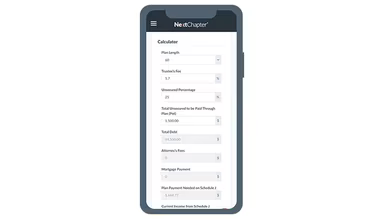
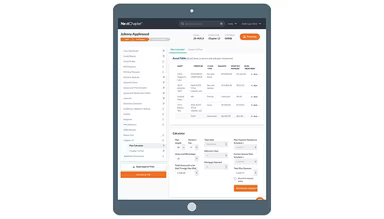
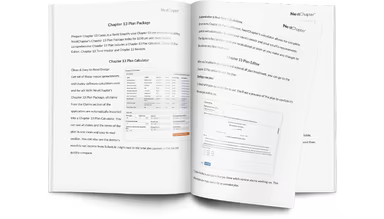
Derived from customer feedback, NextChapter is a cloud-based legal solution utilized by lawyers, paralegals, and small to medium-sized legal teams for managing bankruptcy cases. Users appreciate its user-friendly interface and the ability to access it remotely, although the complexity of setup remains a common issue. Recently, the software introduced an upgraded Chapter 13 plan featuring an in-app calculator, an editable plan editor, time tracking capabilities, and improved payment visibility.
Our Assessment
NextChapter is particularly effective for firms that manage bankruptcy cases and require organized, straightforward case management. It is ideal for solo practitioners to mid-sized teams that prioritize remote access and collaborative processes. The pricing structure is generally affordable for smaller firms. In summary, it serves as a reliable option for firms specializing in bankruptcy that seek consistency and efficient coordination.
What Is NextChapter?
NextChapter is a cloud-based legal software tailored for bankruptcy lawyers. It simplifies case management and document creation, effectively tackling frequent issues like lengthy filing processes and compliance hurdles. This allows legal professionals to dedicate more time to their clients. The platform’s intuitive design enables legal teams to adapt swiftly while ensuring high service quality, leading to enhanced client satisfaction and more efficient operations.
What Is NextChapter Best For?
NextChapter shines in automating the generation of legal documents through its unique linear workflow. By allowing attorneys to enter information once, the system automatically fills out all pertinent bankruptcy forms and schedules, eliminating repetitive data entry. This efficient method drastically shortens the preparation time for intricate bankruptcy cases while also reducing errors.
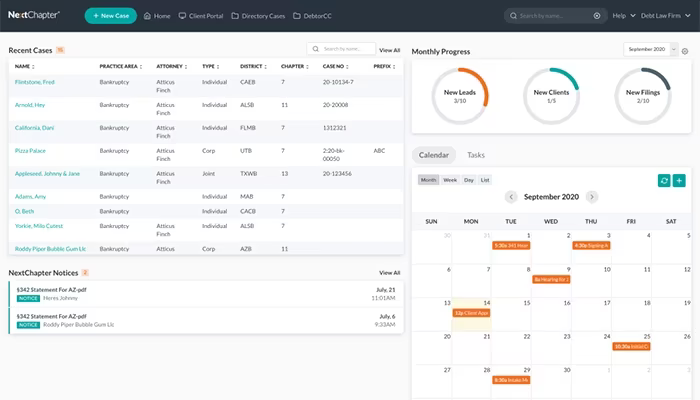
Lawyers can develop reusable custom legal document templates, expediting case preparation. The automation features extend beyond documents, incorporating client communication tools such as automated reminders for hearings and appointments.
How Much Does NextChapter Cost?
The vendor provides three pricing tiers based on the size of the firm and specific requirements:
Pro Basic - $159 (up to 4 cases/year), $649 (up to 11 cases/year), and $999 (unlimited cases/year)
Pro+ - $1,099 (up to 11 cases/year), and $1,599 (unlimited cases/year)
Whoa Package - $1,999 (unlimited cases/year)
For a customized cost estimate for NextChapter, feel free to reach out!
Please note that pricing may vary over time.
NextChapter Integrations
This software integrates smoothly with various third-party applications, including:
Clio software
Infusionsoft by Keap
TransUnion
Google
Outlook
iCloud
Usio
How Does NextChapter Work?
Start by entering client details into the system. NextChapter's linear workflow assists in gathering all essential information for bankruptcy cases.
After data entry, the platform automatically fills out all relevant bankruptcy forms and schedules.
Create legal documents using pre-built or custom templates.
Review the auto-generated documents within the platform. Make any necessary adjustments or additions to ensure they meet specific case requirements.
Submit completed forms electronically and utilize automated communication tools to remind clients about hearings, deadlines, and appointments.
You can watch a free demo of NextChapter to explore its integrations further.
Who Is NextChapter For?
This software is suitable for businesses of all sizes within the legal sector.
NextChapter Use Cases
Based on user feedback and NextChapter’s capabilities, here are scenarios where this platform fits well within legal practices:
Bankruptcy Attorneys Handling High Filing Volumes: Firms managing numerous Chapter 7 or Chapter 13 cases find value in NextChapter’s organized, deadline-focused workflows. It keeps attorneys organized when dealing with multiple filings simultaneously. A user remarked that it “keeps the entire bankruptcy process moving without bottlenecks,” catering well to high-volume practices.
Sole Practitioners or Small Firms Seeking Simple Workflows: Smaller firms benefit from a system that minimizes manual tasks without introducing unnecessary complexity. NextChapter aids solo practitioners and small teams with straightforward case preparation and filing processes, simplifying the management of repetitive tasks.
Firms Transitioning Away From Manual or Paper-Based Methods: Organizations moving from spreadsheets or handwritten notes often turn to NextChapter for a more seamless transition. Its structured approach aligns with standard bankruptcy case progressions, helping teams modernize gradually without overhauling their entire process all at once.
Multi-Attorney Teams Needing Clear Task Coordination: Practices where responsibilities are shared among attorneys, paralegals, and support staff gain from centralized task tracking. NextChapter keeps teams aligned as various individuals manage intake, document organization, and court submissions, reducing confusion regarding ownership and deadlines.
NextChapter User Sentiments
Most Positive Sentiments
Ease of Use & Accessibility: 60% were Positive; 10% were Negative; 30% were Neutral.
A majority of users find NextChapter easy to navigate compared to older desktop-based bankruptcy solutions. One reviewer noted that “the system interface populates the necessary fields on the bankruptcy petition, making it easier and less time-consuming to complete a bankruptcy petition.”
Least Positive Sentiments
Initial Setup Complexity: 30% were Positive; 50% were Negative; 20% were Neutral.
A few users point out a learning curve when adapting to NextChapter, particularly regarding form linking and data mapping.
Cloud-Based Access & Remote Work Flexibility: 55% were Positive; 5% were Negative; 40% were Neutral.
A significant number appreciate being able to access case files remotely from any device or location.
Issues with Forms & Templates: 20% were Positive; 65% were Negative; 15% were Neutral.
User feedback indicates some schedules or local forms may not be user-friendly or require manual updates before submission.
Responsive Customer Support: 50% were Positive; 10% were Negative; 40% were Neutral.
The support team receives high praise. One user commented that support “has been exceptional,” with a “chat feature” available for inquiries.
Occasional Performance Lag: 5% were Positive; 75% were Negative; 20% were Neutral.
A few reviewers have reported slow performance during times of weak connectivity.
Is NextChapter Right For You?
A respected choice in the legal field, NextChapter boosts efficiency and accuracy in navigating complex bankruptcy cases. The software is secure and scalable, ultimately saving time and resources. With cost-effective pricing plans available, it stands as an excellent option for any law firm.
If you’re still unsure whether NextChapter is suitable for you, reach out to our customer support team at info@softwareseekers.com for assistance in making your decision!