

Smokeball
Smokeball streamlines workflows for law firms with intuitive features and Archie Apps, enhancing efficiency and reducing errors. Modernize your practice today!
Key Highlights
Insights drawn from customer feedback
Smokeball serves as a comprehensive practice management solution tailored for attorneys, paralegals, and their teams. It enhances everyday operations through its user-friendly features. Many users commend its simplicity; however, there are some mentions of sluggish loading speeds. Recently, Smokeball launched Archie Apps, designed to minimize human errors and accelerate the delivery process.
Our Assessment
Smokeball stands out as an excellent choice for small to medium-sized law firms looking to refine their workflows and boost operational productivity. The pricing is competitive for firms aiming to enhance efficiency among various team members. In summary, it comes highly recommended for practices focused on modernizing their operations while ensuring secure and scalable workflows.
What Is Smokeball?
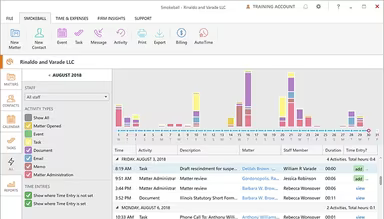
Smokeball is a legal practice management solution that operates in the cloud, specifically designed for law firms. This software helps streamline operations by tackling prevalent challenges such as tedious administrative tasks and inefficient workflows. By providing all-encompassing management tools, Smokeball minimizes manual efforts and boosts organization across the firm. The primary aim of this software is to enhance both productivity levels and client service quality.
What Is Smokeball Best For?
Smokeball is particularly renowned for its AI-driven legal assistant named ‘Archie’. This innovative feature revolutionizes how law firms approach document creation and legal research. The platform's artificial intelligence capabilities can draft intricate legal documents, scrutinize case law, and deliver prompt responses to legal inquiries, ensuring precision and proper citation of relevant sources.
The intelligent automation allows lawyers to accomplish tasks that traditionally required hours in just a few minutes. This efficiency enables legal professionals to concentrate on more valuable client interactions and strategic initiatives.
How Much Does Smokeball Cost?
The software provides four distinct pricing plans tailored to the size and requirements of the firm. These plans include:
Bill: Custom Pricing
Boost: Custom Pricing
Grow: Custom Pricing
Prosper+: Custom Pricing
Reach out to us for a customized estimate regarding Smokeball pricing today!
Please note: Pricing may vary.
Smokeball Integrations
Smokeball integrates effortlessly with a variety of third-party applications, including:
Birdeye
Zoom
QuickBooks
Microsoft Outlook
Microsoft Word
LawPay
How Does Smokeball Work?
To begin using the practice management software, log in with your credentials and follow these steps:
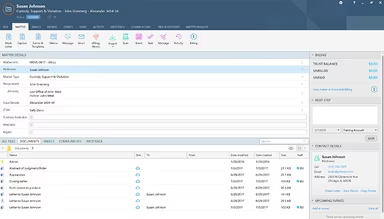
Access case files, client information, and essential documents from your dashboard.
Utilize pre-made templates to create pleadings, letters, and various legal documents.
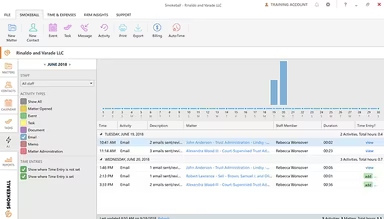
Monitor tasks, deadlines, and case developments to stay organized.
Make use of Smokeball AI to summarize cases, draft emails, and assist with routine responsibilities.
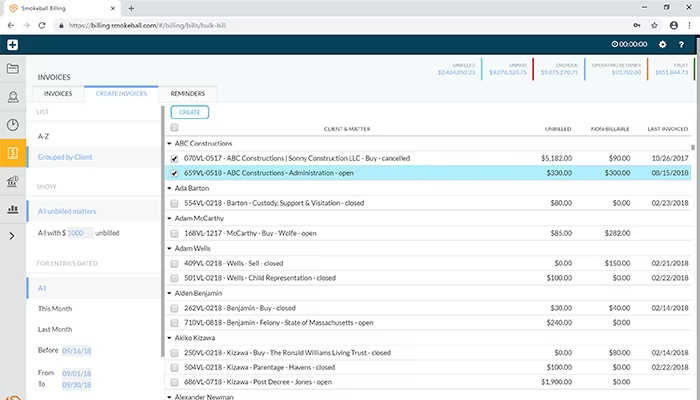
Handle billing and invoicing directly within the platform for quicker collections.
Collaborate with your team remotely and access matters from any location.
Schedule a demo with Smokeball to receive a visual overview of the software's features.
Who Is Smokeball For?
This software is primarily aimed at a range of businesses within the legal sector. This encompasses:
Family law
Personal injury
Real estate
Criminal law
Civil litigation
General practice
Business law
Smokeball Use Cases
An analysis of user feedback and Smokeball's current functionalities reveals several scenarios where this software can greatly benefit law firms:
Small To Mid-Sized Law Firms Managing Daily Workflows:
This software is ideal for small to mid-sized firms aiming to optimize their daily operations. Smokeball assists teams in managing numerous cases without the complexity of intricate systems, allowing all staff members, regardless of tech proficiency, to maintain productivity. Users have noted that even those who are not particularly tech-savvy can quickly adapt and consistently utilize the platform.
Practices Focused On Remote Or Hybrid Work:
For firms with geographically dispersed teams or flexible work environments, Smokeball offers a unified space to access case information and client communications from anywhere. This ensures that staff remain coordinated without relying on multiple disconnected tools, supporting seamless work continuity outside the office.
Firms Seeking Simplified Client Communication:
This software caters to practices that emphasize keeping clients informed and engaged. Firms can track communications, create summaries, and ensure timely updates, which helps minimize missed deadlines and follow-up delays. This feature is especially beneficial for firms managing numerous clients at once.
New Firms Implementing Technology For The First Time:
Laws practices transitioning to a digital workflow for the first time find Smokeball user-friendly. The onboarding process is reported as straightforward and effective, with responsive support available for setup and training. This facilitates easier management of cases digitally without causing significant disruption.
Smokeball User Sentiments
Most Positive Sentiments
Ease Of Use & Workflow Performance Issues:
75% were Positive
10% were Negative
15% were Neutral
User feedback indicates appreciation for how well Smokeball organizes daily tasks, manages cases effectively, and maintains ease of use for all staff members, including those less familiar with technology. One user remarked, “Even staff who are not tech-savvy can rely on the platform daily for all matters.”
Least Positive Sentiments
Document Automation & Templates Billing & Invoicing:
65% were Positive
15% were Negative
20% were Neutral
The automated document creation feature is praised for reducing formatting mistakes and speeding up the generation of pleadings. However, some users find billing processes cumbersome due to a steep learning curve or occasional invoice processing errors. One user commented that “Billing is sometimes confusing and requires multiple steps to complete accurately.”
Centrally Managed Case Management Customer Support Challenges:
55% were Positive
20% were Negative
25% were Neutral
The consolidation of case files, documents, deadlines, and client information simplifies collaboration while minimizing errors. A user expressed satisfaction by saying, “All my matters and documents are in one place, making case management straightforward.” However, some users report slow response times or limited assistance with resolving complex issues. While remote support is available, it may not always be prompt.
Is Smokeball Right For You?
This software primarily serves legal professionals looking to automate routine processes while enhancing overall efficiency. It stands out as an excellent option for law firms aiming to modernize their operations. With its scalability and security features along with award-winning onboarding support, it’s designed to meet various needs.
If you're wondering whether Smokeball is suitable for you, reach out to our customer support team at (661) 384-7070; they will assist you in making an informed decision.