logo

BRIDGE LMS

Bridge LMS transforms employee training through a flexible cloud-based platform that boasts powerful video functionalities along with integrated editing tools....

0.00 | 0 Reviews

Bridge LMS transforms employee training through a flexible cloud-based platform that boasts powerful video functionalities along with integrated editing tools....

Product Overview

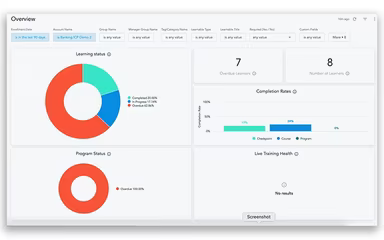
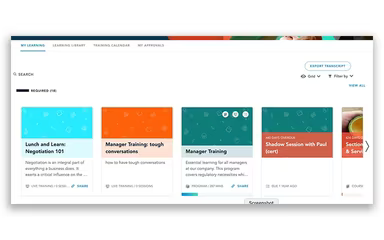
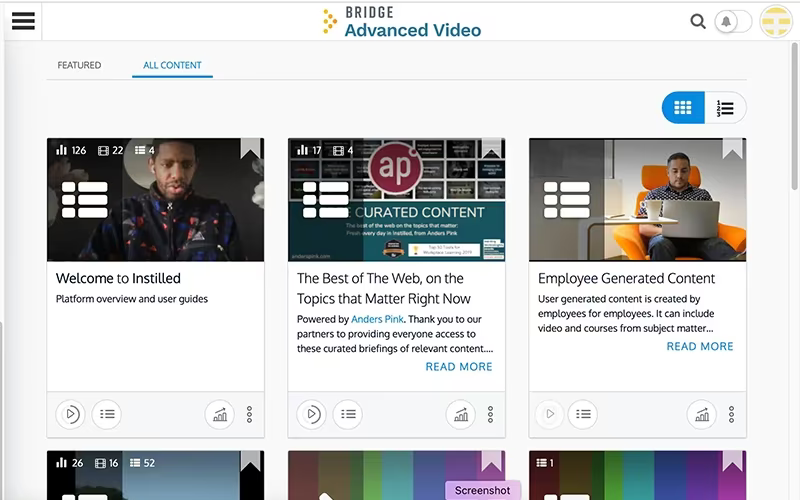
Bridge LMS transforms employee training through a flexible cloud-based platform that boasts powerful video functionalities along with integrated editing tools. The interactive features promote engaging online learning experiences, and the system's ability to monitor performance and manage compliance guarantees effective skill enhancement. Although there are some restrictions on interface customization, Bridge LMS continues to be a valuable tool for streamlining and improving workforce education.
Product Snapshot

Product Details

What Is Bridge LMS?

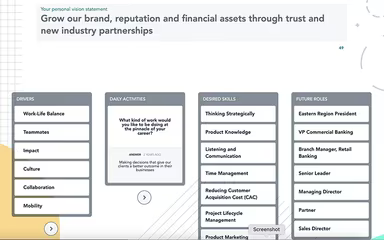
Bridge LMS is a cloud-driven platform designed for managing learning and training for employees. It merges elements of performance management, career development, and engagement tracking into a singular solution. The software enhances the educational experience with features such as video, audio, and animations, facilitating interactive lessons on fundamental topics, bidding strategies, and defensive tactics.

What Is Bridge LMS Best For?

The software is particularly recognized for its exceptional customer support and user-friendly interface. Users can rely on the customer support team, available around the clock, to help with inquiries or provide assistance in maximizing the software's potential. Furthermore, its intuitive design allows users to navigate effortlessly and locate necessary information swiftly.

Bridge LMS Pricing

Bridge LMS provides three distinct pricing plans:

  • Learn

  • Learn & Develop

  • Perform

These plans come with custom pricing options. Reach out to us for a personalized quote that aligns with your specific needs.

Bridge LMS Integrations

The Bridge LMS seamlessly integrates with various third-party applications, including:

  • BambooHR

  • Workday

  • UKG

  • Oracle

  • Ceridian

  • SyncHR

How Does Bridge LMS Work?

Getting started with the Bridge learning management system is straightforward once it is installed:

  1. Access the Bridge LMS platform using the credentials provided by the vendor.

  2. Create user accounts and adjust the platform settings to meet your needs.

  3. Import learner data into the system, including names, email addresses, and course assignments.

  4. Develop new courses or upload existing materials onto the platform.

  5. Enroll learners in their required courses.

  6. Track learners’ progress and course completion through comprehensive analytics and reporting tools.

  7. Offer feedback to learners via platform communication tools like discussions, comments, and messaging.

  8. Utilize gamification features to inspire and engage learners.

Schedule a complimentary demo of Bridge today to explore its capabilities further.

Who Is Bridge LMS For?

A variety of industries benefit from using Bridge LMS software, including:

  • Healthcare

  • Financial services

  • Construction

  • Non-profit organizations

Is Bridge LMS Right For You?

If you seek a robust learning management system that fosters employee growth and development, then Bridge LMS could be an excellent fit. The platform supports SCORM compliance and certification, guaranteeing that employees receive current training materials.

The scalability of Bridge LMS ensures that it can grow along with your business, eliminating concerns about outgrowing the system or needing to switch platforms later on. Additionally, it offers opportunities for peer-to-peer practice and live training sessions.

If you still have questions regarding the software, feel free to reach out to us at info@softwareseekers.com. We would be delighted to assist you with any inquiries you may have.

LMS Software Features

compliance
free trial
mobile app
mobile crm
quiz maker
ai features
cloud based
gamification
telemedicine
corporate lms
ispring cloud
learner porta
call recording
call scripting
learner portal
patient portal
call monitoring
content library
course creation
crm integration
e prescriptions
lab integration
lead management
lms for schools
mobile learning
personalization
user management
course templates
activity tracking
assessmentquizzes
claims management
email integration
progress tracking
sales forecasting
virtual classroom
activity dashboard
applicant tracking
contact management
content management
course development
customizable forms
elearning platform
predictive dialing
student assessment
attendance tracking
collaboration tools
mobile lms software
omnichannel support
real time dashboard
scorm compliant lms
training management
workflow automation
application tracking
inventory management
patient demographics
247 technical support
asynchronous learning
basic access controls
billing and invoicing
customer segmentation
opportunity management
analytics and reporting
certification licensing
hr workforce management
online course platforms
reporting and analytics
supply chain management
certifications licensing
cloud based lms software
course creation software
channel training software
social learning platforms
access controlspermissions
digital learning solutions
employee training software
lms for corporate training
virtual classroom software
access controls permissions
certification and licensing
corporate training software
higher education technology
limited collaboration tools
sources and related content
student engagement platform
call reporting and analytics
certifications and licensing
compliance training software
human resources management hrm
interactive voice response ivr
learning management system lms
access controls and permissions
certification and credentialing
certification tracking software
online exam management software
saas learning management system
appointment managementscheduling
certification licensing software
integration with marketing tools
learner portalactivity dashboard
learning content management system
activity dashboard activity tracking
customer relationship management crm
integration with helpdesks and support systems

Pros

  • Customizable solution for employee learning and development
  • A built-in editor for creating engaging courses
  • In-depth reporting for performance and engagement metrics

Cons

  • Steep learning curve, according to some Bridge users
  • Limited customization options for the overall look

Price

Professional

Custom Pricing

Get Free Guidance from Our Solution Experts.

Ratings

0.00 | 0 reviews

Ratings Distribution

Positive

0%

Neutral

0%

Negative

0%

User Reviews

No reviews yet

Be the first to share your experience with BRIDGE LMS.

Frequently Asked Questions

Find answers to the most common queries about our software recommendation service.

The vendor offers three pricing plans: Learn, Learn & Develop, and Perform. Contact us for a tailored Bridge LMS cost quote.

The typical users of Bridge LMS software include several industries, such as healthcare, financial services, construction, and non-profit organizations.

The application supports several languages, including English, Chinese, Czech, Dutch, French, German, Hungarian, Italian, Japanese, Korean, Russian, Spanish, and Swedish.

Yes, Bridge LMS supports iOS and Android devices.

Yes, Bridge LMS offers an API to its users.

The software integrates with the following third-party applications: BambooHR, Workday, UKG, Oracle, Ceridian, and SyncHR.