

CloudShare
Create and share virtual IT labs in minutes with CloudShare, enhancing your sales and training processes through powerful integrations and analytics.
With CloudShare, you can effortlessly build and distribute virtual IT labs in just a few minutes through your web browser. Additionally, CloudShare provides integrations, policies, and analytics that can enhance and optimize your organization's sales and training workflows.
What Is CloudShare?
Overview
CloudShare is a virtual training solution hosted in the cloud that empowers organizations to effortlessly design, implement, and oversee courses along with hands-on training initiatives. Its intuitive interface streamlines the course creation process, enables progress monitoring, and facilitates learner evaluations across diverse sectors.
A key highlight of CloudShare is its automated cost management feature, which assists organizations in effectively overseeing their training resources. Furthermore, CloudShare is known for its outstanding customer support, which aids in crafting demos, conducting training sessions, and developing proof of concept (POC) projects.
What Is CloudShare Best For?
The software is acclaimed for providing an outstanding hands-on demo experience, exceptional virtual training options, and a powerful lab environment. With CloudShare, users can create extensive training programs that utilize a range of content formats. The platform allows for the development of engaging and interactive training materials tailored to various learning preferences and goals.
CloudShare Pricing
The provider presents straightforward pricing plans customized to meet the specific needs of organizations. Request a personalized quote for CloudShare costs today.
CloudShare Integrations
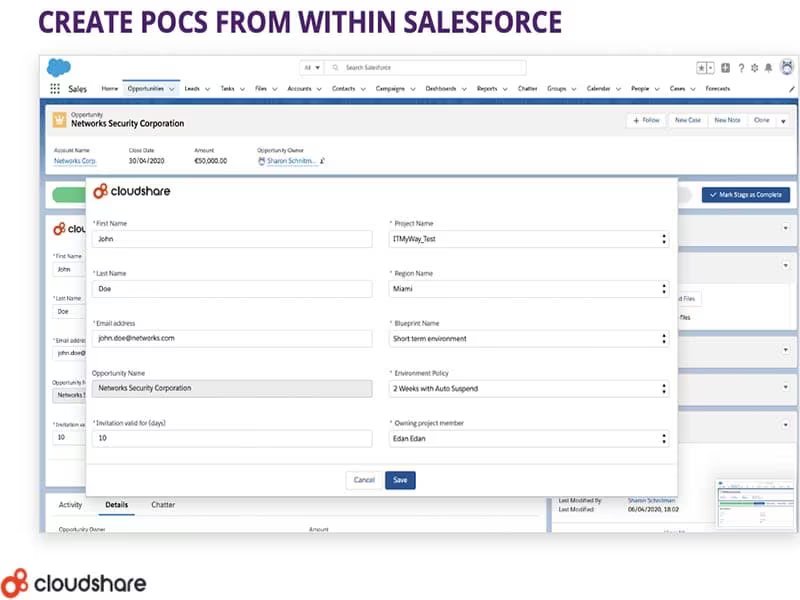
CloudShare seamlessly integrates with numerous third-party applications, such as:
Salesforce
Docebo
Atlassian
Slack
Webhooks
Google
How Does CloudShare Work?
After logging into CloudShare, you can navigate the software as follows:
Explore the user-friendly dashboard to familiarize yourself with the layout.
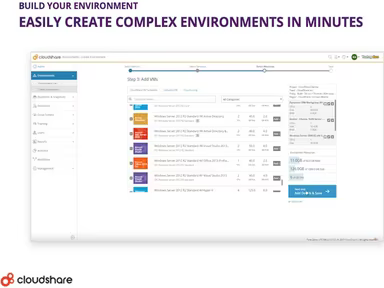
Select the ‘Create Environment’ option to establish a new IT lab.
Modify settings and preferences to suit your requirements.
Add or remove users and assign roles and permissions accordingly.
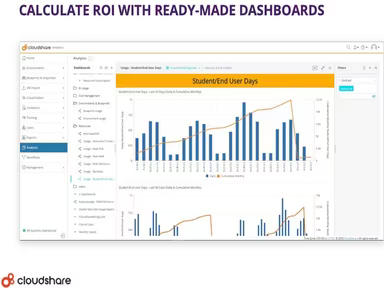
Monitor usage and performance through real-time analytics.
Utilize interactive features for training and demonstrations.
You can also view a complimentary CloudShare demo to discover more about its features.
Who Is CloudShare For?
This platform is tailored for a wide range of businesses, from small enterprises to large corporations. It serves various sectors, including:
IT
Education
Software development
Is CloudShare Right For You?
If you are searching for an all-encompassing and user-friendly solution to efficiently manage your IT lab environments, CloudShare could be an ideal choice!
The platform boasts strong security protocols to safeguard your data and environments. Additionally, it offers scalability options that allow you to modify the size and capacity of your labs as your organization expands.
If you’re still uncertain about whether this software suits your needs based on reviews of CloudShare, reach out to us at info@softwareseekers.com. Our knowledgeable team is here to assist you in making an informed choice.