

Comevo
Transform your institution's learning experience with Comevo, the dynamic virtual orientation software that ensures seamless integration and secure support.
Transform the learning journey at your institution with Comevo, an innovative virtual orientation platform designed for today's digital landscape. Although its robust capabilities might appear daunting at first, effective communication features and extensive support facilitate smooth implementation. Even though it may require considerable resources, its adherence to GDPR standards and scalable framework guarantee a secure and flexible solution.
What Is Comevo?
Overview
Comevo is a virtual orientation platform tailored for training programs in colleges and universities. Its intuitive interface, paired with a variety of features, enhances the experiences of both students and employees. Furthermore, it simplifies the process of delivering personalized and engaging tools that boost efficiency, enabling you to meet deadlines effectively.
What Is Comevo Best For?
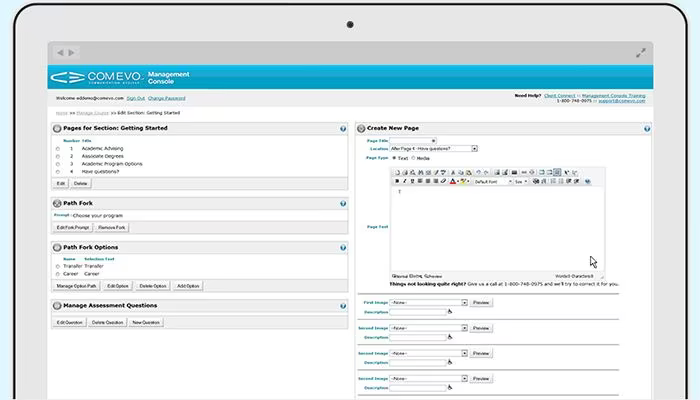
This software includes the Decision PathFork feature, which directs users along a customized learning journey that caters to their unique needs. Administrators can create branching scenarios that adjust dynamically based on user interactions. This ensures that participants receive the most pertinent information for their situation, resulting in a more engaging and productive learning experience.
Comevo Pricing
The software provides several pricing options:
Basic: $333/month
Premium: $583/month
Deluxe: $758/month
You can also inquire about personalized pricing options today!
Please note that prices may vary.
Comevo Integrations
The platform is compatible with various third-party applications; however, specific details have not yet been disclosed by the vendor.
How Does Comevo Work?
Follow this step-by-step guide to navigate the dashboard and utilize Comevo's features:
After logging in, visit the 'Software' section to explore different features and modules available for virtual orientation.
Select 'Orientation and Training' to access this particular module.
Employ content creation tools to produce engaging learning materials, which include writing text-based content, uploading videos and images, and adding interactive components.
Take advantage of multimedia management functions to organize and refresh multimedia content for your orientation and training programs.
Create quizzes and assessments using the assessment creation tool to measure learners' comprehension and retention of knowledge.
Utilize learner tracking features to oversee progress, monitor completion rates, and generate reports.
Investigate additional functionalities like 'Dynamic Q & A,' 'Placement,' 'Checklist,' 'Survey,' and 'Automated Messaging' to enrich the learning experience while simplifying administrative duties.
Access blogs, white papers, case studies, webinars, and content production services in the 'Resources' section for further insights into the LMS.
You can also schedule a free Watch Demo to discover more about its capabilities.
Who Is Comevo For?
The Comevo software serves various sectors and industries including:
Construction
Non-profit
Government
Healthcare
Higher education
Is Comevo Right For You?
If you're seeking an easy-to-use solution for online orientation and training requirements, Comevo could be an excellent fit. It complies with GDPR regulations while ensuring robust security and privacy protocols. The software follows industry-standard security practices to safeguard sensitive information.
It offers secure access controls, data encryption, and regular updates to enhance security against data breaches. Additionally, its scalable design allows it to support the needs of expanding businesses.
If you still have questions about whether Comevo is right for you or need further details, reach out to us at info@softwareseekers.com, and we’ll assist you in making an informed choice.