logo

Kannu

Experience the potential of interactive education through Kannu. This cutting-edge platform delivers an engaging and dynamic environment for both teachers and s...

0.00 | 0 Reviews

Experience the potential of interactive education through Kannu. This cutting-edge platform delivers an engaging and dynamic environment for both teachers and s...

Product Overview

Experience the potential of interactive education through Kannu. This cutting-edge platform delivers an engaging and dynamic environment for both teachers and students. With effortless mobile access and insightful analytics, Kannu enables educational institutions to develop rich media settings that encourage collaboration and promote development. Begin your journey with Kannu today.

Product Snapshot

Product Details

What Is Kannu?

Overview

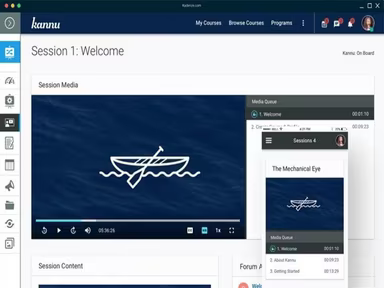
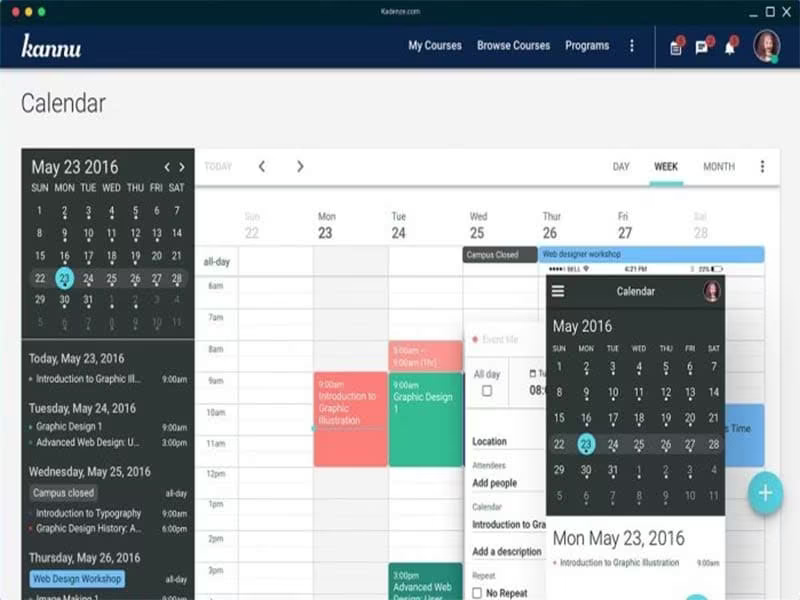
Kannu is an innovative cloud-based Learning Management System (LMS) designed to assist organizations in crafting and delivering online courses. It also supports the management of educational materials and training initiatives. Users can create engaging courses utilizing various content types, such as videos, quizzes, and interactive discussions. The platform's responsive design guarantees that it works seamlessly on both desktop and mobile devices.

What Is Kannu Best Known For?

Kannu is particularly recognized for its impressive course galleries, which allow for real-time sharing of different media formats. This feature fosters collaborative learning experiences both in and out of the classroom, enabling students to interact with various media and offer their feedback.

Kannu Pricing

The pricing options for Kannu are adaptable and tailored to meet the specific needs of your organization. Obtain a customized quote based on your company's requirements and size.

Kannu Integrations

Currently, the vendor has not disclosed any details regarding third-party integrations.

How Does Kannu Work?

Here’s a step-by-step guide on navigating the Kannu software dashboard to maximize its features:

  1. Create an account on the Kannu Software website.

  2. Establish your organization’s profile by entering necessary information.

  3. Personalize your LMS platform with themes, colors, and logos.

  4. Develop courses and enroll students either individually or in bulk.

  5. Track student progress through analytics and reporting tools.

  6. Enhance communication between learners and instructors.

  7. Incorporate quizzes, discussions, and assignments for a more interactive learning experience.

  8. Leverage built-in communication tools for updates and assistance.

  9. Monitor learner progress with grade books and analytics.

  10. Request a free Kannu demo to explore its functionalities further.

Who Is Kannu For?

The Kannu LMS is adaptable software that serves organizations of different sizes across various sectors. The following industries utilize it:

  • Education

  • Entertainment

  • E-commerce

Is Kannu Software Right For You?

If you are in search of an LMS solution that features a modern and user-friendly interface, Kannu may be the perfect fit. It emphasizes data security, offering robust protections like secure data encryption, user authentication, and role-based access controls. In summary, Kannu software provides a high-quality solution with advanced features paired with exceptional data security, making it suitable for organizations of all sizes.

If you’re still uncertain about whether Kannu meets your needs, feel free to reach out to us at info@softwareseekers.com for assistance in making the right choice.

LMS Software Features

compliance
free trial
mobile app
mobile crm
quiz maker
ai features
cloud based
gamification
telemedicine
corporate lms
ispring cloud
learner porta
call recording
call scripting
learner portal
patient portal
call monitoring
content library
course creation
crm integration
e prescriptions
lab integration
lead management
lms for schools
mobile learning
personalization
user management
course templates
activity tracking
assessmentquizzes
claims management
email integration
progress tracking
sales forecasting
virtual classroom
activity dashboard
applicant tracking
contact management
content management
course development
customizable forms
elearning platform
predictive dialing
student assessment
attendance tracking
collaboration tools
mobile lms software
omnichannel support
real time dashboard
scorm compliant lms
training management
workflow automation
application tracking
inventory management
patient demographics
247 technical support
asynchronous learning
basic access controls
billing and invoicing
customer segmentation
opportunity management
analytics and reporting
certification licensing
hr workforce management
online course platforms
reporting and analytics
supply chain management
certifications licensing
cloud based lms software
course creation software
channel training software
social learning platforms
access controlspermissions
digital learning solutions
employee training software
lms for corporate training
virtual classroom software
access controls permissions
certification and licensing
corporate training software
higher education technology
limited collaboration tools
sources and related content
student engagement platform
call reporting and analytics
certifications and licensing
compliance training software
human resources management hrm
interactive voice response ivr
learning management system lms
access controls and permissions
certification and credentialing
certification tracking software
online exam management software
saas learning management system
appointment managementscheduling
certification licensing software
integration with marketing tools
learner portalactivity dashboard
learning content management system
activity dashboard activity tracking
customer relationship management crm
integration with helpdesks and support systems

Pros

  • User-friendly interface
  • Mobile compatibility
  • Collaborative features
  • Secure data storage

Cons

  • Limited integration options, according to some Kannu reviews
  • Customization options can be improved

Price

Professional

Custom

Get Free Guidance from Our Solution Experts.

Ratings

0.00 | 0 reviews

Ratings Distribution

Positive

0%

Neutral

0%

Negative

0%

User Reviews

No reviews yet

Be the first to share your experience with Kannu.

Frequently Asked Questions

Find answers to the most common queries about our software recommendation service.

No, Kannu does not offer an API.

Kannu supports the English language.

The vendor has not provided any information about the third-party applications it integrates with.

Yes, Kannu has a responsive design that allows learners to access course materials on their smartphones or tablets.

Kannu offers flexible pricing plans that follow a subscription-based model. Get a custom Kannu pricing quote according to the size and needs of your business.

Typical users of Kannu include those in the e-commerce, entertainment, and education domains. Music and arts departments also use it.

Kannu offers email, a help desk, chat, and phone support options.

Yes, Kannu allows multiple users with the appropriate permissions to edit an article page. This collaborative feature enhances the learning experience.