
ParentLocker
Transform your workforce management with ParentLocker—streamline tasks, enhance communication, and boost engagement in education and IT.
Introducing ParentLocker, your go-to solution for managing workforce operations efficiently. This all-in-one platform offers a range of features designed to simplify administrative duties, improve communication, and boost engagement. Whether it's tracking attendance or utilizing communication tools, ParentLocker makes processes easier for both the education and IT sectors. Although a few users have mentioned difficulties with navigation, the advantages it provides, including assessment capabilities, far exceed these minor issues.
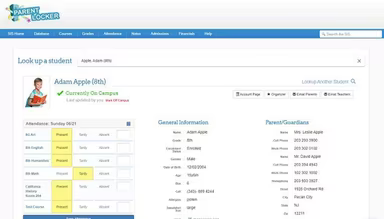
What Is ParentLocker?
ParentLocker acts as a unified center for all your workforce management needs. It encompasses a diverse range of features and modules, integrating various elements of administration, communication, and employee information management into one cohesive platform. The main goal is to simplify and enhance the daily operations within an organization.
What Is ParentLocker Best For?
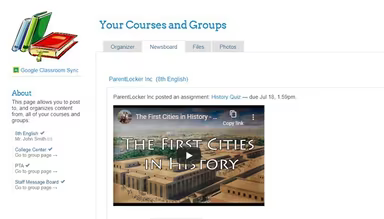
This software provides a robust learning management system (LMS) that facilitates the oversight of employee training across different areas. Managers can utilize the LMS to delegate and monitor daily assignments, disseminate news and announcements, and organize events. Additionally, it allows users to upload and categorize files while sharing photos and videos with specific employees. This all-in-one platform promotes better communication and collaboration between staff and administrators, creating a more engaging learning environment.
ParentLocker Pricing
ParentLocker comes with various pricing plans designed to fit different organizational needs. You can also inquire about a tailored pricing option to ensure it aligns with your specific requirements.
ParentLocker Integrations
The platform supports integration with numerous third-party applications; however, specific details regarding these applications have not been provided by the vendor.
How Does ParentLocker Work?
After logging in with your credentials, you can easily navigate through the dashboard and utilize ParentLocker's features by following this straightforward guide:
Access the user management section to handle user accounts, including adding new users, assigning roles, and adjusting permissions.
Explore the course management module to create and oversee courses, add course materials, set up assignments, and track progress.
To manage user grades, visit the Gradebook feature where you can input grades, calculate averages, and produce reports.
Utilize the available communication tools like messaging or announcement systems to enhance interaction between employees and employers.
Check out the attendance tracking feature to log student attendance and generate reports on attendance.
Visit the resource library to upload and arrange learning materials such as documents, presentations, and multimedia files.
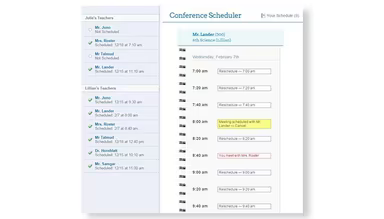
Navigate to the calendar feature to keep track of important dates and manage events efficiently.
Delve into the reporting and analytics section to create detailed reports on various LMS aspects like performance, attendance, and course completion rates.
You can also schedule a complimentary demo of ParentLocker to delve deeper into its functionalities.
Who Is ParentLocker For?
This software is suitable for a variety of sectors, including:
Education
Information Technology
Is ParentLocker Right For You?
If you're in search of communication software that streamlines administrative tasks, enhances communication pathways, and promotes employee engagement, then ParentLocker could be ideal for you. By centralizing multiple facets of management within educational institutions, it aids organizations in saving time, minimizing paperwork, and boosting overall productivity.
The software prioritizes secure access controls, data encryption, and routine backups to protect against data breaches and unauthorized access. Furthermore, ParentLocker is designed to adapt as your organization evolves, offering a flexible solution that meets changing needs over time.
If you still have questions about this platform or need additional information, feel free to reach out to us at info@softwareseekers.com. Our team is here to assist you in making an informed decision regarding the software.