
Schoology LMS
Transform K-12 education with Schoology Learning's robust LMS, enhancing communication and personalized learning for educators, students, and parents.
Key Insights
Derived from customer feedback, Schoology Learning is a cloud-based learning management system designed specifically for K-12 schools and districts, catering to the needs of educators, students, and parents alike. Many users appreciate its robust content management features and effective centralized communication tools. However, some frequently mention issues such as an outdated graphical user interface and cumbersome navigation for regular users. Recent enhancements are geared towards improving personalized learning experiences, highlighted by the addition of the PowerBuddy AI assistant.
Our Assessment
Schoology Learning is particularly well-suited for medium to large K-12 districts that are pursuing digital transformation and standardizing their curriculum. Although the pricing model is tailored to individual needs and necessitates an initial consultation, this approach makes the platform a great fit for larger educational institutions looking for a unified LMS solution to promote operational consistency. The software excels when the focus is on enhancing administrative oversight and ensuring transparency among stakeholders.
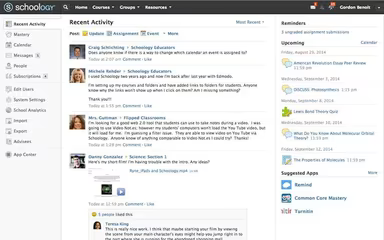
What Is Schoology LMS?
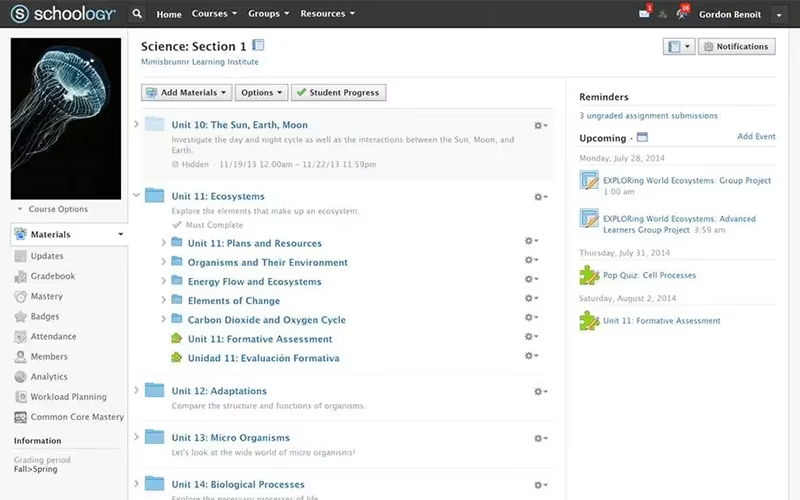
Schoology LMS is a cloud-based educational platform that effectively organizes curriculum, streamlines course delivery, and enhances collaboration and resource sharing in the learning environment. By merging learning management with assessment tools, it seeks to improve student outcomes, encourage community engagement, and tailor learning experiences to individual needs. Schoology also integrates seamlessly with various third-party applications, expanding the resources at users' disposal. As a popular Learning Management System (LMS), Schoology supports millions of users around the world.
What Is Schoology LMS Best For?
This learning management system excels in aiding educators within modern educational settings. One of its standout features is the complete control it offers instructors over creating, managing, and distributing academic materials. Through the Schoology platform, teachers can access personalized tools for course development, connect with a global network for resource sharing and best practices, and utilize detailed analytics—all free of charge. This software is particularly effective for implementing flipped classroom models, allowing students easy access to review course content at their convenience.
How Much Does Schoology LMS Cost?
Schoology LMS provides tailored pricing plans for educational institutions, including K-12 schools, districts, and colleges. The cost structure for Schoology LMS is customized based on factors such as user numbers, necessary features, and the size of the institution.
Contact us for a personalized quote regarding Schoology LMS pricing.
Schoology LMS Integrations
Schoology LMS works well with numerous third-party applications, such as:
Google Drive
Ann Education
Canva
Book Systems
Microsoft Teams
911inform
How Does Schoology LMS Work?
Getting started with the software after installation is straightforward:
Log in using your credentials.
Create your classes, enroll students, and share resources.
Engage with students using messaging and discussion features.
Monitor student progress, offer feedback, and grade assignments using built-in grading tools.
Utilize Schoology's analytics to gain insights into student performance and identify areas needing improvement.
Customize the platform to align with your teaching preferences and lesson planning.
Stay informed through Schoology's support resources and community forums for assistance or guidance.
You can also schedule a free demo of Schoology LMS to explore its functionalities further.
Who Is Schoology LMS For?
This software is designed for educational institutions such as K-12 schools, districts, and higher education organizations. It offers a comprehensive platform for educators, administrators, students, and parents to facilitate online learning, course management, assessments, and collaboration.
Schoology LMS Use Cases
Based on user reviews and the current capabilities of the Schoology platform, we have identified several scenarios where this software is particularly effective for K-12 districts and educational institutions:
District-Wide Digital Curriculum Standardization
This situation applies to mid-to-large K-12 districts that require uniform instructional delivery and centralized governance across multiple schools. Schoology supports phased implementation over 8 to 12 weeks to integrate smoothly with existing Student Information Systems (SIS) while establishing a cohesive platform across the organization. By standardizing instructional delivery methods, districts can reduce administrative risks associated with high teacher turnover and ensure continuity of essential materials.
Implementing Robust Blended Learning Models
Schools transitioning to flexible teaching models that combine face-to-face instruction with asynchronous digital components find Schoology to be highly effective. The platform is recognized for its excellence in both remote and in-person learning environments, allowing students to access coursework and communicate with teachers outside regular school hours. Its design supports engaging blended learning experiences tailored to individual needs while ensuring instructional continuity regardless of location or schedule.
Enhancing Stakeholder Transparency And Parent Engagement
This solution is perfect for districts looking to foster better communication and accountability among teachers, students, and parents. The platform provides dedicated Parent Log-ins that give guardians immediate access to their children's grades and overall academic progress. By facilitating rapid feedback between home and school environments, Schoology actively contributes to improved student performance.
Rapid Deployment For First-Time LMS Adopters
The platform is particularly suitable for districts launching their first large-scale LMS implementation where quick user adoption is crucial. With its user-friendly interface reminiscent of social media platforms, it significantly lowers technological barriers for both educators and students. Younger learners benefit from icon-heavy navigation that simplifies usability, enabling institutions to swiftly transition from deployment to pedagogical application.
Schoology LMS User Sentiment
Most Positive Sentiments
Content Management & Organization: 80% were Positive; 10% were Negative; 10% were Neutral. Users appreciate how efficiently the platform allows them to upload, organize, and manage various course materials—acting as a reliable central hub for all educational resources.
Assessment & Grading Workflow: 75% were Positive; 15% were Negative; 10% were Neutral. The assessment features are valued for minimizing administrative burdens while ensuring timely feedback through an extensive gradebook that accommodates custom proficiency scales essential for standards-based grading.
Parent & Stakeholder Communication: 45% were Positive; 20% were Negative; 35% were Neutral. Schoology excels at promoting transparent communication among schools, students, and parents through dedicated log-ins that provide easy access to grades and assignments.
Least Positive Sentiments
Aesthetics And User Interface (UI): 10% were Positive; 60% were Negative; 30% were Neutral. Many users express dissatisfaction with the visual design of the platform—describing it as unattractive and outdated—which hampers overall user experience despite its functional strengths.
Navigation And Workflow Efficiency: 15% were Positive; 70% were Negative; 15% were Neutral. While initial adoption may be swift, users report inefficiencies in workflow due to non-intuitive navigation requiring excessive clicks for simple tasks.
Inter-Teacher Collaboration/Sharing: 20% were Positive; 55% were Negative; 25% were Neutral. Educators face challenges when attempting to share or replicate course content due to the absence of streamlined options like a "make a copy" function for entire courses—leading to redundant efforts across departments.
Is Schoology LMS Right For You?
The software offered by Schoology is both scalable and customizable according to your organization’s requirements. It can effectively support an increasing number of users, courses, and content while ensuring a smooth experience as your user base expands. This adaptability enables schools and districts to enhance their use of Schoology in response to changing educational demands.
Taking charge of your educational journey with Schoology (LMS) allows you to customize pricing according to the specific needs of your organization. Contact our LMS experts at (661) 384-7070 today to find out how we can help you discover the ideal solution. Elevate your learning experience with Schoology now!