

Teachmint
Transform your teaching with Teachmint, the AI-powered digital board solution that enhances hybrid learning and streamlines classroom management.
Key Insights
Derived from customer feedback, Teachmint stands out as a sophisticated digital board solution enhanced by AI, tailored for educational settings. It serves both teachers and administrators in hybrid or traditional classroom environments. Users commend its user-friendliness and cost-effectiveness, though some have reported occasional performance challenges. Recently, Teachmint introduced several updates, such as the Smart Homework Creator, Smart PDF Import, and an End Class feature, all aimed at enhancing educational quality.
Our Assessment
Teachmint emerges as a dependable choice for schools, universities, and coaching centers in search of scalable solutions for hybrid learning management. It caters to organizations that need seamless workflows alongside economical, mobile-centric options. While its pricing structure is friendly for smaller institutions, it also offers significant long-term benefits for larger teams. We endorse Teachmint for educators who value ease of use and effective classroom management.
What Is Teachmint?
Teachmint is an innovative global technology firm dedicated to enhancing the educational landscape through AI-driven digital boards. Its mission is to streamline the teaching process and enrich learning experiences by merging state-of-the-art hardware with smart software solutions. Aiming to transform classroom collaboration, Teachmint’s offerings are crafted for the future of education.
One of its flagship products, Teachmint X, is a Google EDLA-certified digital board that harnesses AI to prepare classrooms for tomorrow. Featuring cutting-edge hardware and integrated teaching tools powered by artificial intelligence, Teachmint X allows educators to create more engaging, effective, and interactive lessons.
All-in-One Interactive Whiteboard
EduAI
AI-Powered Teaching Assistant
Next-Gen Hardware
Connected Classroom App
What Is Teachmint Best For?
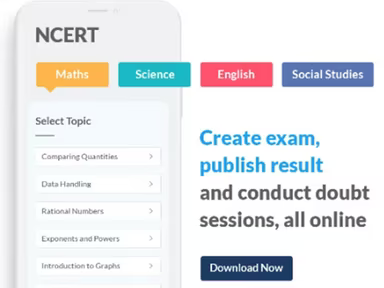
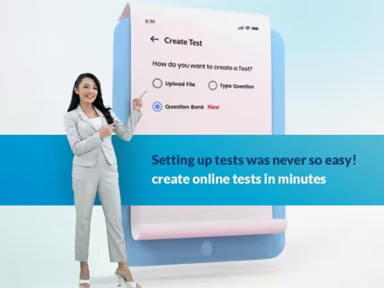
Teachmint excels in providing tools for lesson planning and classroom management. Educators can efficiently organize their lessons with a variety of teaching resources, store materials securely in the cloud, create custom assessments and homework assignments, and easily schedule and record live classes.
This centralized approach to planning and instructional activities makes it especially beneficial for teachers aiming to enhance their efficiency while delivering consistent and engaging learning experiences.
How Much Does Teachmint Cost?
The starting price for Teachmint is $5 per user annually. However, this cost may vary based on your organization’s specific needs. Reach out to us today for a customized pricing quote tailored to your business.
Please note that pricing information has been obtained from third-party sources and may be subject to change.
Teachmint Integrations
The company has not publicly shared any details regarding its third-party integrations.
How Does Teachmint Work?
To get started with the platform, log in using your credentials and follow these steps:
Create digital or hybrid classrooms through the Teachmint platform or Teachmint X digital boards.
Conduct live interactive lessons utilizing whiteboard features, screen-sharing, and annotation tools.
Access securely stored lesson recordings, notes, and summary reports in the cloud.
Leverage the built-in AI assistant ‘EduAI’ to automatically generate quizzes, summaries, and homework assignments.
Track attendance, student engagement, and participation in real-time.
Oversee institutional operations like fee invoicing, admissions, and staff scheduling.
Tailor course plans and assignments for specific subjects or groups of students.
Sync data across devices to ensure seamless learning between physical classrooms and remote environments.
Review performance reports through visual dashboards for actionable insights into student outcomes.
You can also watch a free demo of Teachmint to explore how the software operates.
Who Is Teachmint For?
Teachmint caters primarily to the following educational sectors:
Schools
Higher Education
Coaching Centers
Teachmint Use Cases
Based on user reviews and current capabilities of Teachmint, we identified several practical scenarios where this platform proves advantageous for educational institutions and training organizations:
K–12 Schools Transitioning To Digital Classrooms: Teachmint supports schools moving towards hybrid or fully digital models by offering an integrated classroom and administrative management system. It enables teachers to deliver interactive lessons while managing attendance and ensuring academic continuity regardless of whether classes are held on-site or online.
Coaching Centers Managing High Student Volumes: The platform assists coaching centers in managing numerous batches by organizing schedules, distributing content effectively, and tracking student performance. Its centralized dashboard allows instructors to oversee student engagement and academic progress while simplifying administration at the batch level.
Higher Education Institutions Seeking Operational Efficiency: Colleges and universities undergoing digital transformation or managing multiple campuses can benefit from Teachmint’s scalability features. The system promotes clear communication among faculty, students, and administration while automating essential workflows such as attendance tracking, assessments, and resource sharing to enhance institutional efficiency.
Schools Implementing AI-Enhanced Learning Tools: Institutions facing teacher shortages or wishing to personalize learning can utilize Teachmint’s AI assistant EduAI for automating routine academic tasks like quiz creation, content summarization, and homework design. This allows educators to concentrate on providing individualized support while maintaining consistency in instruction.
Organizations Standardizing Training Across Multiple Locations: Teachmint's connected classroom framework enables organizations such as vocational institutes or corporate training programs to deliver uniform instruction across dispersed teams. Trainers can conduct live sessions while accessing analytics and managing learners from a single control center.
Teachmint User Sentiment
Most Positive User Sentiments
Ease Of Use And Workflow:
User feedback indicates a 70% positive sentiment regarding ease of use with 20% neutral responses and 10% negative feedback. Users appreciate the intuitive design which simplifies setup and daily operations requiring minimal training.
Classroom Management And Communication:
A 65% positive sentiment highlights satisfaction with integrated classroom management tools such as attendance tracking and communication features that enhance transparency between educators, students, and parents.
Affordability And Accessibility:
Around 60% of reviewers value the affordable pricing model which offers enterprise-level features at a low cost suitable for small schools and coaching centers.
Least Positive User Sentiments
Performance And Technical Stability:
A report shows 50% negative sentiment concerning app stability during live sessions or when managing large student groups; however, many issues are resolved through updates.
Customer Support Responsiveness:
User feedback reveals mixed opinions about customer support; some praise chat support while others report slow response times or unresolved queries leading to a 55% negative sentiment.
Limited Integrations And Advanced Customization:
A noted 55% negative sentiment regarding limited third-party integrations compared to bigger LMS competitors raises concerns among users seeking advanced customization options or deep API workflows.
Is Teachmint Right For You?
If you seek a contemporary scalable educational solution that merges advanced technology with excellence in teaching practices, then Teachmint could be the right choice for you. Designed for various educational environments, it balances flexibility with high-performance standards.
The platform's Google EDLA certification guarantees secure access to Android services alongside its acclaimed innovations which uphold reliability and global quality benchmarks. Recognized as one of India’s prominent edtech innovators with several EdTech excellence awards under its belt, Teachmint continues empowering educators through user-friendly analytics, personalized learning paths, and institution-wide scalability. From managing admissions to tracking student progress across multiple tasks, it provides comprehensive support for educational institutions.
If you’re still unsure whether this software meets your needs, feel free to reach out to our customer support team at info@softwareseekers.com for further assistance.