

TrainCaster
Elevate your employee training with TrainCaster's easy course creation, content management, and certification tracking for a seamless learning experience.
TrainCaster is a cloud-based learning management system designed to facilitate training for employees in different sectors. It includes user-friendly tools for creating courses, managing content delivery, generating reports, and tracking certifications. While it does not support scheduling courses for future dates, the software remains a robust solution that complies with SCORM/AICC standards, making it ideal for overseeing online training and educational initiatives within companies.
What Is TrainCaster?
TrainCaster is a learning management system (LMS) hosted in the cloud, offering organizations a user-friendly and adaptable platform to develop, administer, and manage both employee and customer training online. Users can effortlessly create engaging training courses using their own materials or by uploading PowerPoint presentations and videos. The software boasts comprehensive reporting features, automated notifications, discussion forums, and compatibility with various other tools. Additionally, it supports both self-paced and instructor-led training options. In essence, TrainCaster LMS enhances the efficiency of training administration and compliance tracking while providing an intuitive experience for both users and administrators.
What is TrainCaster Best For?
One of the most impressive features of TrainCaster is its remarkably user-friendly learning interface. Whether you are an administrator tasked with creating and overseeing training programs or a participant engaging in online courses, the platform’s intuitive design and adaptable authoring tools make it easy to get started swiftly. With multiple ways to upload or generate content, anyone can begin crafting captivating online learning resources with just a few clicks.
TrainCaster Pricing
The LMS presents a variety of pricing plans tailored to meet the diverse needs of organizations. Additionally, you have the option to request a personalized quote for TrainCaster costs.
TrainCaster Integrations
The vendor has not shared any information regarding third-party integrations available with the software.
How Does TrainCaster Work?
To effectively utilize the software for employee training after logging in, follow these steps:
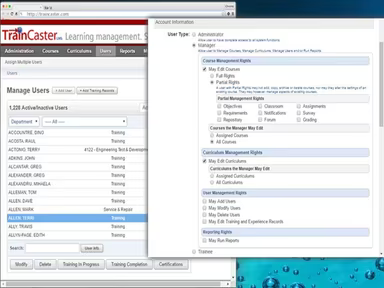
On the dashboard, you'll find sections labeled 'Courses,' 'Learners,' 'Reports,' and 'Administration.' This area is where all training activities are managed.
Select 'New Course' in the 'Courses' section to create a new course. Provide a title, description, and appropriate category.
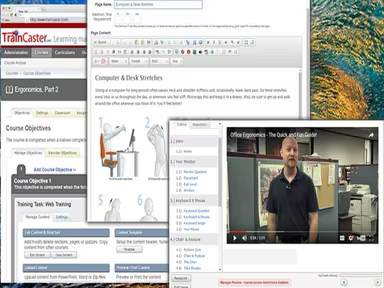
Add content directly using the built-in editor or upload existing resources such as PowerPoint files, PDFs, or videos.
Organize the content in a logical sequence or categorize it into modules and sections according to your preferences.
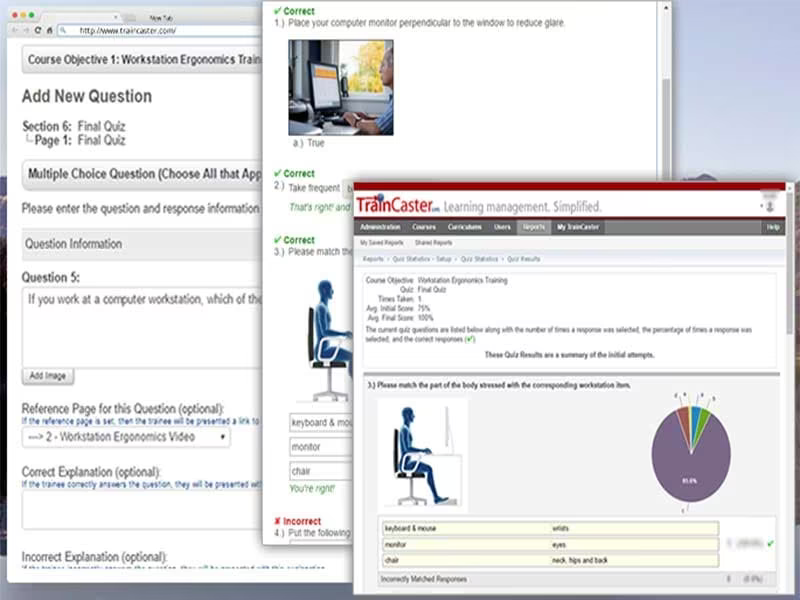
Incorporate assessments like quizzes or surveys either throughout or at the conclusion of the course.
Preview the course to identify any errors or formatting issues before making it live.
The course is now complete; assign it to individual learners or groups of learners.
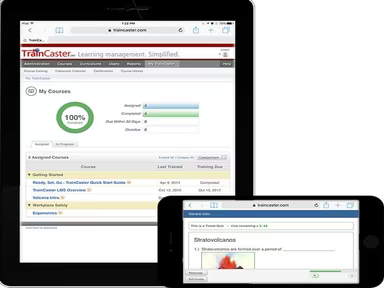
Learners can access the course on their dashboard and complete it at their own pace.
Monitor learner progress and results through the 'Reports' section; coordinate with learners if necessary.
Courses can be updated or expanded at any time using the revision feature.
Administrators can handle additional aspects such as notifications, customer service prompts, compliance issues, etc., via the admin panel.
You may also schedule a complimentary TrainCaster demo to discover more about how the software functions.
Who Is TrainCaster For?
TrainCaster is tailored for delivering online training courses suitable for businesses of any size—small, medium, or large. It serves organizations that need to manage and provide training content as well as skill development for their employees or clients. The industries that utilize this software include:
Healthcare
Information Technology
Manufacturing
Oil and Energy
Retail
Is TrainCaster Right For You?
If you are searching for a versatile and powerful LMS that can accommodate all your training requirements, then TrainCaster LMS might be what you need. Renowned for its user-friendly design and robust features, this platform simplifies learning administration for clients across various sectors.
TrainCaster incorporates strong security measures to protect user data and course libraries, including GDPR compliance, password security, and activity monitoring. Its scalable design can support unlimited users, making it ideal for companies of all sizes.
The key advantages include built-in authoring capabilities, SCORM compliance, automated reporting, and solutions for administrative and compliance challenges such as decentralized management and inconsistent tracking. If your current systems or manual methods are obstructing your training initiatives, TrainCaster can centralize management and enhance data insights.
If you still have questions about whether this software is suitable for you, feel free to reach out to us at info@softwareseekers.com to learn more about the platform.