logo

Userlane

Are you facing challenges with user onboarding? Struggling with engagement issues and an increase in support inquiries? Userlane offers a solution tailored to i...

0.00 | 0 Reviews

Are you facing challenges with user onboarding? Struggling with engagement issues and an increase in support inquiries? Userlane offers a solution tailored to i...

Product Overview

Are you facing challenges with user onboarding? Struggling with engagement issues and an increase in support inquiries? Userlane offers a solution tailored to improve software skills via its on-screen assistance. Discover this platform to promote smooth user adoption and enhance support interactions. Start your journey today.
Product Snapshot

Product Details

What Is Userlane?

Overview

Userlane is a cloud-based learning management system (LMS) designed to offer on-screen guidance along with comprehensive walkthroughs for web applications and software. Its user-friendly interface and powerful features aim to streamline intricate software tasks, enhance the onboarding process for users, improve training for employees, and enrich customer support interactions. The platform includes various functionalities such as training recordings, gamification elements, analytics, and more.

What Is Userlane Best For?

Userlane is highly regarded for its interactive on-screen guidance and effective user onboarding capabilities. It enables organizations to develop detailed walkthroughs and tooltips that appear directly within the application, providing real-time assistance to users. This distinctive feature helps businesses improve user adoption rates, boost engagement, lessen the volume of support inquiries, and enhance overall software proficiency.

Userlane Pricing

The cost associated with the software varies based on your specific needs and organizational size. You can obtain a tailored pricing plan for Userlane that aligns with your company's requirements.

Userlane Integrations

The following third-party applications can be integrated with Userlane LMS:

  • Zendesk

  • Confluence

  • KnowledgeOwl

  • Microsoft SharePoint

How Does Userlane Work?

After installation, navigating the dashboard is straightforward:

  1. Log into Userlane using your credentials.

  2. Activate the Userlane guide for step-by-step support.

  3. Utilize the top navigation bar to access various modules.

  4. Customize your dashboard with different layout and theme options.

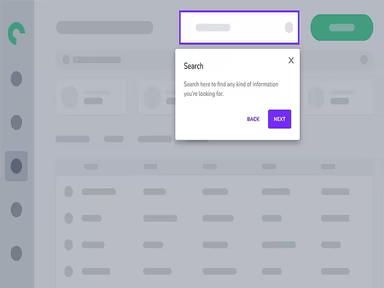
  5. Employ the search bar for quick access to specific features.

  6. Explore tools for task management and collaboration.

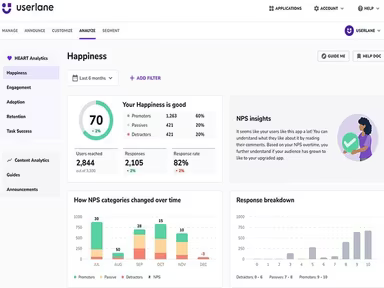
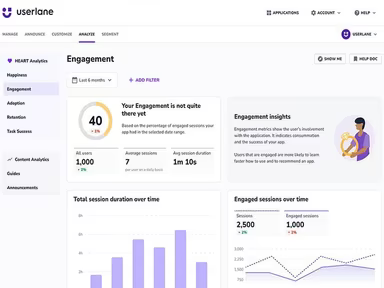
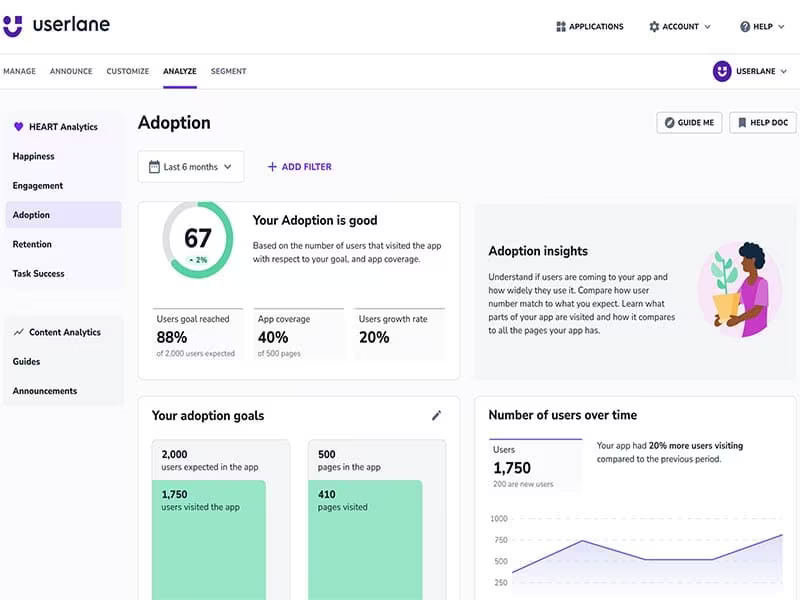
  7. Keep track of analytics related to user engagement and productivity.

You can also arrange a complimentary demo of Userlane to explore its features further.

Who Is Userlane For?

Userlane software is utilized across multiple industries, including:

  • Information technology

  • Automotive

  • Healthcare

  • Engineering

  • Recruitment

  • Finance

  • Transportation

Is Userlane Right For You?

If you seek a cloud-based software platform that simplifies application usage by guiding users through real-time processes while offering immediate support within applications, then Userlane could be exactly what you need. The software has received accolades for its outstanding performance in user onboarding and training. Numerous prominent organizations across various sectors, including Microsoft, Main5, Sopra Steria, and Gavdi, rely on it. In terms of security, Userlane emphasizes data privacy and utilizes advanced security measures to protect user information.

If you're still uncertain about whether Userlane is suitable for you, reach out to us at info@softwareseekers.com, and our customer support team will assist you in making an informed decision.

LMS Software Features

compliance
free trial
mobile app
mobile crm
quiz maker
ai features
cloud based
gamification
telemedicine
corporate lms
ispring cloud
learner porta
call recording
call scripting
learner portal
patient portal
call monitoring
content library
course creation
crm integration
e prescriptions
lab integration
lead management
lms for schools
mobile learning
personalization
user management
course templates
activity tracking
assessmentquizzes
claims management
email integration
progress tracking
sales forecasting
virtual classroom
activity dashboard
applicant tracking
contact management
content management
course development
customizable forms
elearning platform
predictive dialing
student assessment
attendance tracking
collaboration tools
mobile lms software
omnichannel support
real time dashboard
scorm compliant lms
training management
workflow automation
application tracking
inventory management
patient demographics
247 technical support
asynchronous learning
basic access controls
billing and invoicing
customer segmentation
opportunity management
analytics and reporting
certification licensing
hr workforce management
online course platforms
reporting and analytics
supply chain management
certifications licensing
cloud based lms software
course creation software
channel training software
social learning platforms
access controlspermissions
digital learning solutions
employee training software
lms for corporate training
virtual classroom software
access controls permissions
certification and licensing
corporate training software
higher education technology
limited collaboration tools
sources and related content
student engagement platform
call reporting and analytics
certifications and licensing
compliance training software
human resources management hrm
interactive voice response ivr
learning management system lms
access controls and permissions
certification and credentialing
certification tracking software
online exam management software
saas learning management system
appointment managementscheduling
certification licensing software
integration with marketing tools
learner portalactivity dashboard
learning content management system
activity dashboard activity tracking
customer relationship management crm
integration with helpdesks and support systems

Pros

  • Offers intuitive on-demand assistance
  • Real-time view of digital transformation progress to mitigate critical process risks
  • In-app virtual assistant provides immediate support
  • Gamification techniques make the learning process enjoyable
  • The in-app engagement suite helps increase user proficiency

Cons

  • Administrators may require time to familiarize with the platform
  • Setting up the software can be intricate, according to some reviews
  • Customization options can be improved

Price

Professional

Custom

Get Free Guidance from Our Solution Experts.

Ratings

0.00 | 0 reviews

Ratings Distribution

Positive

0%

Neutral

0%

Negative

0%

User Reviews

No reviews yet

Be the first to share your experience with Userlane.

Frequently Asked Questions

Find answers to the most common queries about our software recommendation service.

Yes, Userlane has an API available.

Userlane, a digital adoption platform, supports English and German languages.

Userlane LMS integrates with third-party applications such as KnowledgeOwl, Zendesk, Confluence, and Microsoft SharePoint.

Yes, Userlane supports mobile devices.

The software has flexible pricing options. Get a personalized Userlane price quote depending on your organization’s requirements.

Typical users of Userlane include recruitment, information technology, healthcare, finance, engineering, automotive, and transportation.

Userlane offers several support options to make software adoption easier for users. It includes a knowledge base, chat, email, a help desk, and phone support.

Yes, there are several Userlane alternatives. However, Userlane provides a more interactive and engaging user experience than most of its competitors.

By facilitating faster and more efficient software adoption, Userlane helps organizations maximize their software investments and maximize productivity.