logo

Waybook

Waybook is a cutting-edge software solution designed to enhance the way you document, organize, and disseminate your organization's knowledge. This platform ser...

0.00 | 0 Reviews

Waybook is a cutting-edge software solution designed to enhance the way you document, organize, and disseminate your organization's knowledge. This platform ser...

Product Overview

Waybook is a cutting-edge software solution designed to enhance the way you document, organize, and disseminate your organization's knowledge. This platform serves as a central hub that makes team onboarding and process documentation more efficient, guaranteeing that all team members are aligned and informed.
Product Snapshot

Product Details

What Is Waybook?

Waybook is a cloud-based learning management system (LMS) that transforms information, processes, and documents into structured training, onboarding, and reference materials. It serves as a complete business playbook, consolidating all necessary documentation in a single, easily accessible location. Notable features include employee onboarding, standard operating procedures, employee manuals, and corporate academies. With Waybook, capturing, recording, and disseminating business knowledge to your trainees becomes remarkably straightforward.

What Is Waybook Best For?

This software is acclaimed for its intuitive interface and engaging learning capabilities, which empower businesses to train their employees effectively. Designed to cater to the needs of modern organizations, especially those that are adapting to remote work, Waybook provides a smooth training experience.

Waybook Pricing

The provider presents three pricing options:

  • Waybook Core - $83/month

  • Waybook Pro - $166/month

  • Waybook Consulting - $95/hour

For a personalized Waybook cost that meets your organization's specific requirements, click Get Pricing.

Please note: Prices may vary.

Waybook Integrations

This software connects seamlessly with various third-party applications, including:

  • Google Drive

  • Unsplash

  • Zoom

  • Airtable

  • Loom

  • Wistia

  • Zapier

How Does Waybook Work?

To get started with Waybook after logging in, follow these steps:

  1. Create a playbook for your organization. This will act as the main repository for all your documents and processes.

  2. Utilize the content editor to incorporate your business process documentation and onboarding resources into the playbook.

  3. Organize your content logically for your team. You can develop sections, chapters, and pages to structure your playbook effectively.

  4. Set up access and permissions for your playbooks. You can control who has the ability to view, edit, or manage each playbook.

  5. Invite team members to join Waybook. They will receive an email invitation to create their accounts.

  6. Delegate specific content to your team members. They will be alerted about their assignments upon logging in.

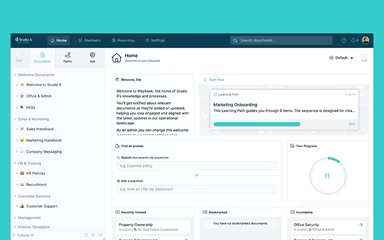
  7. Monitor your team's progress using the activity dashboard. You can track who has accessed documents and completed tests.

If you want to see the software in action, watch a free Waybook demo and discover more about its features.

Who Is Waybook For?

Waybook is ideal for businesses of all sizes and assists in documenting and sharing knowledge, processes, and procedures. It is applicable across various sectors including:

  • Technology

  • Healthcare

  • Education

  • Finance

Is Waybook Right For You?

If you are looking for a centralized, user-friendly solution for managing your team's onboarding and process documentation, Waybook may be the perfect fit for you.

This platform is designed with both security and scalability in mind. It features robust access controls and permissions to protect your sensitive data. Additionally, it is scalable enough to support your business's growth.

If you're still uncertain whether Waybook suits your needs, please reach out to our customer support team at info@softwareseekers.com for assistance in making the right choice.

LMS Software Features

compliance
free trial
mobile app
mobile crm
quiz maker
ai features
cloud based
gamification
telemedicine
corporate lms
ispring cloud
learner porta
call recording
call scripting
learner portal
patient portal
call monitoring
content library
course creation
crm integration
e prescriptions
lab integration
lead management
lms for schools
mobile learning
personalization
user management
course templates
activity tracking
assessmentquizzes
claims management
email integration
progress tracking
sales forecasting
virtual classroom
activity dashboard
applicant tracking
contact management
content management
course development
customizable forms
elearning platform
predictive dialing
student assessment
attendance tracking
collaboration tools
mobile lms software
omnichannel support
real time dashboard
scorm compliant lms
training management
workflow automation
application tracking
inventory management
patient demographics
247 technical support
asynchronous learning
basic access controls
billing and invoicing
customer segmentation
opportunity management
analytics and reporting
certification licensing
hr workforce management
online course platforms
reporting and analytics
supply chain management
certifications licensing
cloud based lms software
course creation software
channel training software
social learning platforms
access controlspermissions
digital learning solutions
employee training software
lms for corporate training
virtual classroom software
access controls permissions
certification and licensing
corporate training software
higher education technology
limited collaboration tools
sources and related content
student engagement platform
call reporting and analytics
certifications and licensing
compliance training software
human resources management hrm
interactive voice response ivr
learning management system lms
access controls and permissions
certification and credentialing
certification tracking software
online exam management software
saas learning management system
appointment managementscheduling
certification licensing software
integration with marketing tools
learner portalactivity dashboard
learning content management system
activity dashboard activity tracking
customer relationship management crm
integration with helpdesks and support systems

Pros

  • Huge variety of interactive learning features
  • User-friendly design
  • Efficient tracking and analytics
  • Seamless integrations

Cons

  • Minor bugs and glitches
  • Lack of mobile app
  • Customer support can be improved, according to some Waybook reviews

Price

Professional

$83

Get Free Guidance from Our Solution Experts.

Ratings

0.00 | 0 reviews

Ratings Distribution

Positive

0%

Neutral

0%

Negative

0%

User Reviews

No reviews yet

Be the first to share your experience with Waybook.

Frequently Asked Questions

Find answers to the most common queries about our software recommendation service.

No, Waybook does not offer an API.

Waybook provides dedicated support in English.

Waybook integrates with several third-party applications, including Unsplash, Zoom, Airtable, Dropbox, Google Drive, Loom, Wistia, and Zapier.

No, Waybook does not support mobile devices.

Waybook offers three pricing plans tailored to different organizational needs. Request custom Waybook price to get your custom plan.

Waybook is designed for businesses and organizations across various industries, including technology, healthcare, education, and finance, to document, organize, and share their knowledge, processes, and procedures.

Waybook support channels include email, knowledge base, live chat, and FAQs/forums for community support.

A functional process management system, like Waybook, is a tool that helps businesses document, organize, and share their company processes. It streamlines the management of these processes, making them more efficient and effective.

Waybook provides a centralized platform for storing all your onboarding and training materials. This makes it easier to onboard new team members and ensures they can access all the necessary reference materials.

Waybook allows you to create and store all your training materials in one place. This ensures that new hires have access to the information they need to get up to speed quickly and efficiently.

Waybook automatically notifies readers about updates to the documents, including new features. This ensures that your team is always aware of the latest changes and updates.

With a user-friendly interface, Waybook software provides training to your team members to ensure they know how to use all the features effectively.